
Verification answers “may I act on this account?” Diagnosis answers “what action actually helps?” They solve different problems. A successful technical diagnostic does not identify a caller, and a verified caller can still receive the wrong fix.
The two-part verification rule
For ordinary account service, you must:
- Confirm two distinct security factors through the conversation.
- Open the correct account in CustomerDeck and click Confirm Identity with Caller.
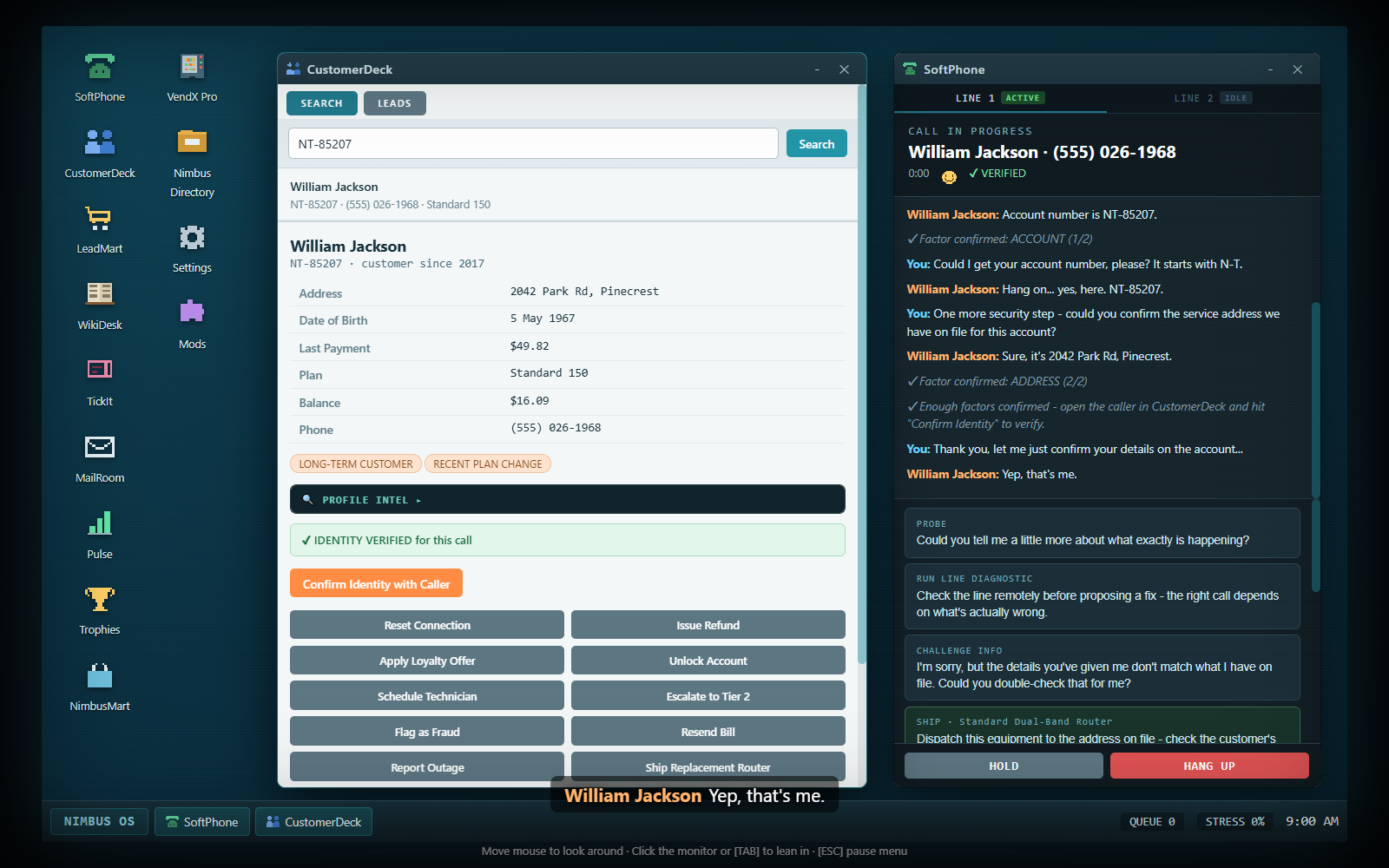
SoftPhone shows the factor count while you gather them. A system line announces when enough have been confirmed. The count does not replace the CustomerDeck click: look for Verified on the phone and the record's green identity confirmation.
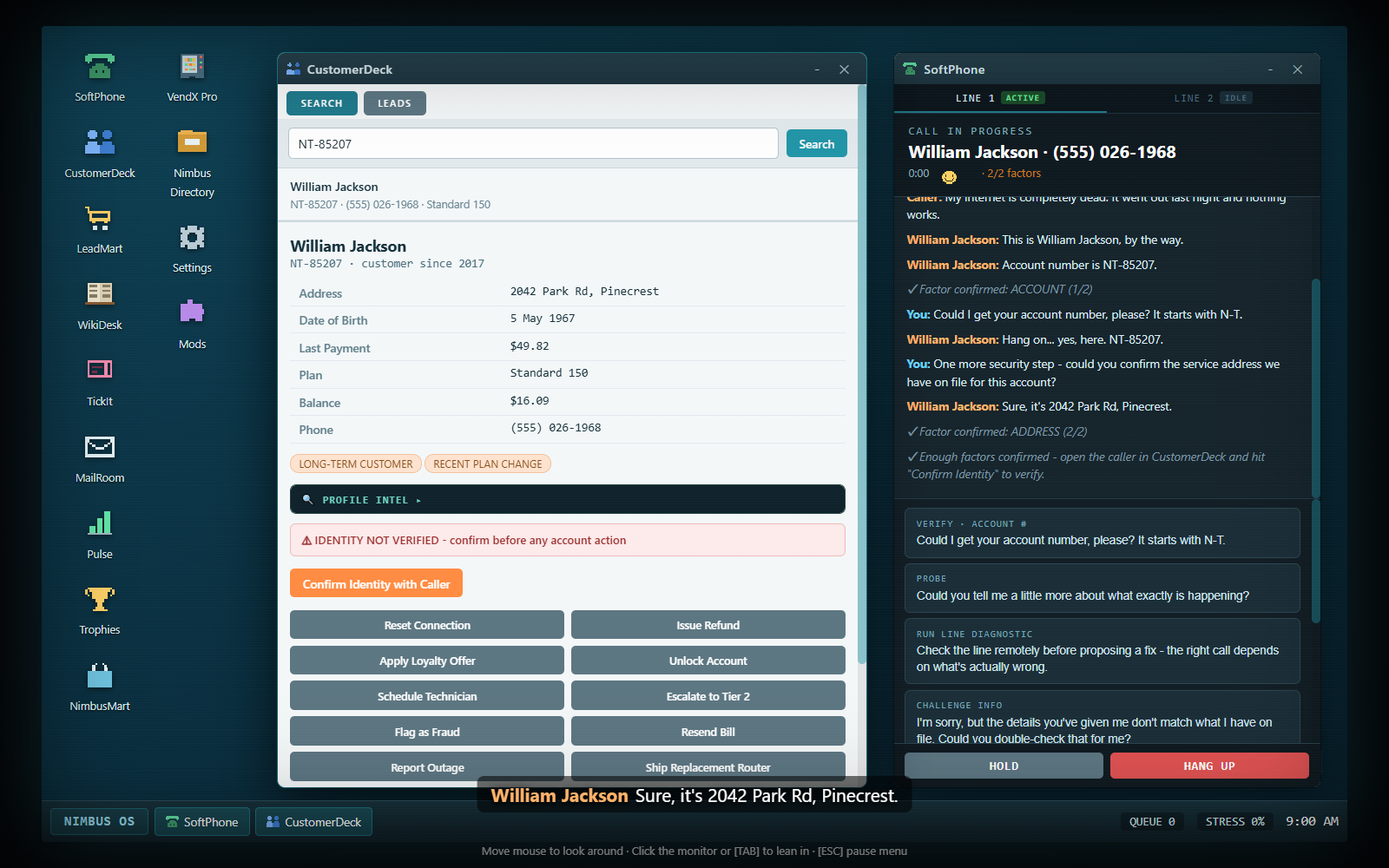
Each factor counts once. Asking the same question twice does not turn one confirmed account number into two factors. A caller volunteering a correct number during the greeting can already credit that account-number factor; read the count rather than asking it again automatically.
Verification belongs to the active call and matching account. Opening another customer's record does not transfer permission to that account. The next caller requires their own verification, even if they happen to have a similar name.
A caller who knows their account number
This is the standard route:
- Listen for the volunteered account number, or choose Verify · Account #.
- Search that number in CustomerDeck and open the matching result.
- Choose Security Check in SoftPhone. This asks for the address on the account.
- Read whether the answer matches. A matching account number plus matching address provides two factors.
- Click Confirm Identity with Caller on that exact record.
- Only then perform ordinary account actions.
Knowing the caller's name is useful for finding the account, but a name does not count as the extra factor for an account-number caller. An impostor can know a name and number; the security check still matters.
If CustomerDeck returns nothing, compare the digits in the transcript with what you entered. Repeating the account-number question can give an honest caller a chance to correct misread digits. Challenge Info can also prompt correction when the caller really has made a mistake, but it is not a harmless catch-all question: accusing someone whose details are already correct costs mood.
A caller without an account number
Lacking a number does not automatically make someone fraudulent. They can identify themselves using their legal name and another factor:
- Use Verify · Name. If the caller uses a nickname or an old surname, follow the offered Verify · Legal Name step.
- Search CustomerDeck using the confirmed name. Click the intended account; do not act on the first vaguely similar result.
- Use an available second factor: Verify · DOB, Verify · Last Payment, or Security Check for the on-file address.
- Resolve any retry prompt before assuming a mismatch is final.
- Once two factors are credited, click Confirm Identity with Caller.
The payment option appears only when the account has a payment record. A social engineer confidently stating a customer's name is not awarded the normal name factor; trust the factor feedback rather than the fluency of their story.
For an unverified caller without an account number, Schedule Callback is an alternative when they cannot supply enough details now. It ends the call without giving account service and at a neutral satisfaction level. It is not offered as a shortcut for a caller who has a number or is already verified.
Retry prompts and honest mistakes
The game distinguishes missing information and some honest mistakes from a confirmed failed check. Use the specific prompt that appears:
| Situation | Offered route | What to remember |
|---|---|---|
| Caller misreads their date of birth | Verify · Retry DOB | Gives them a chance to correct it; Reject DOB Answer treats it as a failed check |
| Caller cannot find the last payment amount | Verify · Retry Payment | Lets them check a statement; skipping the check does not credit the factor |
| Caller cannot confirm the address on file | Verify · Retry Address | Lets them find the old address; eligible movers also gain alternative-factor options |
| Caller uses a nickname/old surname | Verify · Legal Name | Establish the account's actual legal name before relying on the search result |
| Caller has misread account digits | Repeat the account question or challenge the mismatch | Read the corrected number and search again |
Retries have a small mood cost, but are preferable to taking an unverified action. Rejecting or skipping a pending verification check counts as a failed check, so do not use those buttons as if they were consequence-free navigation controls. Repeated unnecessary factor questions also annoy callers. Gather what is needed, confirm identity and move on.
Movers and old addresses
A legitimate mover may be unable to recite the address currently on file. Run Security Check so that state is recognized. You can give them time to find the address, or use an available date-of-birth or last-payment check as the alternative factor. An account-number factor plus a valid alternative can be enough.
After confirmation, use Update Address in SoftPhone to record the new service address. Verification first, address change second, visit booking third. Booking a technician before the mover's address has been updated is blocked. See the complete moving workflow.
A confident address that contradicts the file is a different situation from “I have moved and cannot remember it.” Fraudulent callers do not receive the ordinary mover fallback merely for failing the address check.
Lockouts, fraud and compliance
After three failed security checks, the account is locked for the current interaction. Further ordinary actions are blocked. Use Escalate to Tier 2 on the relevant record for a legitimate verification problem, or Flag as Fraud when the evidence points to an impersonation attempt. Lockout is a protective stop, not a prompt to try every account-action button.
Flag as Fraud is deliberately allowed without successful identity confirmation because the point is to protect an account when verification fails. It still needs the relevant account: flagging an unrelated record is a strike. Accusing a legitimate customer is harmful even when it does not immediately produce a compliance strike. A single confused answer is not proof that every other detail is malicious.
Fraud and social-engineering calls can expose an in-call Flag as Fraud option after a mismatch or failed check. This is useful when a withheld number makes a normal search difficult. It reports the account involved in the call rather than requiring you to guess an unrelated customer.
Scam calls that ask you to disclose information use a different response menu. Refuse, end and report is the safe service decision. An authoritative badge number or urgent story does not authorize disclosure. Pranks and wrong numbers have their own conversational wrap-up/redirect choices and do not require an account action.
Technical diagnosis
For supported technical and billing scenarios, SoftPhone offers a diagnostic after the problem is stated. It adds a highlighted system result to the transcript. Running it is informational, does not require completed identity verification and does not resolve the case by itself. Account actions still require verification afterward.
| Diagnostic control | What it investigates |
|---|---|
| Run Line Diagnostic | Total internet loss: local fault, regional outage or router hardware |
| Run Speed Diagnostic | Slow speeds: real data cap, Wi-Fi-only interference or packet loss |
| Run Signal Diagnostic | Mobile signal: SIM, tower capacity or handset fault |
| Run Box Diagnostic | TV box: software hang, interrupted update or dead hardware |
| Run Usage Diagnostic | Data-cap complaint: real usage, meter mismatch or old throttle flag |
| Run Billing Diagnostic | Roaming complaint: valid usage, rate error or a pack that expired |
The same opening complaint can have different causes on different calls. “Internet is down” does not always mean Reset Connection, and “my cap was reached” does not always mean the customer genuinely used all their allowance. Use the diagnostic result and current account flags, not only the scenario's familiar opener.
Diagnostic results are normally available once per issue. Read the result before searching WikiDesk; it supplies useful terms such as replacement router, packet loss, meter resync or firmware. The full article/action reference is in solutions, equipment and plans.
Finding the right article
Search WikiDesk with two or three distinctive terms from the result. Click an article to open it, then read its steps and the note about any CRM action. The search returns overlapping and sometimes generic material; a high text match is not proof that every article is the right resolution.
WikiDesk Indexer upgrades can show relevance percentages and match badges. These are assistance, not a replacement for reading the diagnostic. More than one article can be supported by the call family while only one best matches this particular cause.
If no relevant SoftPhone option appears, check whether you opened the article rather than merely its search results, whether the caller has finished speaking, and whether the article belongs to the current issue. A stale article stays in WikiDesk across calls and may need replacing.
What a partial fix means
The game distinguishes Best, Good and OK solution quality. An accepted fallback or a supported but poorly matched root-cause fix can resolve a call at lower quality. Resolution is therefore not a guarantee of maximum CSAT. Generic escalation is useful when you are genuinely stuck, but careful verification and the right cause-specific solution usually produce a better result.
During a compound call, verification carries to the second issue, but the first resolution does not. Listen again and use a new relevant article. For ordinary account problems, keeping this distinction clear prevents a successful first fix from turning into an unrelated action on the second.