Game version 1.0.0 · 11 October 2026 · 18 chapters
Browser Print lets you save this complete edition as a PDF. Folded story spoilers are included in this print edition.
CHAPTER 01 / PLAY
Getting started
On Hold puts you at a Nimbus Telecom support desk. Your job is to listen to callers, find the right customer, verify their identity, work out what is wrong, explain or apply a suitable fix, and leave a usable ticket. You also have a wallet, stress, coworkers, reviews and an increasingly unpredictable office to manage. Good service matters; acting on the wrong account can hurt much more than taking a little extra time.
This manual describes the shipped 1.0.0 rules. Community packs can add their own callers, articles, objectives and stories. When playing an authored experience, read its description and objective panel as well as this manual.
Before the first shift
Start the installed game and choose Options from the title screen. You can change settings before creating a career. A keyboard and mouse are the clearest way to work the desktop: you will click dialogue choices, search records and move overlapping app windows. The desk camera follows your mouse while you are leaning back; there is no walking route to memorize.
Configure these four things first:
Language: choose the language of the interface, the dialogue subtitles and the recorded dialogue independently.
Audio: set a comfortable master and dialogue volume. Subtitles remain available when recordings are turned off.
Video: check display mode and UI scale. Fullscreen Borderless fills the display; window-size choices apply to Windowed mode.
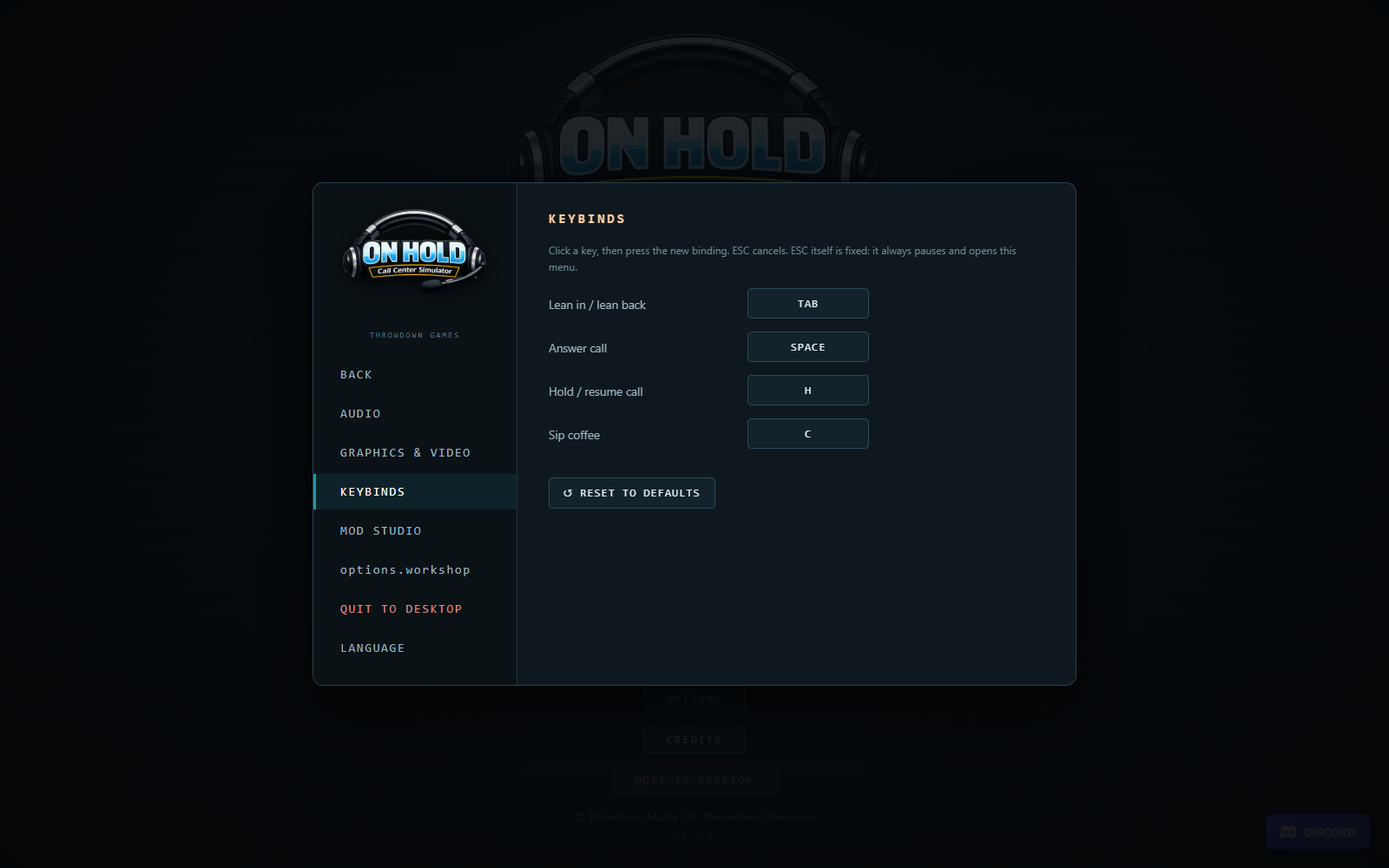
Keybinds: check Lean in/out, Answer, Hold/resume and Sip coffee. The manual uses the default keys, but tutorial prompts display your current bindings.
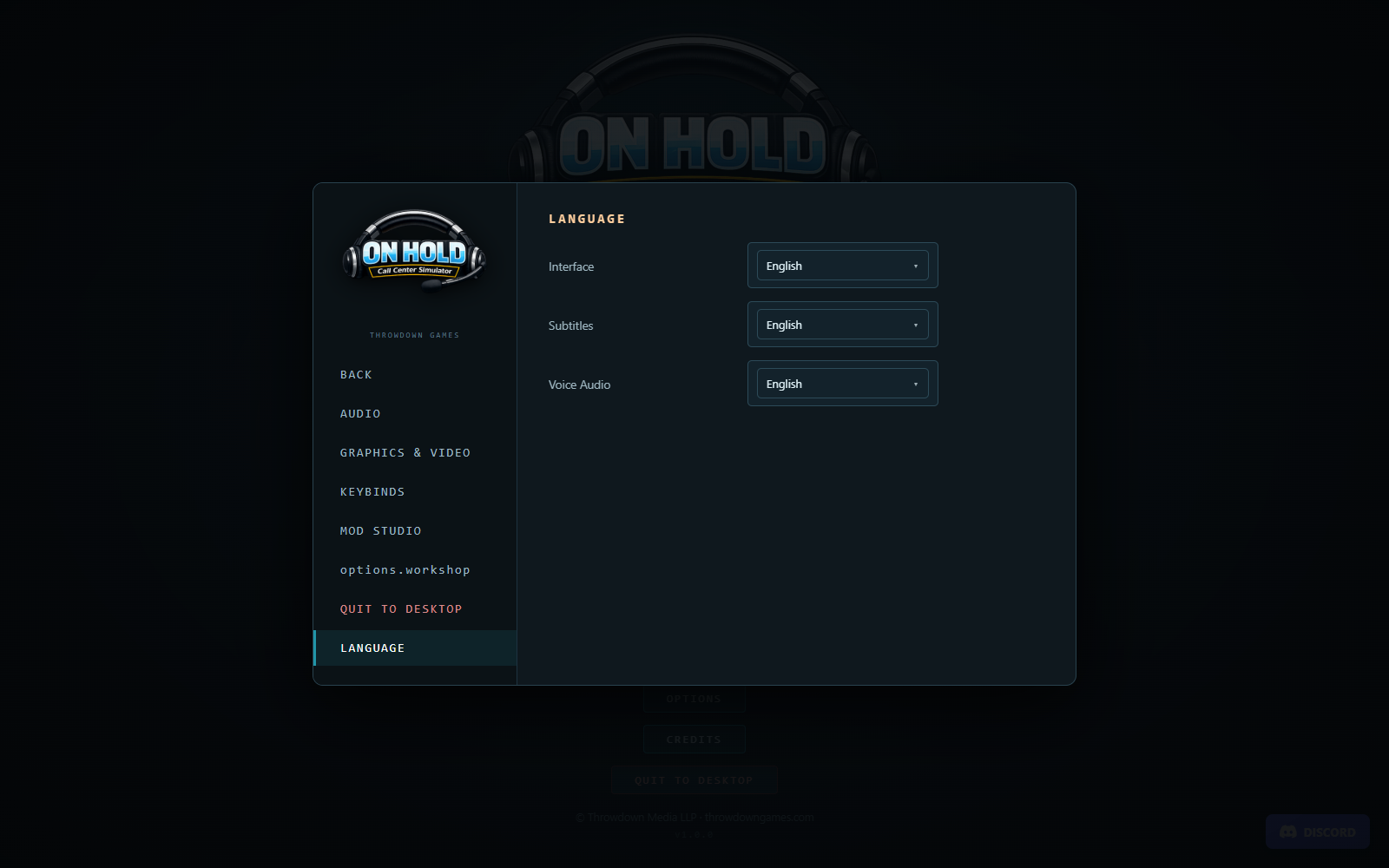
Stock language choices are English, Chinese, French, Hindi, Spanish and German. You can, for example, use an English interface, German subtitles and French audio. Changing one choice does not change the other two. Valid community language packs can add choices; untranslated text falls back to English. Authored player names and community text may remain as written by their author.
The desktop and controls chapter explains every settings group and the work apps. To keep your first shift focused on learning, start with stock content or a simple mod profile rather than several unfamiliar campaign packs.
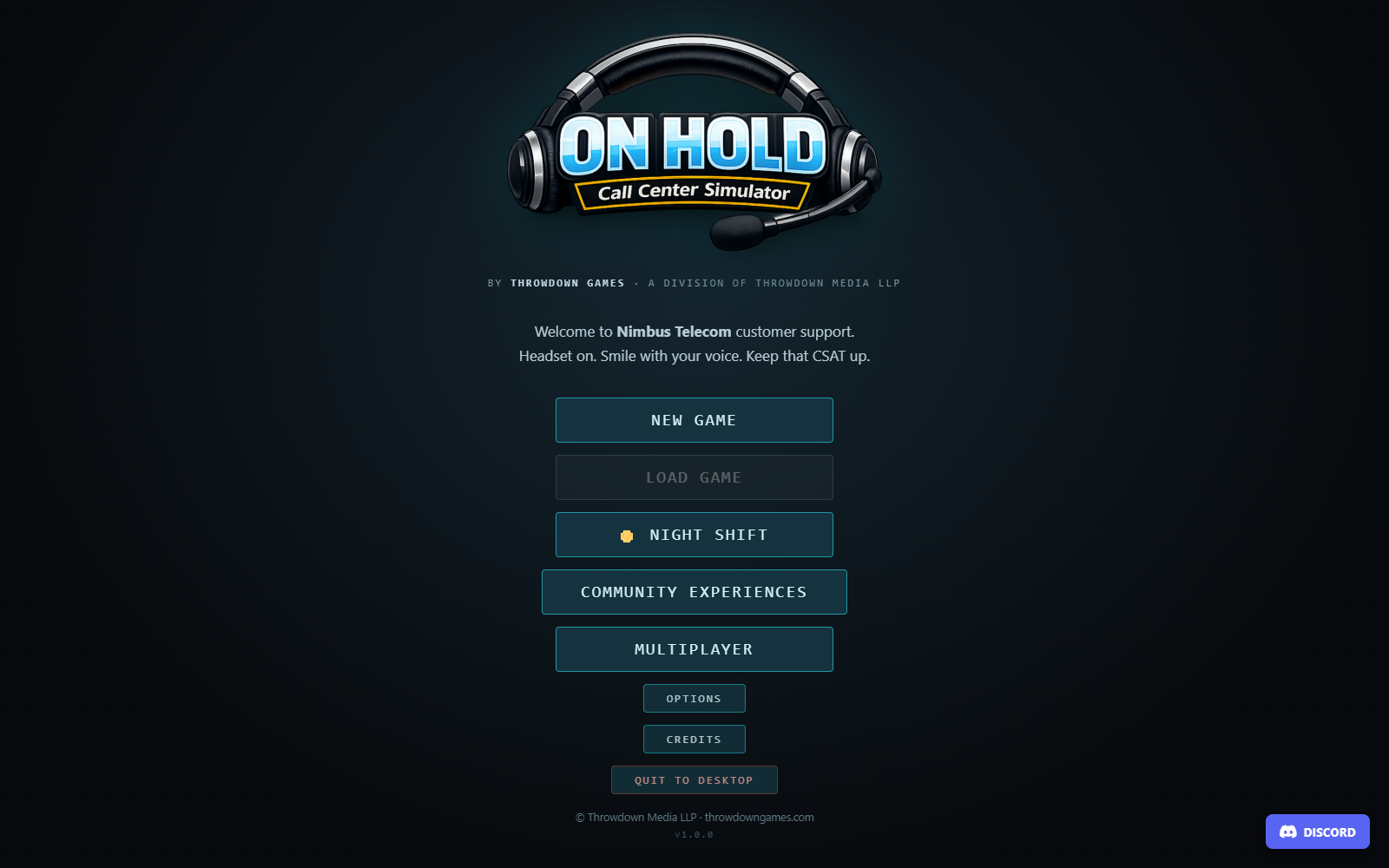
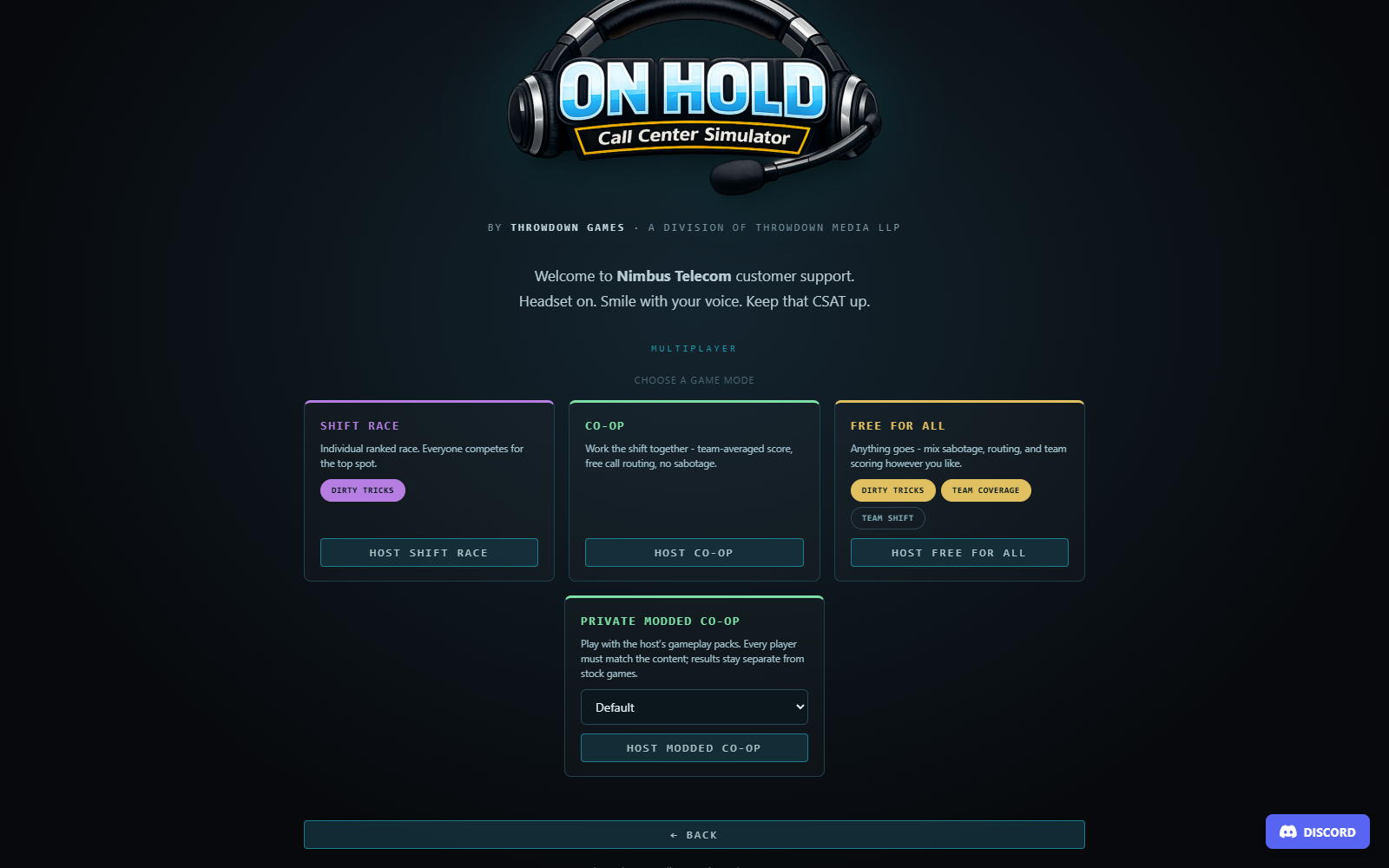
Start from the title screen. Open Options to set up your controls, then choose New Game for a career with training. Night Shift and Multiplayer start separate modes. Open full-size screenshot ↗
Create a career
Choose New Game. There are three save slots. An empty slot starts a new career; clicking an occupied slot opens an overwrite confirmation. Read that confirmation carefully: choosing Overwrite replaces the existing career in that slot. Cancel leaves it alone.
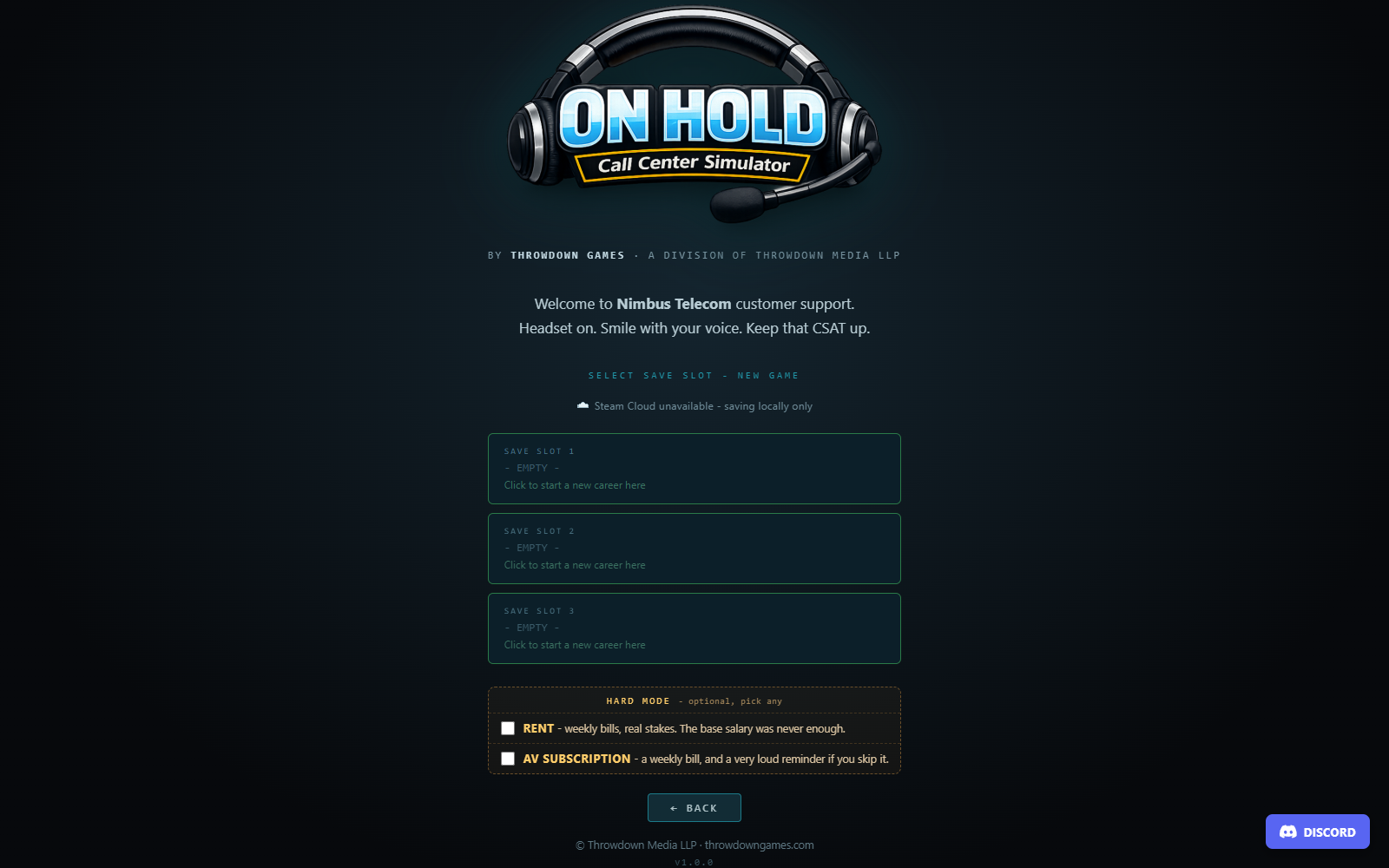
The New Game screen also offers optional Hard Mode choices for rent and an antivirus subscription. You can choose either, both or neither. These are career-creation choices stored with that career, so decide before clicking its slot. Leaving them off is a reasonable way to learn the call workflow before adding weekly expenses.
Choose a new-career slot. Set any optional bills before selecting an empty slot. This example is saving locally; your Cloud status appears above the slots. An occupied slot requires an overwrite confirmation. Open full-size screenshot ↗
An ordinary new career begins on day one with guided training. Night Shift, multiplayer and authored community experiences have their own start flow and do not run that ordinary career tutorial. Load Game becomes usable when a saved slot exists; its cards show the day, wallet and save date. See saves and troubleshooting for persistence, backups and Cloud behavior, and career progression for reviews and advancement.
Your first minutes at the desk
The training card introduces your cubicle and guides one call through the tools. Drag the card by its header if it covers a button you need. Steps with a continuation button wait for your click; practical steps advance when you perform the required action.
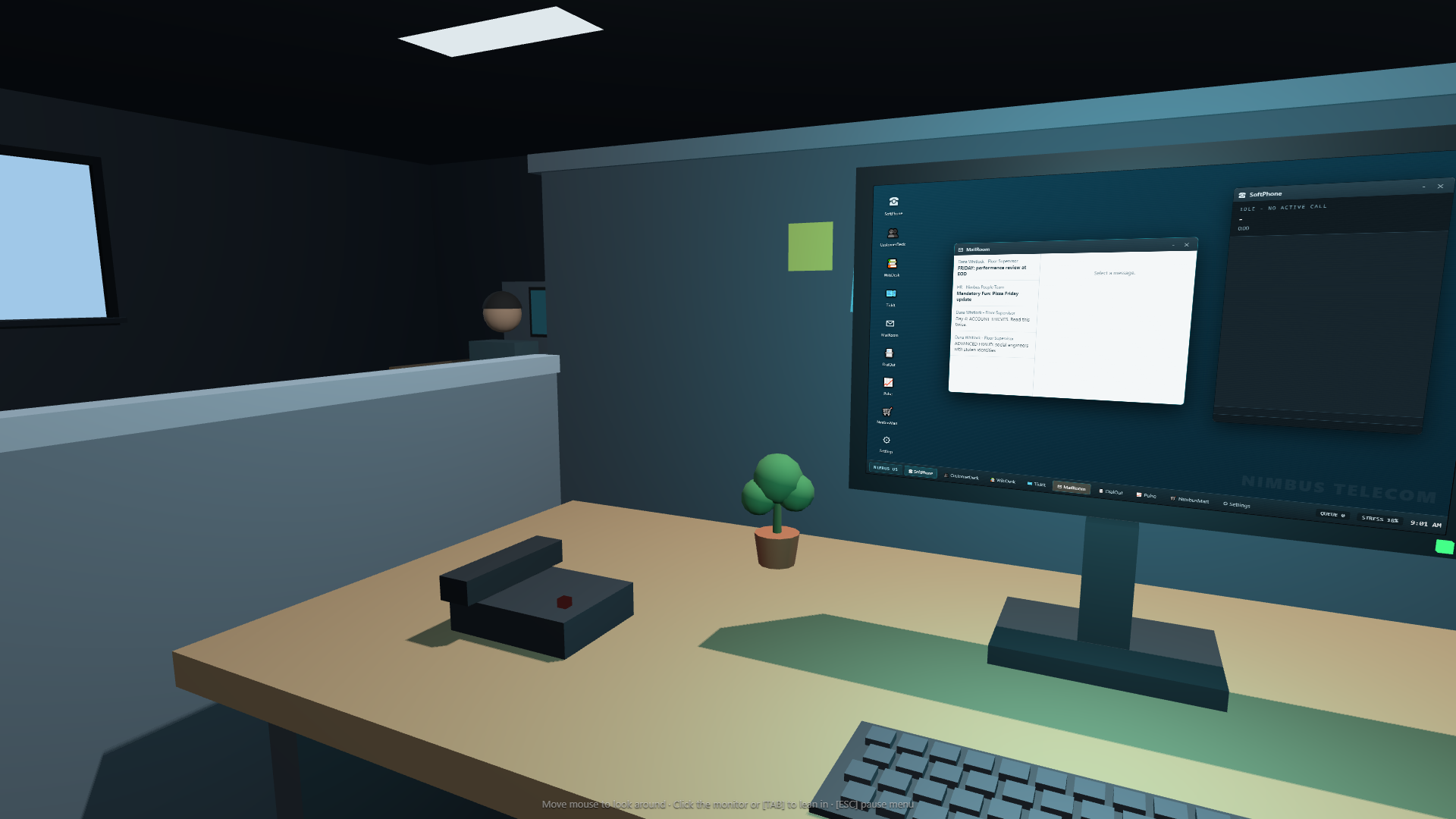
Your workstation. Click the monitor or press Tab to lean into Nimbus OS. The phone and other desk objects can be reached while leaning back. Open full-size screenshot ↗
Move the mouse to look around the office.
Click the monitor or press Tab to lean in.
Open MailRoom and click Rajeev's email to read it. Opening the app alone is not the same as reading a message.
Wait for the first call and answer with Space or Answer in SoftPhone.
Follow the dialogue choices and tutorial prompts. The caller's words are written into the transcript while they speak.
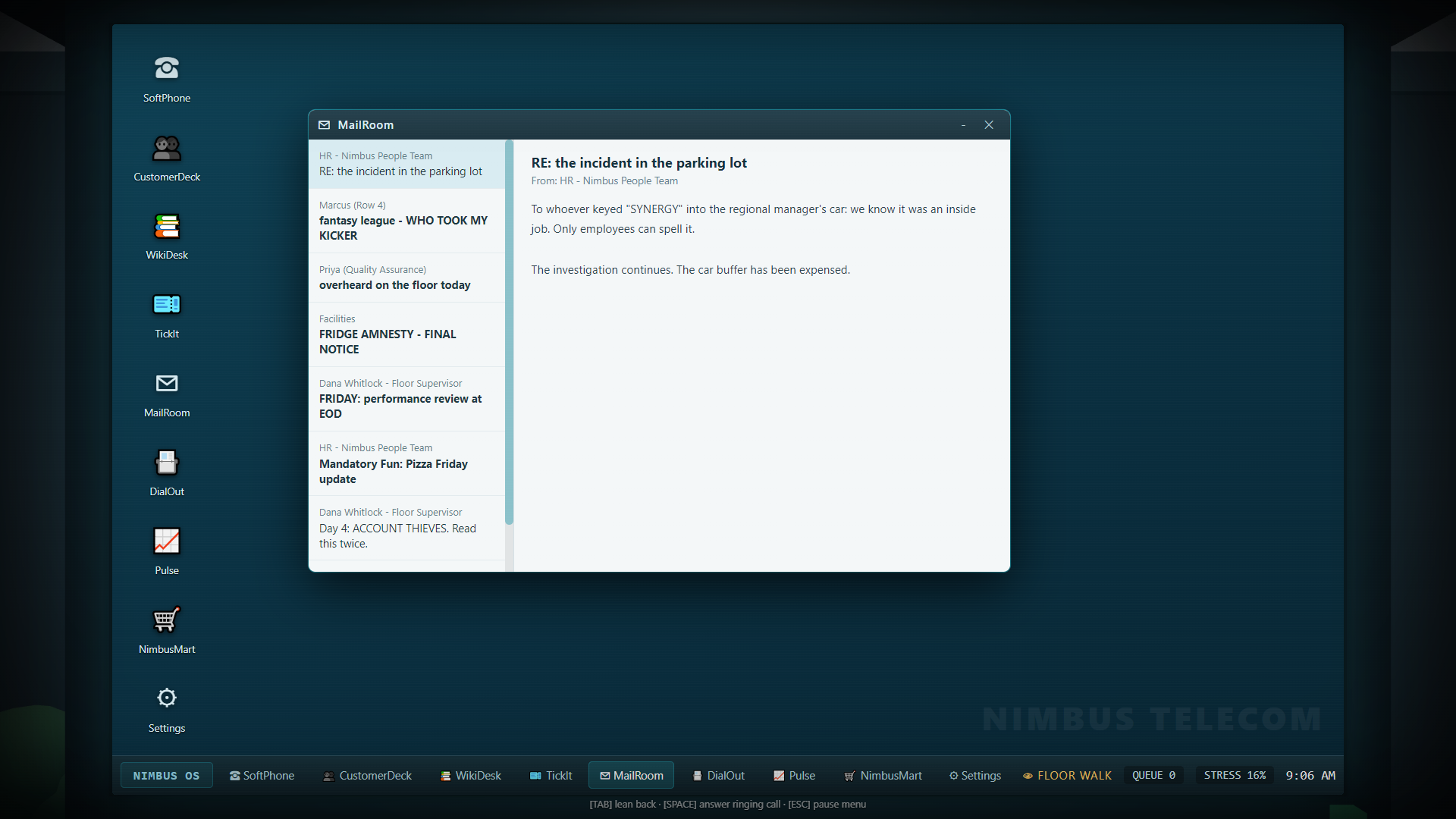
Find and read an email. Select a message in the inbox on the left to read it on the right. This later-shift example has an HR message selected; during training, select Rajeev's email instead. Open full-size screenshot ↗
The first call is deliberately held back while the early training steps are being explained. If you take a long time finding the monitor or mail, a safety net routes the call after roughly a minute of active attention to those early steps. That is a cue to answer, not a requirement to restart the game. The email remains available afterward.
The complete first-call loop
These are the actions the training teaches. More complex calls vary the middle of the sequence, but this is the foundation:
Step
What you do
Where you do it
Answer and greet
Answer the ring, then choose a greeting
SoftPhone, Line 1
Gather details
Ask for identifying information and listen to the problem
SoftPhone dialogue
Find the record
Search the caller's name or account number, then open the matching record
CustomerDeck
Verify
Confirm two distinct factors on the line, then deliberately confirm identity on the record
SoftPhone and CustomerDeck
Diagnose
Read flags, probe if needed and run any available diagnostic
CustomerDeck and SoftPhone
Select the fix
Search for and open the relevant article
WikiDesk
Explain or execute
Use the matching dialogue option and any required account action
SoftPhone and CustomerDeck
Close
Finish the call through the dialogue options
SoftPhone
Document
Choose a suitable category and click Log Ticket
TickIt
The tutorial's first example uses KB-201, Total loss of internet service, and Reset Connection. In later internet calls, run the line diagnostic before assuming the same fix applies: a regional outage and dead router call for different responses. The verification and diagnosis chapter explains the distinction.
The most easily missed step is Confirm Identity with Caller in CustomerDeck. Two factors do not verify the caller automatically. Wait for the green verification state before performing ordinary account actions.
Training after the first call
Training also demonstrates suspicious callers, pranks and a short system outage. Read each card: the correct approach to a non-customer call may be refusal or a polite redirect rather than an account search. A demonstration that goes badly may be retried, so another ring is part of training rather than evidence that your save is broken.
The final cards introduce the second phone line, breaks, coffee, purchases and career pressure. Click the final training button to hand the queue over to normal scheduling. You can skip training using its skip control; this releases the remaining day-one calls immediately. Skipping does not grant completed work or perform the tutorial actions for you.
A sensible first-shift rhythm
Keep SoftPhone, CustomerDeck and WikiDesk available without hiding one behind a full stack of windows. Use Review Account before a long lookup, or put the caller on hold for a short period. Verify once, diagnose the actual problem, perform the correct fix and close promptly. Open TickIt between calls to clear paperwork while the problem is still fresh.
Check MailRoom again when it flashes or a notification arrives. Some messages contain action buttons; simply reading those messages does not choose a response. Check Pulse when you want a readout of your current performance rather than judging the entire day by the last angry caller.
The career queue eventually runs out. If ordinary career tickets are still waiting, Shift Complete asks you to log them and use Clock Out. Once you clock out, the daily report records unfinished paperwork as mistakes. Finishing the phone call and finishing its record are separate jobs.
If you feel stuck
What you see
First thing to check
No call during the opening tutorial
Complete the training card's requested step or continuation button; the early queue is intentionally held
Only dots where dialogue choices should be
Wait for the current spoken line to finish
Two factors shown but account actions complain
Open the correct CustomerDeck record and click Confirm Identity
No matching CustomerDeck result
Recheck the transcript, spelling, account digits and any corrected legal name
A green proposed fix did not finish the call
Read the system line: it may still require a CustomerDeck action
Shipping or technician action is blocked
Complete the equipment, address or signup step described in the solutions chapter
A service-unavailable panel covers an app
Wait for the office incident to restore the service; repeatedly clicking through it will not help
Your desk has two practical views: lean back to interact with the office, and lean in to operate Nimbus OS on the monitor. Switching view is normal during a shift. Looking away from the screen is not a pause; the phone and queue can keep moving.
Default keyboard controls
Key
Action
Conditions and useful details
Tab
Lean in or lean back
Works as the desk-view toggle; clicking the monitor also leans in
Space
Answer the inbound call
Answers a ringing Line 1 call and brings its panel into view; it does not dial a lead
H
Hold or resume the inbound caller
Requires an active Line 1 call; wait for a spoken line to finish before toggling
C
Sip coffee
Lean back first so you can reach the mug; clicking the mug is an alternative
Esc
Open or close the options/pause menu
Fixed binding; it also returns title subscreens to the main title menu
Enter
Submit a CustomerDeck search
Use while the search field is selected
Answer, hold and coffee shortcuts are suppressed while you are typing into an input, text area or selection control. If pressing Space writes a space into a search field, click outside the field or use SoftPhone's Answer button. Tab is specifically handled as the desk toggle, so use the mouse when you need to select an app field.
Change the four configurable bindings through Options → Keybinds. Click the existing key, then press the replacement. Esc cancels capture and cannot be reassigned. Assigning a key already used by another action removes that other assignment: check all four rows afterward. Reset to Defaults restores the initial bindings.
Check your keyboard bindings. Click the displayed key to change it, or use Reset to Defaults to restore these four shortcuts. Esc cancels a replacement and always remains the pause/menu key. Open full-size screenshot ↗
Mouse controls around the desk
While leaning back, move the pointer to look across the cubicle. Hovering an interactive object shows a tooltip; clicking performs its action. The monitor, desk phone, mug, plant, noticeboard and break-room machine are useful places to inspect. Some other objects become interactive as the office changes.
Find the desk controls. The phone answers a ringing inbound call, the plant can be watered, and the monitor returns you to the work apps. Move the mouse to inspect other parts of the cubicle. Looking away from the screen does not pause the queue. Open full-size screenshot ↗
Object
What a click does
Monitor
Lean in to Nimbus OS
Desk phone
Answer the currently ringing inbound call; an idle phone has no call to answer
Coffee mug
Use the coffee action
Coffee machine
Uses the coffee/refill interaction
Fernando Jr., the plant
Water the plant
Noticeboard/sticky-note area
Open the board to read its notes
Vending machine
Open VendX Pro
Printer
Interact with the printer when there is a fixable problem
Close notes and the board with their close button or Esc. If a desk object will not react, check whether you are leaning in, the camera is transitioning, a refill animation is underway or a note overlay is still open. The office view is a seated workstation; the important work tools open through the monitor rather than requiring you to walk to another desk.
Operating Nimbus OS
Click a desktop icon once to open its app. Double-clicking also works. Drag a window by its title bar to reposition it, and click a window to bring it to the front. Keep the top bar reachable so you can move an overlapping window out of the way.
Both – and × hide an app window. Reopen it from its desktop icon. A taskbar app button can bring its window forward or hide the currently focused window. These controls organize the simulated desktop; closing SoftPhone's window does not hang up the caller, and closing CustomerDeck does not cancel an account action already performed.
Notifications can open the relevant app when clicked. The taskbar shows queue count, stress and the office clock. Stress changes color at higher values, so it is a useful quick check when your attention is on the desktop. An app with Service Unavailable cannot be used until the temporary incident restores it.
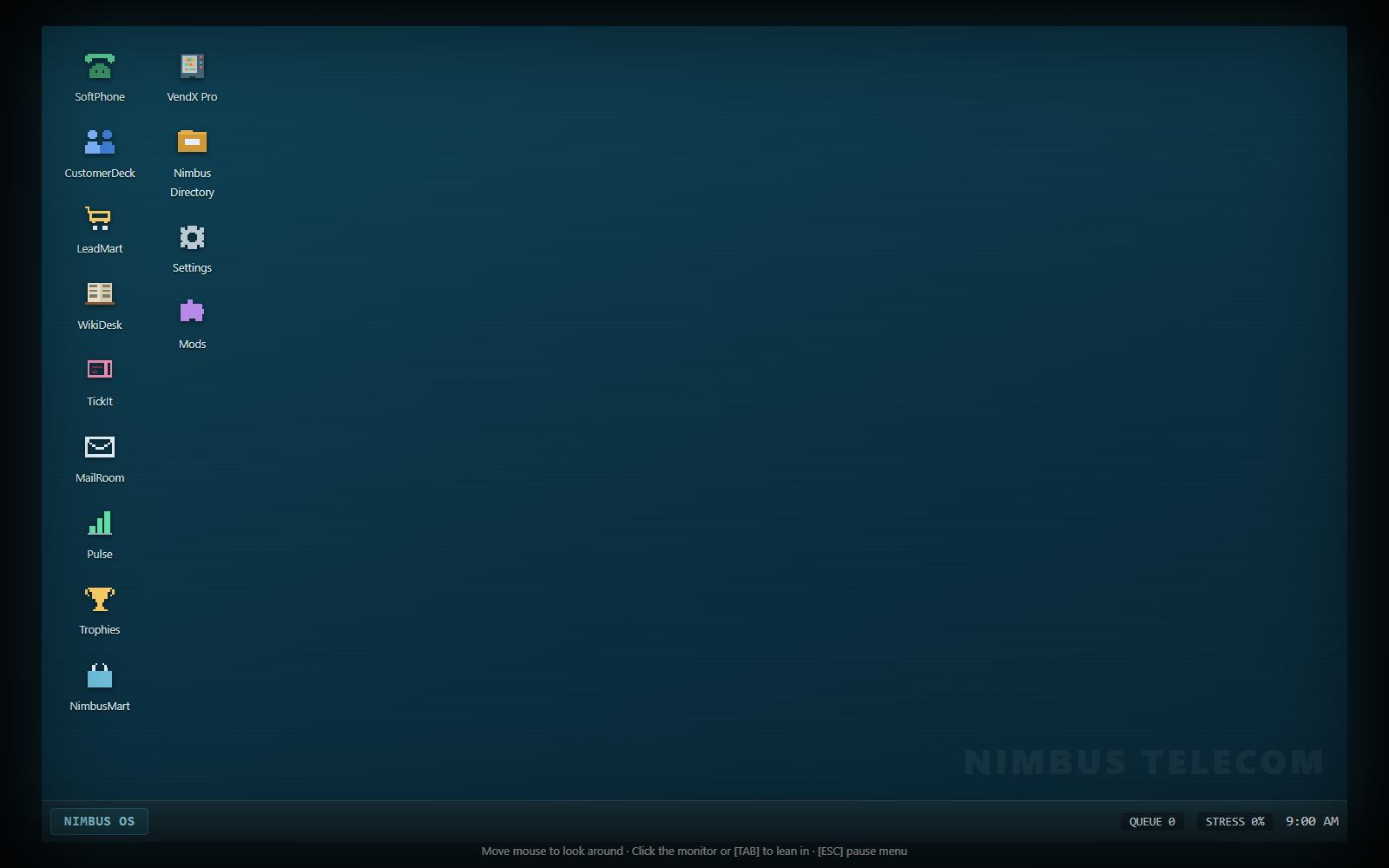
Find the work apps. Click an icon to open its app. Start with SoftPhone, CustomerDeck and WikiDesk for calls; use TickIt for the record afterward. The bottom taskbar keeps shift status in view. Open full-size screenshot ↗
App reference
App
Main purpose
When to use it
SoftPhone
Inbound dialogue, call state, transcript and outbound calls
During every call; Line 1 is inbound, Line 2 is outbound
CustomerDeck
Search accounts, inspect flags, confirm identity and perform account actions
Before acting on a customer's account
WikiDesk
Search and read support articles
When matching symptoms or diagnostic results to a fix
TickIt
Categorize completed calls and inspect open follow-up cases
Between calls and before Clock Out
MailRoom
Read messages and select available message actions
At the start of the day and when mail arrives
Pulse
View live performance and career readouts
To monitor CSAT, resolutions, earnings and strikes
Trophies
View the achievement board and local mod trophies
To inspect goals and earned awards
Nimbus Directory
Search the wider subscriber database, including filters and profile details
When a broad record search or prospect research is useful
LeadMart
Buy prospect packs for the outbound lead book
Before expanding your cold-call list
NimbusMart
Buy workstation upgrades
When you have money to improve the desk or tools
VendX Pro
Buy consumables from the vending stock
For the available short-term effects during a shift
Settings
Open the game's options menu
To adjust presentation, sound and bindings
Mods
Inspect installed content and loader notices
To diagnose an enabled pack or upcoming profile change
CustomerDeck's normal search needs at least two characters and shows a short list of matching results. Search does not mean select: click the result to open the account. Nimbus Directory provides the larger search-and-filter view. Neither app verifies a customer merely because their record is visible.
WikiDesk searches its titles, keywords and article text as you type. A search of fewer than two characters shows the broad list. All clears the search. Click an article to reference it for SoftPhone; the results list by itself is not an opened article. The article can stay referenced across calls, so always check that its subject still matches the current caller.
Language settings
Options → Language has three independent selectors:
Interface language changes menus, training instructions and stock app presentation.
Subtitle language changes in-call dialogue text.
Audio language chooses the language of the recordings.
Choose any combination. The six stock languages are English, Chinese, French, Hindi, Spanish and German. Enabled community packs can extend text and audio coverage. Missing translations fall back to English; missing or unusable recordings can continue as timed subtitles, so dialogue progress does not require every custom line to have a recording. See installing mod profiles and languages, audio and office packs for community content.
Audio settings
Adjust Master, Sound effects, UI, Ambience and Music separately. Voice acting enables or disables spoken dialogue, Dialogue volume controls its level, and Your (agent) voice selects Female or Male. Caller voices are selected for the caller automatically rather than by that agent selector. Subtitles are always available.
If you hear office ambience but cannot hear conversation, check Voice acting, Dialogue volume and Master. If clicks are loud but the office is quiet, inspect UI and Ambience independently. The voice pack status in the audio panel describes installed recordings rather than a gameplay requirement.
Video and readability settings
Fullscreen Borderless uses the display's native area. Windowed lets you choose a window size, from 1280 × 720 through 3840 × 2160, including the 3440 × 1440 ultrawide choice. Window size is disabled while borderless mode is selected.
UI scale offers Auto, 100%, 125%, 150%, 175% and 200%. Increase it when menus and the HUD are hard to read on a high-resolution display. UI scale and Render scale do different jobs: UI scale changes interface sizing, while render scale changes the 3D scene's drawing resolution. Lowering render scale may help a struggling GPU without requiring smaller interface text.
The graphics panel also offers Field of view, Antialiasing, Shadows, Camera sway (breathing) and CRT scanlines on the PC screen. Field of view ranges from 45° to 75°. Camera sway and scanlines are optional visual effects; disabling them can make a long desktop session more comfortable. Graphics changes apply to the live scene when one is running and are retained for later starts.
Pausing and leaving
During an ordinary shift, Esc opens the pause menu and freezes the current game while you work in that menu. Resume returns to the shift. Saving and leaving a career use separate menu entries; read saves and troubleshooting before relying on an unfinished call being restored exactly as it was.
Mod Studio and Workshop are title-menu activities. They are available from title-screen Options rather than the middle of an active shift. Return to the title when you want to author a pack, manage its publication or make changes intended for the next content load.
A multiplayer session has additional timing and synchronization considerations. Read multiplayer before assuming that your local menu freezes another player's game.
CHAPTER 03 / PLAY
Handling calls
A clean call combines good conversation with accurate account work. SoftPhone does not ask you to type a free-form reply: choose from the dialogue options it offers. Read the caller's actual problem, the option's text and the app's system feedback rather than clicking every green button you can find.
The reliable sequence is answer → greet → identify → verify → diagnose → fix → close → log. Some calls are simple conversations, some contain a second issue, and some should never receive account service at all.
The screenshots below follow one internet-loss call from diagnosis to paperwork. Its diagnostic identifies a local connection fault, so the example uses KB-201 → Reset Connection → Internet ticket. Use your own caller's result to choose the appropriate fix and ticket category.
1. Answer the ring
An inbound call appears on SoftPhone → Line 1. Use Answer, press Space with no text field selected, or click the desk phone while leaning back. The answer shortcut brings the inbound panel forward even if you were looking at Line 2. A live outbound prospect is held when you return to the inbound line.
A normal unanswered ring has a base timeout of about 26 seconds; upgrades can extend it. The queue is work waiting to reach your line, not a list of calls you must answer simultaneously. Drop Call rejects the ringing call and is not equivalent to a polite completed conversation.
Ordinary careers also offer two ways to route a ring before answering:
Ringing-call control
What it does
Limit/cost
Transfer
A sufficiently friendly coworker takes the call
Up to two per day; costs coworker reputation
Tier 2
Sends the unanswered call to the senior team
Once per day; $4 routing fee and some stress relief
Career Transfer needs a coworker with enough reputation to accept the favor. If nobody owes you enough, its feedback explains why. These ringing controls are different from Escalate to Tier 2 on an active CustomerDeck account.
2. Greet, then listen
Ordinary callers offer Warm, Standard and Rushed greetings. Warm improves the opening mood; Rushed starts with a mood cost. The caller's opener follows your greeting. Wait for it to finish and read its transcript before choosing the next response.
While a spoken exchange is underway, dialogue options temporarily disappear and dots can appear in their place. This is deliberate sequencing. Repeated clicks do not make the current sentence finish faster. You can search and arrange tools while listening, but wait for the relevant dialogue option to return before asking the next question.
The transcript contains You, the caller and system feedback. System lines record factors, diagnostics, required actions and mistakes. It is particularly useful when a customer reads out an account number, corrects a detail or explains a second problem. The inbound transcript is cleared when the call ends, so write its ticket promptly rather than assuming that conversation remains available forever.
3. Gather useful information
Ask for account details or a name through the offered verification options. Search those details in CustomerDeck and select the correct result. An exact account number is usually less ambiguous than a common name. Name search can still be valuable when the caller misreads digits or does not know their number.
Use Probe to ask for more detail about the problem. Stock normal-call probing is limited to two exchanges; the answers can distinguish a whole-account fault from a device-specific issue or clarify what the customer is actually requesting. Probing for symptoms is different from confirming a security factor.
Review Account is the safest way to buy lookup time when offered. It grants a 45-second grace window without ordinary dead-air penalties or impatience decay, and can be used twice per call. It is unavailable while a review window is already running or after those two uses. Use that time to search the record, inspect its flags or read WikiDesk rather than leaving the caller in silence without explanation.
4. Manage mood and waiting
SoftPhone shows the call timer, a mood indicator and verification progress. A happy greeting alone cannot rescue irrelevant actions or endless waiting. Useful empathy, accurate explanations and a correct fix improve the interaction; repetition, false accusations and unrelated account buttons make it worse.
Option or delay
How to use it
Empathy
The first use helps most, the second helps less, and later repetition can annoy the caller
De-escalate
Offered for an irate caller in the right state; lets them vent before you continue
Review Account
Grants limited, explicit lookup time rather than unexplained silence
Hold / Resume
Useful for a short interruption; do not treat hold as an unlimited pause
Explain
Describes a relevant issue before an action; can improve mood
Push Back / Unload
Relieves your stress at the expense of professionalism, caller mood and complaint risk
A caller left on hold loses mood as time passes. The base hold drain happens every ten seconds, and total hold time above 45 seconds can reduce the final satisfaction score. Re-engaging through a dialogue choice automatically takes an inbound caller off hold. H or the Resume control also resumes them.
Unexplained dead air begins to hurt after about 20 seconds of silence during an unresolved active call. It can trigger a caller complaint line and a mood loss. Time spent speaking, the Review Account grace window and hold have their own handling. Once a case is resolved, the ordinary dead-air timer is suppressed, but unnecessarily long total handle time can still affect the score.
Caller mood can fall far enough that they hang up. Keep lookup time purposeful. H cannot toggle during a spoken line, so use it after the exchange finishes rather than assuming a ignored press means hold is active.
5. Verify before acting
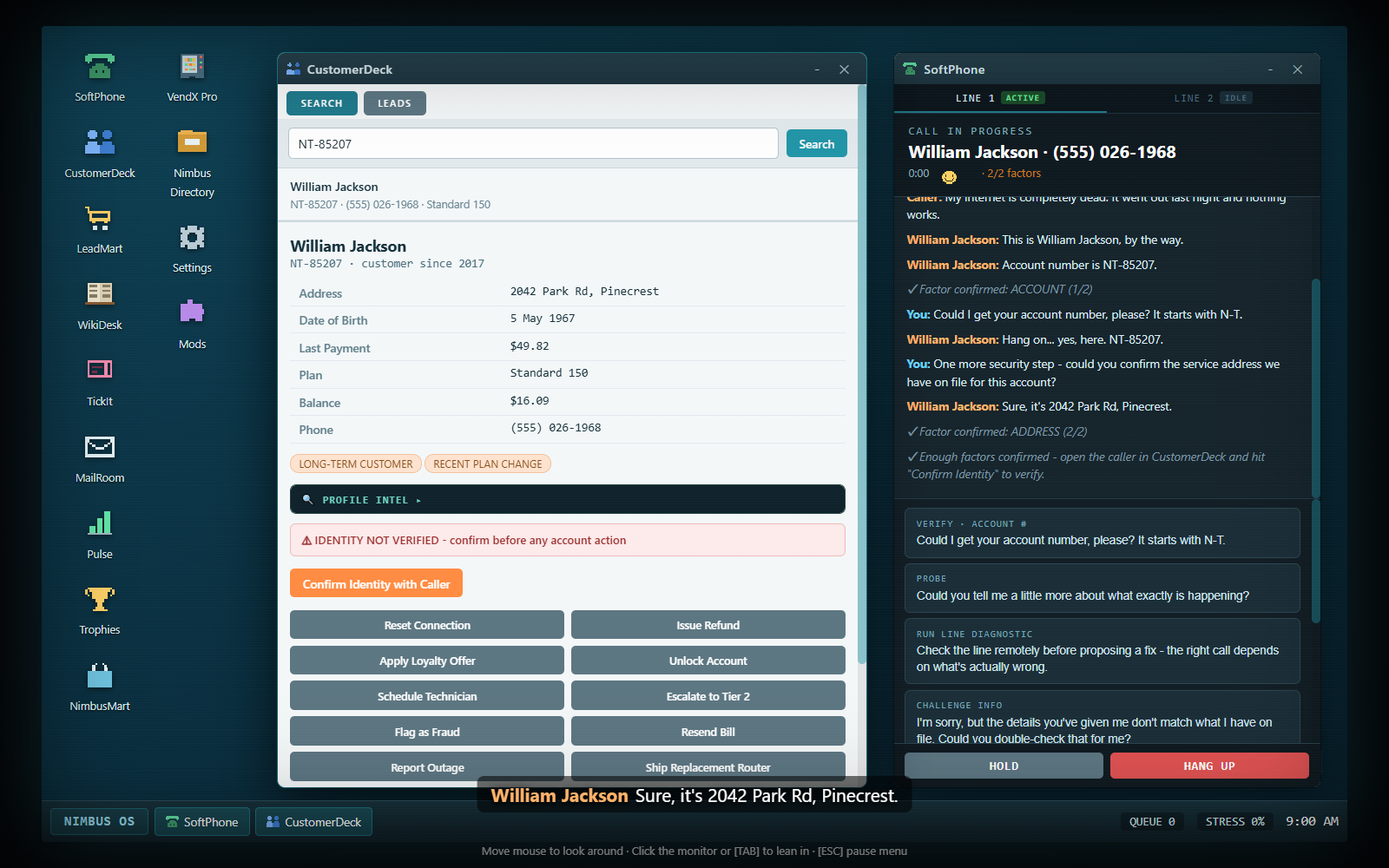
Normal account work requires two confirmed factors and a separate Confirm Identity with Caller click on the matching CustomerDeck record. A factor count of 2/2 is not the final verified state. Use the full verification guide for account-number callers, no-number callers, mistakes and lockouts.
Reading an article or running the offered technical diagnostic is informational. Clicking Reset Connection, Issue Refund, Unlock Account or another account action is consequential. Performing an ordinary action before verification, on a different customer or without an active customer call can produce a compliance strike.
Flag as Fraud and the narrow no-account Schedule Callback flow are specific exceptions; they are not permission to skip verification on a normal service request.
6. Diagnose and resolve
Check flags and any available diagnostic in SoftPhone, then search WikiDesk with words from the actual result. Open the article itself. If it is relevant to this scenario, SoftPhone offers an associated explanation or proposed fix. An article left open from the previous caller may be unrelated and produce no useful option.
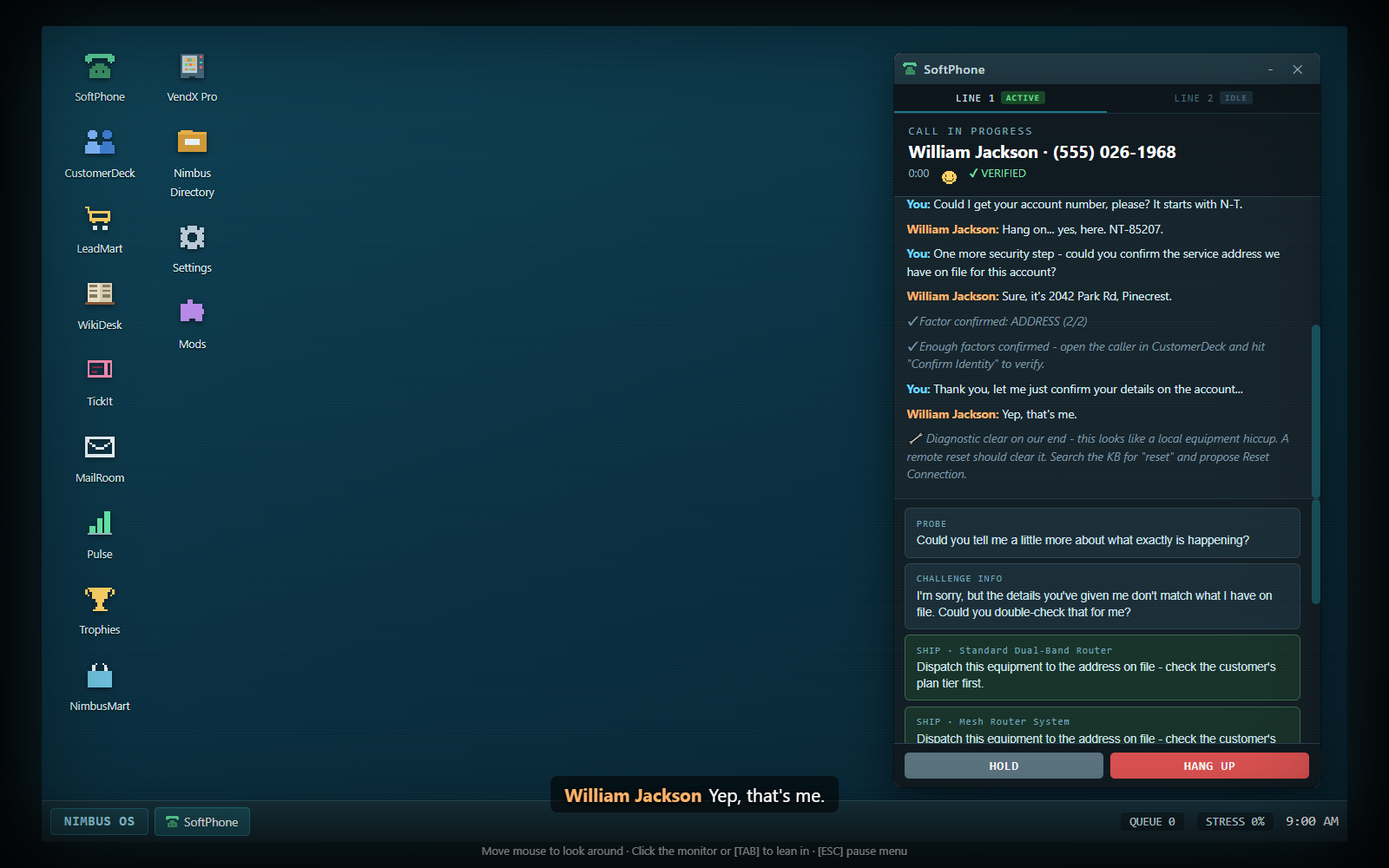
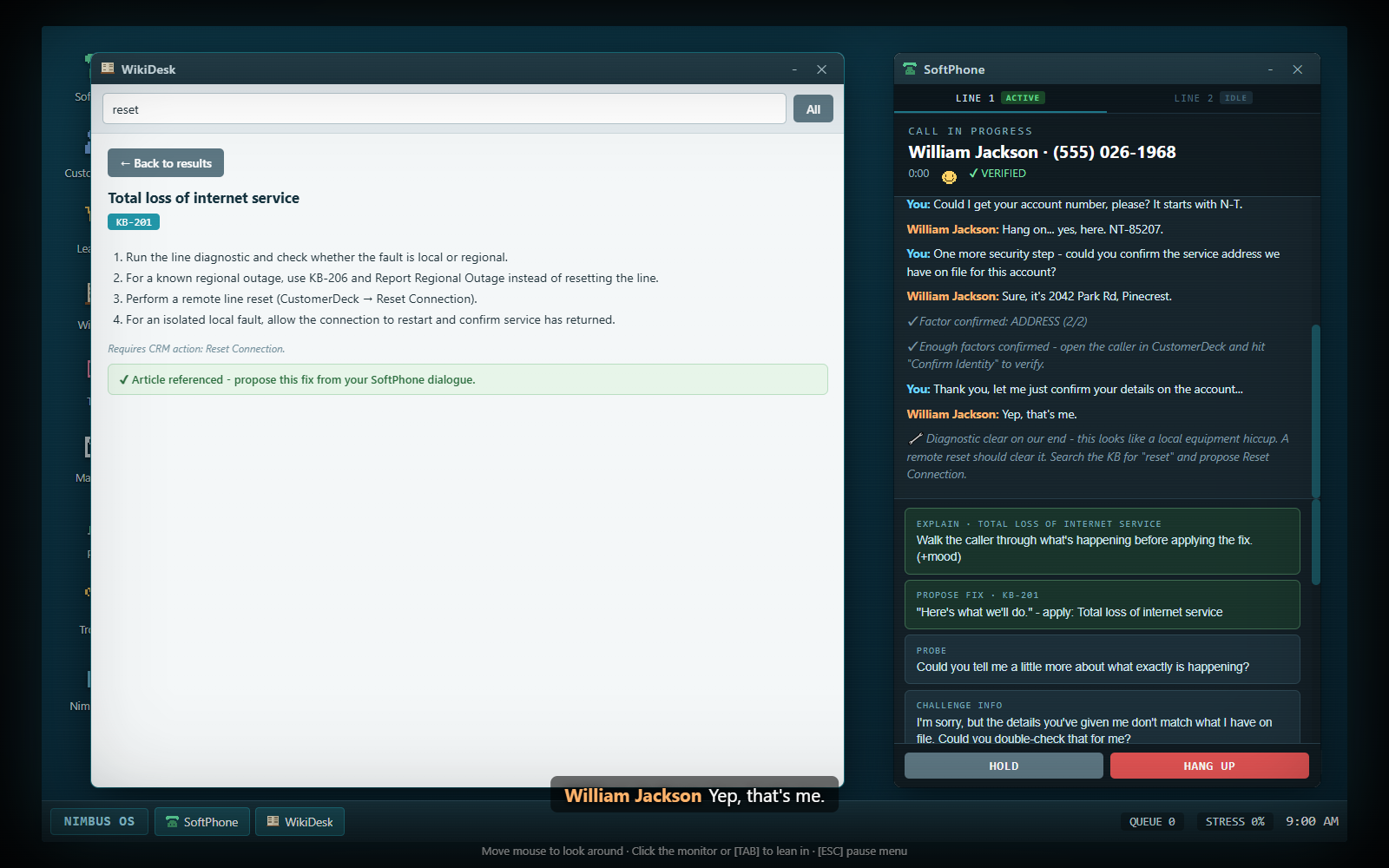
Read the diagnostic result in SoftPhone. After choosing Run Line Diagnostic, look for the wrench-marked diagnostic message in the transcript. This example points to a remote reset; an outage or router fault requires a different route. Open full-size screenshot ↗
There are three main completion patterns:
Explanation only: an appropriate Explain dialogue option resolves an informational issue; no account-action button is required.
Explain/propose, then act: SoftPhone's proposal records the agreed fix, and a system line tells you which CustomerDeck action completes it.
Act with the matching article referenced: a valid CustomerDeck action can complete the fix directly when the correct article is open. If you acted before opening it, use Confirm Fix with Caller when it appears.
An explanation before an action may improve mood, but it is not a universal extra click required after every valid fix. Propose Fix is not the same as actually executing a refund, shipment or reset. Read the system feedback to find the unfinished part.
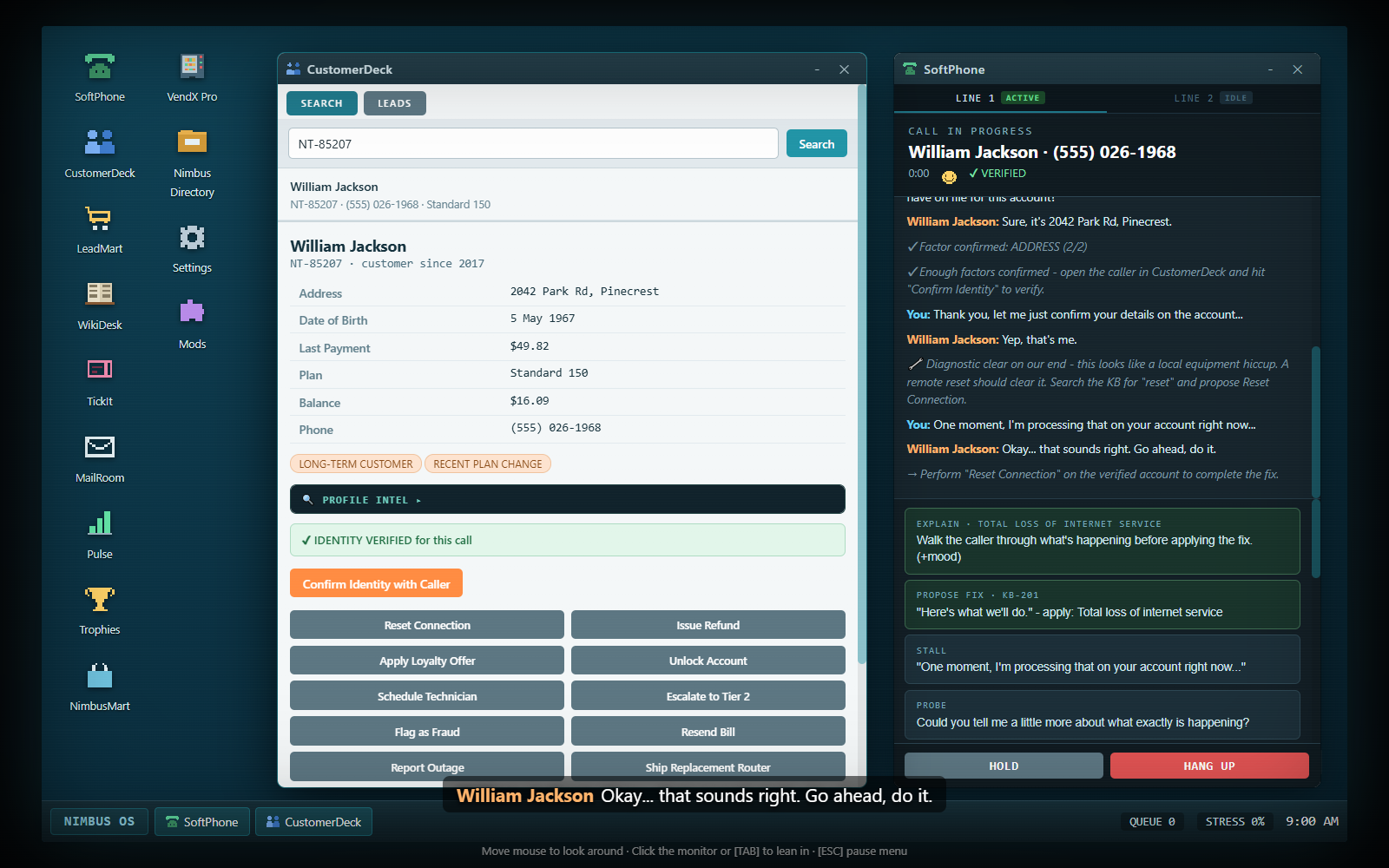
Complete the action named by the transcript. The proposal leaves Reset Connection pending in this example. Click the matching Reset Connection button in CustomerDeck on the verified account, then read SoftPhone's feedback. Proposing the fix alone does not execute it. Open full-size screenshot ↗
Some scenarios offer a plain Response menu rather than the ordinary verify-and-act route. Choose the response that addresses the request. There is no correctness highlight on those answers. A fitting response can resolve the conversation; an off-topic reply annoys the caller and counts as mishandling. Do not go hunting for an account action when the conversation is asking for an explanation.
7. Finish the whole conversation
After resolution, Anything Else? offers a closing check. Eligible loyal customers can also receive a loyalty-credit offer. Some scenarios allow a plan-upgrade pitch; that is optional and can fail, so it should not replace fixing the original issue. Use End Call in the dialogue to close cleanly when you are done.
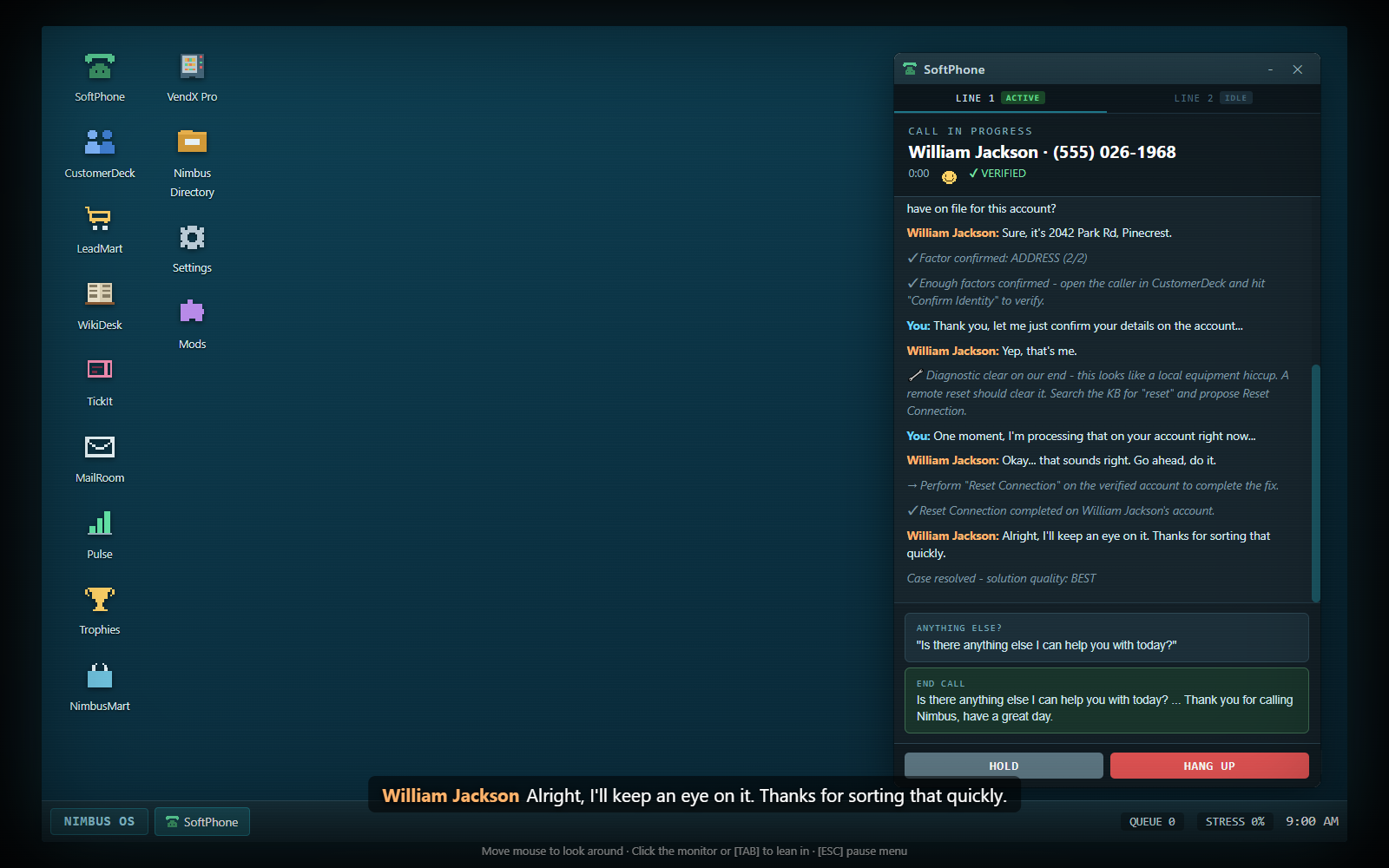
Confirm resolution before closing the conversation. The transcript confirms Reset Connection completed and Case resolved in this example. Use Anything Else? for the closing check, then End Call when you are finished. The red Hang Up control below is a separate manual termination button. Open full-size screenshot ↗
Hang Up is an emergency/manual termination control. Its first click arms a Sure? confirmation for a short interval; the second confirms. On an unresolved ordinary customer call, hanging up is a poor result. A normal dialogue wrap-up is the more reliable way to finish service.
Later callers may raise a second, unrelated issue after the first is fixed. Read the new opener. Identity verification carries over, but the second issue needs its own diagnosis, article and fix. Previous action completion and the first proposed fix do not automatically solve it. A compound call receives a wider handle-time budget, so prioritize accuracy over rushing its second half.
8. Log the ticket
Open TickIt. For each pending call, select a category and click Log Ticket. The categories are Internet, Billing, Account, TV, Mobile, Technical, Security and Other. Correct categorization pays a $3 bonus; the wrong category records a mistake and earns no category bonus. A compound record can accept either of its expected issue categories.
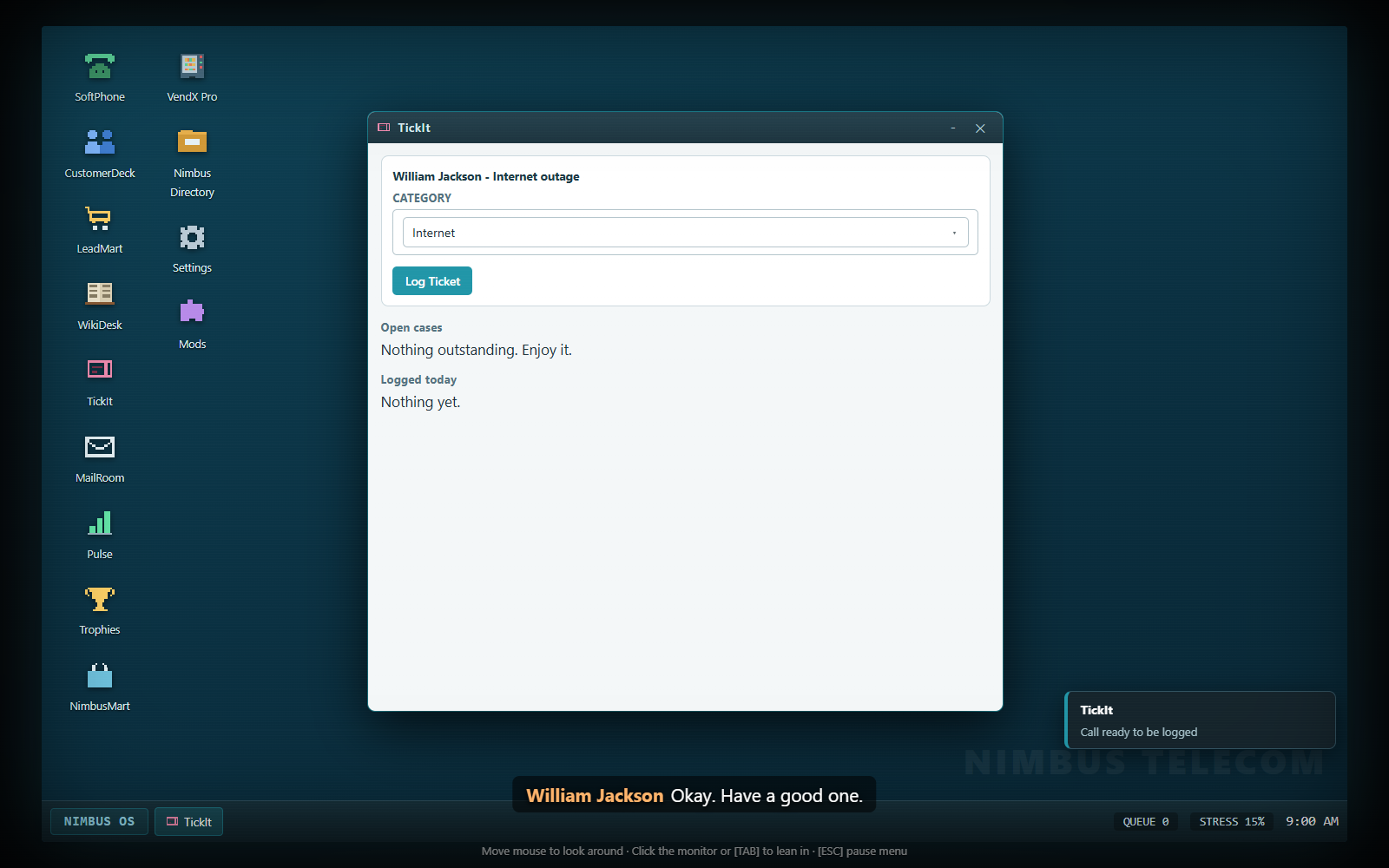
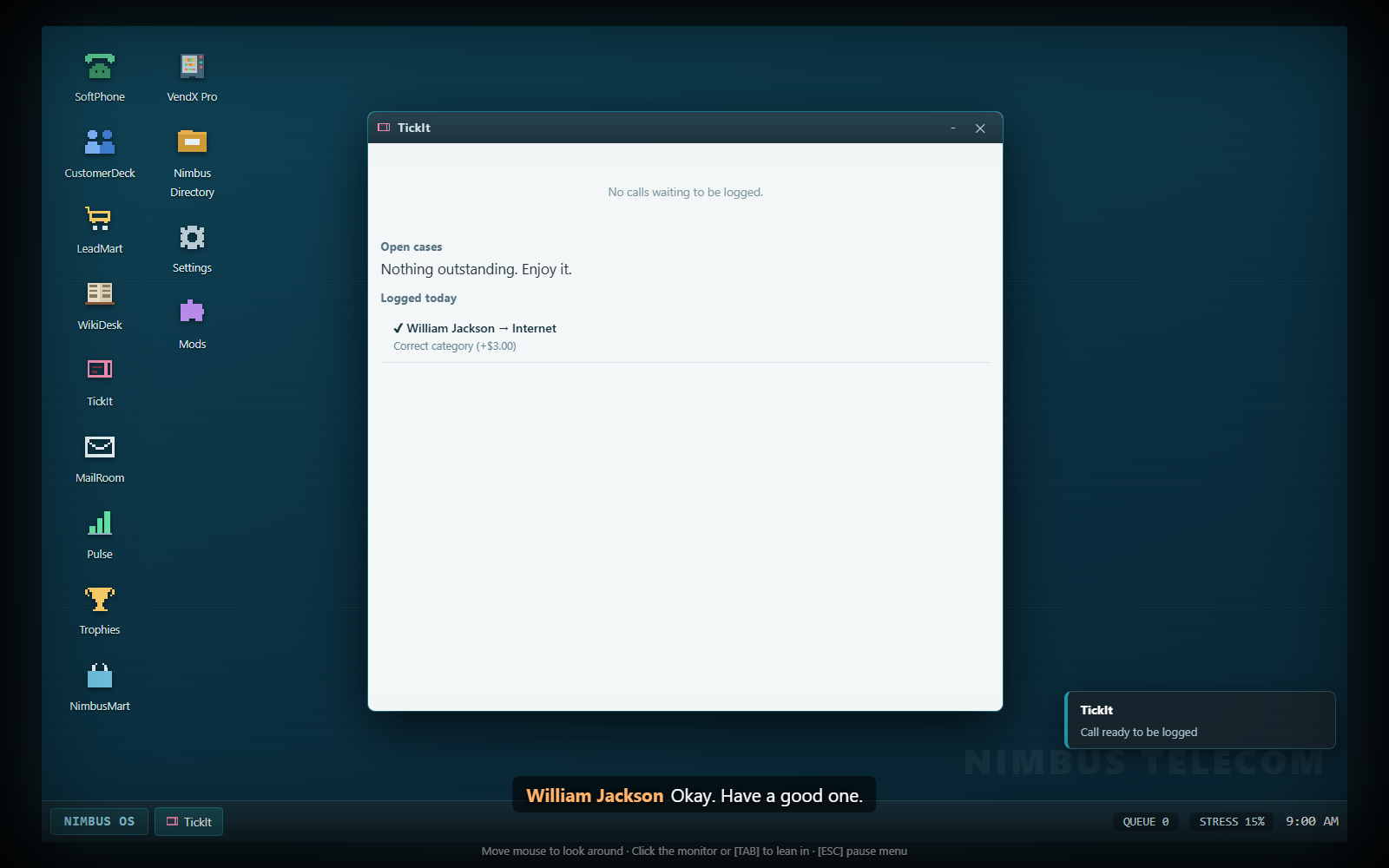
Choose the issue's category before logging. After ending the conversation, open TickIt and find its pending record. Select Internet for this internet-loss example, then click Log Ticket. Ending the call does not log it automatically; choose the category that matches each caller's issue. Open full-size screenshot ↗Check that the ticket was logged. The completed record now appears under Logged today, and this example's pending queue is clear. Repeat the categorization and logging step for each remaining record. Open full-size screenshot ↗
TickIt's Open Cases section is a separate list of unfinished business that may return later. Logging a completed call is not the same as resolving every follow-up listed there. See cases, characters and office events.
At the end of an ordinary career shift, pending records trigger the paperwork/Clock Out stage. You can finish categorizing them before opening the report. Clocking out with work still pending affects the report, so use the quiet moment to clear it. Separate run modes can end automatically and should not be expected to wait for career paperwork.
A worked duplicate-charge call
Answer and choose an appropriate greeting.
Listen for the duplicate-payment complaint; do not confuse it with an expired promotional price.
Collect the caller's account number and a matching security factor.
Search CustomerDeck, open the right account and click Confirm Identity with Caller.
Inspect the duplicate-charge flag and open KB-302 in WikiDesk.
Explain/propose the refund in SoftPhone, then use CustomerDeck → Issue Refund. Alternatively, with the correct article open, the valid refund action can complete the fix directly.
Read the resolved state, finish the conversation and open TickIt.
Verification answers “may I act on this account?” Diagnosis answers “what action actually helps?” They solve different problems. A successful technical diagnostic does not identify a caller, and a verified caller can still receive the wrong fix.
The two-part verification rule
For ordinary account service, you must:
Confirm two distinct security factors through the conversation.
Open the correct account in CustomerDeck and click Confirm Identity with Caller.
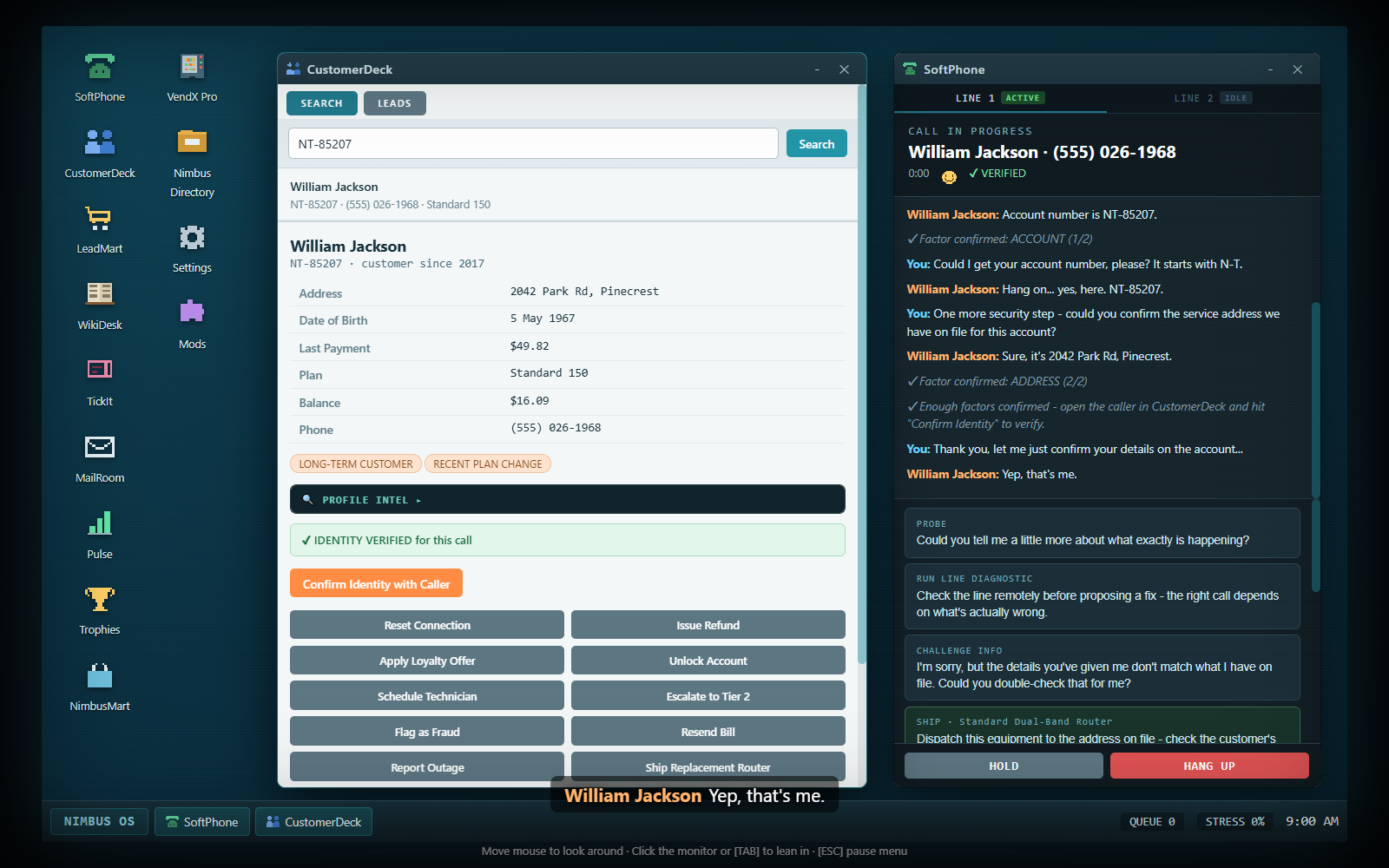
SoftPhone shows the factor count while you gather them. A system line announces when enough have been confirmed. The count does not replace the CustomerDeck click: look for Verified on the phone and the record's green identity confirmation.
Two factors do not finish identity verification. The example caller has supplied a matching account number and address, but CustomerDeck still shows an unverified identity. Check that this is the matching account, then click Confirm Identity with Caller before using account actions. Open full-size screenshot ↗
Each factor counts once. Asking the same question twice does not turn one confirmed account number into two factors. A caller volunteering a correct number during the greeting can already credit that account-number factor; read the count rather than asking it again automatically.
Verification belongs to the active call and matching account. Opening another customer's record does not transfer permission to that account. The next caller requires their own verification, even if they happen to have a similar name.
A caller who knows their account number
This is the standard route:
Listen for the volunteered account number, or choose Verify · Account #.
Search that number in CustomerDeck and open the matching result.
Choose Security Check in SoftPhone. This asks for the address on the account.
Read whether the answer matches. A matching account number plus matching address provides two factors.
Click Confirm Identity with Caller on that exact record.
Only then perform ordinary account actions.
Look for the green verification confirmation. After Confirm Identity with Caller, the matching CustomerDeck record shows Identity Verified. This confirms permission to act on this account during this call; you still need to diagnose the problem and choose a suitable fix. Open full-size screenshot ↗
Knowing the caller's name is useful for finding the account, but a name does not count as the extra factor for an account-number caller. An impostor can know a name and number; the security check still matters.
If CustomerDeck returns nothing, compare the digits in the transcript with what you entered. Repeating the account-number question can give an honest caller a chance to correct misread digits. Challenge Info can also prompt correction when the caller really has made a mistake, but it is not a harmless catch-all question: accusing someone whose details are already correct costs mood.
A caller without an account number
Lacking a number does not automatically make someone fraudulent. They can identify themselves using their legal name and another factor:
Use Verify · Name. If the caller uses a nickname or an old surname, follow the offered Verify · Legal Name step.
Search CustomerDeck using the confirmed name. Click the intended account; do not act on the first vaguely similar result.
Use an available second factor: Verify · DOB, Verify · Last Payment, or Security Check for the on-file address.
Resolve any retry prompt before assuming a mismatch is final.
Once two factors are credited, click Confirm Identity with Caller.
The payment option appears only when the account has a payment record. A social engineer confidently stating a customer's name is not awarded the normal name factor; trust the factor feedback rather than the fluency of their story.
For an unverified caller without an account number, Schedule Callback is an alternative when they cannot supply enough details now. It ends the call without giving account service and at a neutral satisfaction level. It is not offered as a shortcut for a caller who has a number or is already verified.
Retry prompts and honest mistakes
The game distinguishes missing information and some honest mistakes from a confirmed failed check. Use the specific prompt that appears:
Situation
Offered route
What to remember
Caller misreads their date of birth
Verify · Retry DOB
Gives them a chance to correct it; Reject DOB Answer treats it as a failed check
Caller cannot find the last payment amount
Verify · Retry Payment
Lets them check a statement; skipping the check does not credit the factor
Caller cannot confirm the address on file
Verify · Retry Address
Lets them find the old address; eligible movers also gain alternative-factor options
Caller uses a nickname/old surname
Verify · Legal Name
Establish the account's actual legal name before relying on the search result
Caller has misread account digits
Repeat the account question or challenge the mismatch
Read the corrected number and search again
Retries have a small mood cost, but are preferable to taking an unverified action. Rejecting or skipping a pending verification check counts as a failed check, so do not use those buttons as if they were consequence-free navigation controls. Repeated unnecessary factor questions also annoy callers. Gather what is needed, confirm identity and move on.
Movers and old addresses
A legitimate mover may be unable to recite the address currently on file. Run Security Check so that state is recognized. You can give them time to find the address, or use an available date-of-birth or last-payment check as the alternative factor. An account-number factor plus a valid alternative can be enough.
After confirmation, use Update Address in SoftPhone to record the new service address. Verification first, address change second, visit booking third. Booking a technician before the mover's address has been updated is blocked. See the complete moving workflow.
A confident address that contradicts the file is a different situation from “I have moved and cannot remember it.” Fraudulent callers do not receive the ordinary mover fallback merely for failing the address check.
Lockouts, fraud and compliance
After three failed security checks, the account is locked for the current interaction. Further ordinary actions are blocked. Use Escalate to Tier 2 on the relevant record for a legitimate verification problem, or Flag as Fraud when the evidence points to an impersonation attempt. Lockout is a protective stop, not a prompt to try every account-action button.
Flag as Fraud is deliberately allowed without successful identity confirmation because the point is to protect an account when verification fails. It still needs the relevant account: flagging an unrelated record is a strike. Accusing a legitimate customer is harmful even when it does not immediately produce a compliance strike. A single confused answer is not proof that every other detail is malicious.
Fraud and social-engineering calls can expose an in-call Flag as Fraud option after a mismatch or failed check. This is useful when a withheld number makes a normal search difficult. It reports the account involved in the call rather than requiring you to guess an unrelated customer.
Scam calls that ask you to disclose information use a different response menu. Refuse, end and report is the safe service decision. An authoritative badge number or urgent story does not authorize disclosure. Pranks and wrong numbers have their own conversational wrap-up/redirect choices and do not require an account action.
Technical diagnosis
For supported technical and billing scenarios, SoftPhone offers a diagnostic after the problem is stated. It adds a highlighted system result to the transcript. Running it is informational, does not require completed identity verification and does not resolve the case by itself. Account actions still require verification afterward.
Diagnostic control
What it investigates
Run Line Diagnostic
Total internet loss: local fault, regional outage or router hardware
Run Speed Diagnostic
Slow speeds: real data cap, Wi-Fi-only interference or packet loss
Run Signal Diagnostic
Mobile signal: SIM, tower capacity or handset fault
Run Box Diagnostic
TV box: software hang, interrupted update or dead hardware
Run Usage Diagnostic
Data-cap complaint: real usage, meter mismatch or old throttle flag
Run Billing Diagnostic
Roaming complaint: valid usage, rate error or a pack that expired
The same opening complaint can have different causes on different calls. “Internet is down” does not always mean Reset Connection, and “my cap was reached” does not always mean the customer genuinely used all their allowance. Use the diagnostic result and current account flags, not only the scenario's familiar opener.
Diagnostic results are normally available once per issue. Read the result before searching WikiDesk; it supplies useful terms such as replacement router, packet loss, meter resync or firmware. The full article/action reference is in solutions, equipment and plans.
Finding the right article
Search WikiDesk with two or three distinctive terms from the result. Click an article to open it, then read its steps and the note about any CRM action. The search returns overlapping and sometimes generic material; a high text match is not proof that every article is the right resolution.
WikiDesk Indexer upgrades can show relevance percentages and match badges. These are assistance, not a replacement for reading the diagnostic. More than one article can be supported by the call family while only one best matches this particular cause.
If no relevant SoftPhone option appears, check whether you opened the article rather than merely its search results, whether the caller has finished speaking, and whether the article belongs to the current issue. A stale article stays in WikiDesk across calls and may need replacing.
What a partial fix means
The game distinguishes Best, Good and OK solution quality. An accepted fallback or a supported but poorly matched root-cause fix can resolve a call at lower quality. Resolution is therefore not a guarantee of maximum CSAT. Generic escalation is useful when you are genuinely stuck, but careful verification and the right cause-specific solution usually produce a better result.
During a compound call, verification carries to the second issue, but the first resolution does not. Listen again and use a new relevant article. For ordinary account problems, keeping this distinction clear prevents a successful first fix from turning into an unrelated action on the second.
CHAPTER 05 / PLAY
Solutions, equipment and plans
Use this chapter when you know who the caller is but need to decide which article, action or prerequisite completes their request. The tables describe stock content. Community scenarios can provide other articles and action labels; read their authored instructions and the game's feedback.
Account changes require a verified caller on the correct record. A relevant WikiDesk article helps identify the supported fix, but simply opening it does not run an account action. Start with identity verification and diagnosis if you have not completed that part of the call.
How articles and actions fit together
WikiDesk contains advice. SoftPhone lets you explain or propose that advice. CustomerDeck executes the account action when one is required.
For a normal action-based solution, open its article, optionally explain the issue, propose the fix and use the named CustomerDeck button. A correct action with its matching article already referenced can resolve the call directly. If the action was performed first, Confirm Fix with Caller can complete the associated explanation afterward.
For an explanation-only solution, use the relevant SoftPhone Explain option. Some verified callers also receive a direct explanation option without opening WikiDesk. There is no benefit in pressing an unrelated reset, refund or technician button merely because the explanation did not ask for one.
The system transcript states when a required action remains, when prerequisites are incomplete and when the case is resolved. Read it after each important step. Explain may improve mood; Propose Fix may leave an account action pending; Resolved means the current issue has completed.
Open the article, then follow its relevant action. WikiDesk's KB-201 is open for this local connection-fault example. Read the article's procedure and named CustomerDeck action, then use the matching SoftPhone option or account action as described above. Merely finding an article in search results does not open it or complete its fix. Open full-size screenshot ↗
Stock article reference
The reference below includes normal gameplay fixes. Several WikiDesk entries have overlapping subjects; use the current diagnostic rather than treating a familiar article number as universally correct.
Article
Use when the evidence indicates
Relevant completion
KB-201 — Total loss of internet service
Isolated local connection fault
Reset Connection
KB-202 — TV box frozen or stuck on boot screen
An online TV box has a hung process
Reset Connection
KB-203 — Slow speeds: data cap throttling
A real monthly allowance has been used
Explain the cap; an eligible plan upgrade is optional
KB-204 — Mobile: SIM replacement
An intermittently registering/worn SIM
Confirm matching SIM equipment, then Send Replacement SIM
KB-206 — Regional outage
Confirmed outage in the customer's area
Report Outage
KB-207 — Router hardware fault
Line is healthy, router does not respond
Confirm matching router, then Ship Replacement Router
KB-208 — Wi-Fi congestion or interference
Wired service is fine and Wi-Fi is the issue
Reset Connection
KB-209 — Persistent packet loss
Fault affects wired and wireless connections
Explain the line fault; this article's explanation is a resolution route
KB-210 — Tower congestion / area capacity
SIM registers normally but local capacity is faulty
Report Outage
KB-211 — Device-level mobile fault
SIM and tower are healthy; handset is faulty
Explain the manufacturer referral
KB-212 — Failed TV firmware update
Online box is stuck mid-update
Confirm equipment details, then Push Firmware Update
KB-213 — TV hardware fault
Box responds to no remote commands
Confirm matching TV box, then Ship Replacement TV Box
KB-214 — Incorrect roaming rate
Carrier-side roaming billing error
Issue Refund
KB-215 — Usage meter out of sync
Recorded usage does not match actual traffic
Reset Connection to resync
KB-216 — Stuck throttle flag
Old restriction remains despite low current usage
Clear Throttle Flag
KB-301 — Promotional rate expired
Expired introductory pricing, not a duplicate payment
Applicable explanation or loyalty offer; some callers present a direct Response menu
KB-302 — Duplicate charge
Duplicate/incorrect charge on the account
Issue Refund
KB-401 — Account locked / cannot log in
Legitimate login lockout after successful verification
Unlock Account
KB-402 — Email setup
Customer needs mail-app settings
Explain IMAP setup; no CRM action
KB-501 — Cancellation retention
Customer wants to leave
Apply Loyalty Offer
KB-502 — Moving home/service transfer
Service move or installation booking
Complete the address/signup step, then Schedule Technician
KB-503 — Plan change/renewal
Customer wants a tier change or renewal
Pick the tier in SoftPhone, then Change Plan
KB-612 — International roaming
Legitimate roaming usage, or an expired pack needing goodwill
Explain valid charges, or use the supported Apply Loyalty Offer route for an expired pack
KB-701 — Static IP lease lost
A business account's fixed reservation was overwritten
Reset Connection
Articles about generic browser cache, manual router firmware, parental controls, voicemail and Wi-Fi settings can appear in searches. Some conversational call types use a Response menu instead of a KB/CRM sequence. Match what the caller asked rather than performing every procedure with a similar keyword.
The stock static-IP scenario enters the ordinary career pool from day four only after Technical Certification I. Seeing KB-701 in the library does not mean every new agent immediately receives those advanced calls. See career progression for certifications.
For the stock email setup, the fictional Nimbus settings are mail.nimbustel.example, IMAP port 993, SSL enabled, and the full email address as username. These are in-game support details, not a real mail service you need to configure on your computer.
Show the full diagnostic answer reference
The diagnostic result tells you which row applies. This table exposes the stock root-cause choices for players who want a direct solution reference.
KB-213 + correct TV-box confirmation + Ship Replacement TV Box
Data-cap complaint
Genuine cap
KB-203 + explanation
Data-cap complaint
Metering error
KB-215 + Reset Connection
Data-cap complaint
Old throttle flag
KB-216 + Clear Throttle Flag
Roaming bill
Legitimate itemized usage
KB-612 + explanation
Roaming bill
Incorrect rate table
KB-214 + Issue Refund
Roaming bill
Pack expired partway through trip
KB-612 + Apply Loyalty Offer
Equipment must match the account's plan
Physical replacements have an extra SoftPhone equipment choice before the CustomerDeck dispatch action is allowed. Open the account and read its current Plan. Choose the matching item from the Ship · … options; then run the appropriate CRM action.
Current account plan
Replacement router
Replacement TV box
Replacement SIM
Basic 50
Standard Dual-Band Router
Standard TV Box
Standard Physical SIM
Standard 150
Standard Dual-Band Router
Standard TV Box
Standard Physical SIM
Fast 500
Mesh Router System
4K TV Box
eSIM Activation
Giga 1000
Fiber ONT + Router Combo
4K TV Box
eSIM Activation
These are the game's fixed equipment pairings. Choosing a more expensive-looking item does not make it correct for a cheaper plan. A wrong choice costs a little caller mood and displays a mismatch, but leaves the picker available so you can correct it. It is not an automatic compliance strike and does not permanently prevent the proper shipment.
The correct selection confirms the equipment/shipping prerequisite and displays the address on file. It does not perform the shipment: finish with Ship Replacement Router, Send Replacement SIM or Ship Replacement TV Box on the verified record.
Firmware updates use the equipment-confirmation gate too. Some update-only flows show Confirm Equipment on File. The stock TV-box call family also supports a physical replacement, so its equipment picker can be shown even when the diagnostic points to firmware. Select the plan-matching TV box to satisfy the gate, then perform Push Firmware Update for the update result. Do not dispatch a box simply because you used its equipment-confirmation picker.
Moving home: the required order
Gather the account number or legal name.
Run the security check. If the mover cannot recall the old address, use the offered retry or date-of-birth/last-payment fallback.
Click Confirm Identity with Caller in CustomerDeck after two factors.
In SoftPhone, use Update Address. Read the confirmation that the record now contains the new address.
Open KB-502 and explain/propose the service transfer.
Use CustomerDeck → Schedule Technician.
Finish the call and log Account in TickIt.
Trying to book the technician before Update Address produces a prerequisite warning and leaves the issue unresolved. An address used as a successful verification factor is the old on-file address; it is not the new service address. The dedicated Update Address dialogue collects and writes the change.
In an ordinary saved career the address change persists. Multiplayer and Night Shift use scratch state and do not rewrite a saved career's customer record. Community campaigns have their own save/content rules; see saves and troubleshooting.
New installation: signup before booking
A new-install caller has already begun signup and needs the visit booked. Their New Customer flag does not waive verification. After confirming identity, SoftPhone offers Sign Up · [tier] options. Pick the suitable plan. The system confirms the plan and service address.
Then use the relevant service-transfer/installation article and Schedule Technician. The booking button is blocked until that signup selection has been made. You do not manually create a second subscriber in Directory just to complete this call. The call already supplies the customer record; the signup dialogue is the required intake step.
The four stock tiers are:
Tier
Monthly rate
In-game description
Basic 50
$29.99
50 Mbps; browsing and one stream at a time
Standard 150
$49.99
150 Mbps; comfortable for a small household
Fast 500
$69.99
500 Mbps; multiple streams and working from home
Giga 1000
$89.99
1000 Mbps and no data cap
These dollar amounts are the fictional telecom plans and wallet economy. They are not purchases charged to you outside the game.
Plan change or renewal
This request has its own selection gate:
Verify the customer and read the current Plan in CustomerDeck.
Listen to whether they want more capacity, a lower bill or renewal.
Pick Switch · [tier] in SoftPhone, or Renew · [current tier] to keep the same plan.
Open KB-503 and use its relevant explain/propose route.
Click CustomerDeck → Change Plan to complete the issue.
Wrap up and log Account.
Selecting a tier updates the discussed plan/rate and unlocks Change Plan, but does not by itself resolve the call. The system describes a changed rate as effective next billing cycle; renewal keeps the existing rate. Choosing the current tier is valid and should not be mistaken for a missing upgrade option.
Optional sales and loyalty after a fix
Some resolved callers offer a plan-upgrade pitch. Only tiers above their current plan are offered, so a Giga 1000 customer has no higher tier to sell. Caller mood and the size of the jump affect acceptance. A declined pitch can hurt mood; a good technical resolution is often more valuable than forcing a sale onto every call.
Eligible loyal customers can receive Offer Loyalty Credit after the primary issue. It is an appreciation gesture, not a substitute for solving a duplicate-charge error or network failure. Avoid confusing it with cancellation retention or the cause-specific roaming goodwill route, where the loyalty action is part of the actual resolution.
Escalation and technician fallback
Escalate to Tier 2 is available as a generic active-case fallback, subject to the correct account and verification/lockout rules. Some scenarios also support a standalone technician fallback. These routes can complete service at lower solution quality and create unfinished follow-up work. Review open cases rather than assuming a handed-off issue can never return.
Do not keep clicking account buttons after resolution. Most are rejected as unnecessary; a few specifically supported goodwill actions remain possible. A green resolved state is your cue to perform any deliberate closing choice and end the conversation.
Common prerequisite warnings
Warning
Correct next action
Not enough security factors
Return to SoftPhone and confirm another distinct factor
Action without identity verification
Confirm identity on the correct CustomerDeck record before trying again
Confirm shipping/equipment first
Read the plan and make the matching SoftPhone selection
Update the address before scheduling
Use Update Address after verifying the mover
Complete signup before scheduling
Pick a Sign Up tier for the new-install caller
Pick a plan tier before completing
Choose Switch/Renew, then Change Plan
Case already resolved
Finish the dialogue rather than applying another fix
Account locked
Escalate the relevant record or report genuine fraud
Career mode follows your working life at Nimbus Telecom. The first five days introduce the queue, sales, suspicious callers and a performance review. Passing Friday does not finish the game: later days continue indefinitely, introducing a wider caller pool, special working conditions, repeat customers and longer-term progression.
For the first shift, follow Getting started. This chapter explains what the numbers mean and how an ordinary agent develops into a specialist or supervisor.
The first week and the endless queue
The baseline schedule is:
Day
Label
Scheduled calls
Minimum scheduling gap
Handling-time target
1
Monday
5
18 seconds
150 seconds
2
Tuesday
7
14 seconds
140 seconds
3
Wednesday
8
12 seconds
130 seconds
4
Thursday
9
10 seconds
120 seconds
5
Friday
10
9 seconds
110 seconds
These are starting configurations, not a promise that the phone rings at perfectly regular intervals. Calls can wait behind an active caller, and training, events, follow-ups and modifiers alter the day's workload. The handling-time target encourages efficient work; it is not a rule that automatically ends every call at that exact second.
After day 5, baseline volume grows toward 16 calls. Scheduling gaps fall toward 6 seconds and the handling target falls toward 85 seconds. The weekday label repeats every five days. A Friday review therefore happens on days 5, 10, 15 and so on.
Read MailRoom before starting serious work. Tomorrow's modifier can be announced in the previous report, followed by a morning email. Spend and train with that workload in mind.
Pulse: your performance dashboard
Open Pulse on the desktop to see calls taken, resolutions, average CSAT, earnings today, strikes, missed calls, misconduct warnings, cold sales and office morale. The recent-week table shows completed days; the career footer shows lifetime days, resolutions, scams foiled and earnings. Later, Pulse also contains your service tier, Pod 4 rivalry and supervisor controls.
Check your performance in Pulse. Read the dashboard on the right to identify what needs attention before your next caller. These are example figures from a career; your own totals change during the shift. Open full-size screenshot ↗
Keep these measures separate:
Taken counts concluded calls you handled. A caller who hangs up still contributes to the day's outcomes.
Resolved counts successful outcomes, including appropriately handled security and certain special calls. Promising an ordinary callback is not a completed resolution.
Missed records ringing calls that were not handled, including deliberate drops where applicable.
CSAT is the average of rated handled outcomes, on a five-star scale.
Money today is income recorded during the shift. Your wallet also reflects spending, fines and other payments, so the two totals need not match.
Strikes are shift-scoped compliance failures. Warnings persist across the career and concern misconduct. One is not a synonym for the other.
The result is bounded between 0 and 100. The resolution denominator is the scheduled workload, not just the calls you answered. Avoiding difficult calls therefore does not create a perfect resolution rate. Call storms, routing and similar events can change that workload.
Daily grade
Minimum score
S
92
A
82
B
70
C
55
D
40
F
Below 40
For example, CSAT 4.5, eight resolutions from ten scheduled calls, no strikes, one miss and one unlogged ticket produce 80 points: B. Fixing the logging alone raises that result to 82: A. Finishing more callers well remains more valuable than rushing through them for a larger earnings number.
When the queue finishes, clear pending work in TickIt. If tickets remain, the game enters wrap-up and offers CLOCK OUT. You may leave them unlogged, but each pending ticket costs two score points. Correct ticket categories also earn money; see Handling calls and Money and stress.
Weekly reviews
Every fifth day, management grades the average score of the latest five completed days. Weekly thresholds differ from daily thresholds:
Review
Minimum adjusted average
Bonus
S — Floor Legend
90
$120
A — Top Performer
78
$80
B — Solid Week
65
$50
C — Meets Expectations
50
$25
D — Needs Improvement
35
$10
F — Under Review
Below 35
$0
More than five callbacks in the review period subtract five points from the weekly average. Closing at least three open cases adds three points; having at least four cases still open subtracts four. These adjustments are bounded to the 0–100 range. A callback is a legitimate fallback when identity cannot be established, but repeatedly putting problems off affects the review.
The review also settles enabled recurring bills, compares your performance with Chad and checks progression milestones. Keep enough cash for bills before spending the review bonus. Follow-up discipline is explained in Cases, characters and events.
Service tiers and resolution mastery
After at least three completed days, the average CSAT of up to your most recent five days determines the service label in Pulse:
Tier
CSAT average
Platinum
At least 4.8
Gold
At least 4.5
Silver
At least 4.0
Bronze
At least 3.5
Unranked
Below 3.5, or insufficient history
Platinum is a rolling status, not a permanent certification. Holding it across ten consecutive completed days awards its career milestone. Separately, a full review week averaging at least 80% first-contact resolution unlocks Expedite Solutions: a persistent 5% pay premium on ordinary resolved calls in that career.
Certifications
Open NimbusMart → CERTIFICATIONS. Each of four tracks has three sequential tiers costing $200, $600 and $1,500. Buying a tier immediately records its benefits and books training for tomorrow. Only one course can be booked at a time. The training shift has roughly half the normal baseline queue, with a minimum of three calls; other modifiers can still affect it.
Track
Tier I
Tier II
Tier III
Technical
Eligible advanced faults; +5% resolved-call pay
+10% resolved-call pay
+15% resolved-call pay
Retention
Resolved cancellation CSAT +0.3
+0.6
+1.0
Compliance
Verification-question mood penalty reduced 30%
Reduced 60%
Same 60% reduction, plus one strike waiver per shift
Certification bonuses are the current tier's total, not the sum of all earlier tiers. Technical content can have certification prerequisites, so the course also changes what can route to you. Training is a career system; it is unavailable in ordinary multiplayer and Night Shift.
Becoming a supervisor
Two consecutive A or S weekly reviews trigger an HR promotion offer delivered by email. A weaker review interrupts the streak. Accept or decline from MailRoom; promotion is a choice, not an automatic switch after ten days.
Supervision retains the ordinary tools and much of your queue. Baseline personal call volume becomes approximately 60% of the day's configured queue, with a minimum of three. On top of that, other agents hand up real escalated callers. They may already be angry because someone used the wrong fix or left them in silence. Treat them through SoftPhone, CustomerDeck and WikiDesk as genuine calls.
Open Pulse → SUPERVISOR — FLOOR CONTROL:
Morning posture
Trade-off
PUSH FOR VOLUME
Around 30% more scheduled work; pay ×1.25; morale −8
Choose once per shift. Protecting the team trims the remaining schedule, while pushing adds callers. Set posture early enough for it to influence the day's remaining work.
You can coach Marcus, Denise, Sofia or Chad twice per shift. Each session advances shift time by 45 seconds, adds coaching credit and raises morale; coaching Pod 2 also improves their reputation toward you. Accumulated coaching reduces the number of future hand-ups and makes a coached agent less likely to escalate. The cost is time: callers can stack up while you are coaching.
When an agent complaint appears, TAKE THE HIT puts it on your complaint record while improving their trust and floor morale. DOCUMENT IT assigns the complaint to that agent and lowers morale and, for Pod 2, their reputation toward you. This is a management decision with consequences, not a free morale button.
Supervisor pay includes a $55 base salary, adjusted by office morale and the average reputation of Marcus, Denise and Sofia. The performance adjustment can be negative, with a −$20 lower bound. Salary is paid at the completed-day report, alongside the other economic systems.
The current dismissal rule records each D/F supervisor shift and dismisses you when that counter reaches two; a better intervening day does not reset that counter. Do not assume a strong day erases earlier poor supervisor results. After three supervisor shifts, HR offers a return to your former role. Returning is a recorded career choice.
Career endings and what remains
Four counted compliance strikes in one shift end the career. Three misconduct warnings also end it. Two consecutive daily F grades cause performance dismissal. Some optional narrative choices have their own endings. A dismissal removes the active career slot; its wallet and purchased career equipment do not carry into a replacement career.
Achievements and the local prestige track remain separate from the slot. Prestige records completed career days across careers:
Lifetime completed days
Honorific
10
Probation Survivor
25
The Grinder
50
Pod Legend
100
Compliance Nightmare
These titles do not automatically grant a wage increase. When a career ends, prestige remembers your best coworker reputation. A new career can inherit one quarter of that remembered warmth, rounded down and capped at 15 per coworker. Night Shift and multiplayer do not bank career prestige days.
Your wallet funds a better headset, training, lunch and eventually a better home. Stress changes how comfortably you handle the next caller. Both systems continue across an ordinary career, so an expensive purchase or a rough afternoon can affect tomorrow.
All dollar amounts in this chapter are fictional in-game currency. NimbusMart, VendX Pro and LeadMart purchases do not charge real money.
Earning and spending
Good resolutions are your main legitimate income. The base resolved-call payment is derived from 6 + rounded CSAT, then adjusted for solution quality: the best solution pays the full amount, a good fallback pays 80% and an acceptable fallback pays 50%, rounded to whole dollars. Correctly matching the diagnostic cause, article and action generally offers the strongest outcome; see Solutions, equipment and plans.
VIP resolved calls double that resolution payment. Successfully upselling a VIP adds a further ×1.5 to that payment, giving three times the ordinary equivalent, as well as the upsell's separate commission. A resolved compound call can add a bonus of rounded 4 + CSAT for handling both issues.
Other income includes correctly categorized tickets, legitimate outbound sales, well-handled security calls, on-time case closures, review bonuses and special-event rewards. Technical certification, resolution mastery and the day's modifiers can increase eligible pay. Your income display is not your current spendable balance: purchases and fines affect the wallet separately.
Correctly logging a ticket pays $3. A wrong category does not pay that bonus. The usual categories are Internet, Billing, Account, TV, Mobile, Technical, Security and Other. Some calls accept more than one category. Consult the outcome and issue rather than treating every reset as “Technical.”
Stress and composure
A fresh ordinary shift starts at 20 stress before apartment or mode-specific effects. Positive stress comes from missed calls, poor outcomes, compliance problems, suspicious activity and office incidents. Helpful outcomes and recovery activities can reduce it. Stress is bounded between zero and 100 unless an active effect imposes a higher minimum.
Career stress above 60 lowers the starting mood of new callers, reaching a −10 penalty at stress 100. This makes neglecting your own recovery a performance issue. The office also becomes visually more oppressive as stress rises. That presentation does not mean you have already been fired.
In career mode, reaching 100 triggers one burnout per day. Stress drops to 65, but a 35-stress floor lasts for the remainder of the shift. A live caller also loses mood. It is survivable, although the lingering pressure makes the rest of the afternoon harder. Night Shift has a different rule: reaching 100 ends the run. Ordinary multiplayer does not use career burnout.
The day report's composure label reflects your stress peak and whether you burned out: Ice cold, Steady, Strained, Frayed or Burned out. It is an additional description of your day, not a replacement for the daily CSAT/resolution grade.
Coffee
Your baseline pot provides three sips per shift. A normal sip removes 14 stress before modifiers; the highest Coffee Machine tier raises that to 18. The Mug Warmer adds three more points of relief. Apartment upgrades can add sips and accelerate recovery.
Lean back to interact with the mug in the office, or use your coffee binding. An empty mug can trigger a trip to the breakroom. You cannot leave during an active call. Refilling restores the full daily pot capacity, but the phone continues to matter while you are away: a refill trip is not a pause menu.
Decaf modifiers can reduce sip effectiveness to zero. Drinking another cup does not bypass that effect. Save sips for a real recovery opportunity and check the day's email or Night Shift memo before relying on them.
Break and Focus Mode
BREAK is available once per shift outside an active call unless a modifier disables it. It lasts 60 seconds, pauses the inbound queue and applies recurring stress relief. It is a recovery tool. Attempting it with a deep queue may produce a warning from the game.
FOCUS MODE is also once per shift, lasts three minutes, and mutes/holds inbound delivery so you can work outbound. You must first answer or drop a currently ringing call, and cannot start it during an active inbound call. Waiting callers accumulate and return when Focus Mode ends. It is useful for sales, but it does not remove the inbound workload. Skeleton Crew and other effects may disable it.
NimbusMart gear catalog
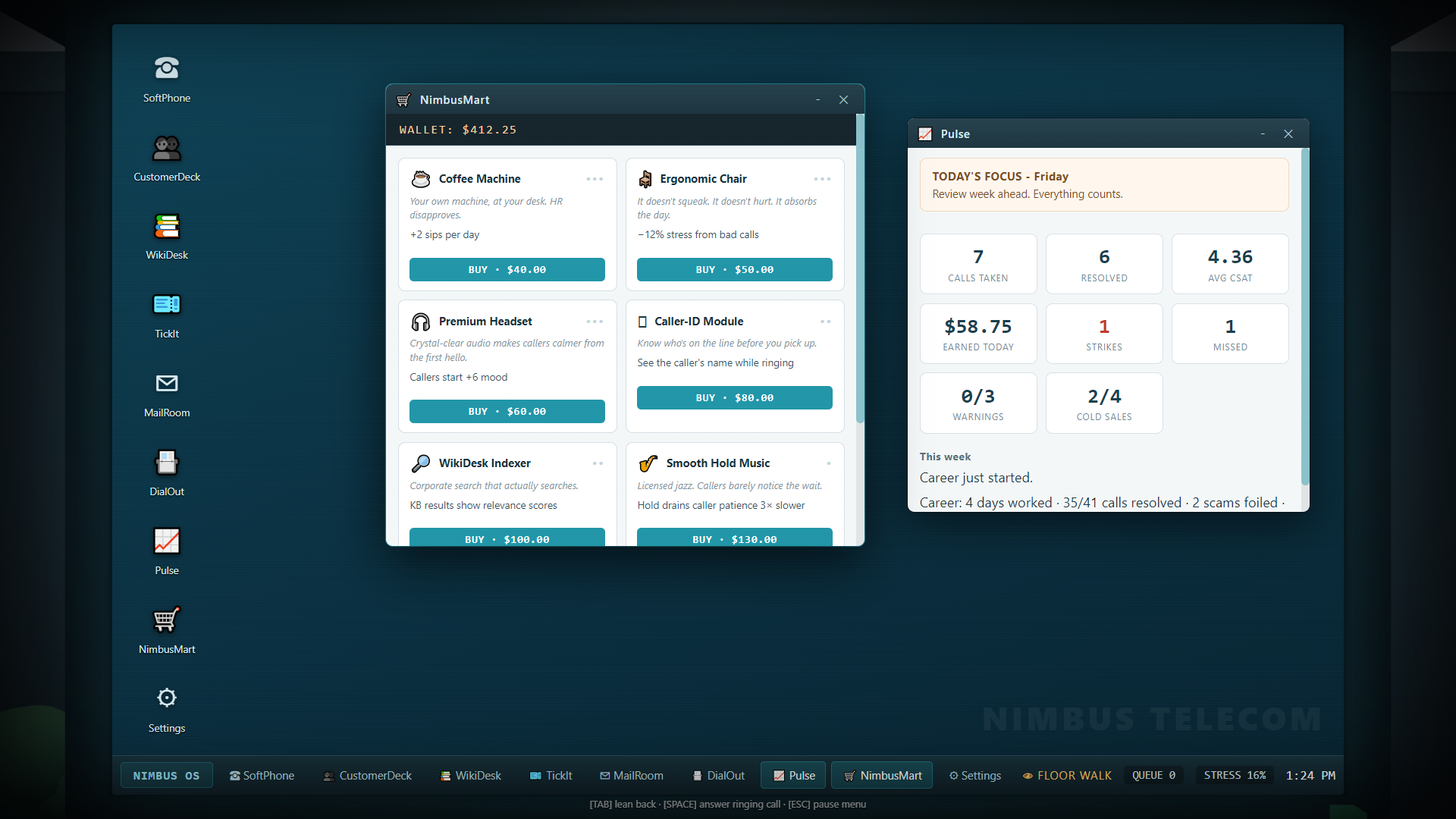
Open NimbusMart → GEAR. Purchase tiers sequentially. Costs below are the price of each next tier; benefits are the total at that tier, not cumulative additions from every earlier tier.
Compare workstation upgrades. Read an upgrade's benefit and next-tier price before clicking Buy. The wallet at the top uses fictional career money. Pulse alongside it can help you choose a purchase that addresses your actual weak point. Open full-size screenshot ↗
Equipment
Tier costs
Benefits
Coffee Machine
$40 / $90 / $170
+2 / +4 / +6 daily sips; tier III also improves brew to 18 stress relief
Ergonomic Chair
$50 / $120 / $220
Positive stress reduced 12% / 25% / 40%
Premium Headset
$60 / $140 / $240
New callers start with +6 / +12 / +18 mood
Caller-ID Module
$80 / $160
Caller name while ringing; tier II adds an issue hint
WikiDesk Indexer
$100 / $260
Relevance scores; tier II adds a live-call match badge
Smooth Hold Music
$130
Hold drains patience three times more slowly
Queue Discipline
$90
Twelve more ringing seconds before a miss
Union Rep
$320
The first compliance strike each day is waived
Union Rep stacks with the tier-III Compliance Certification waiver. A waiver prevents a counted strike; it does not establish identity, make a wrong action correct or repair a bad customer outcome. Use it as insurance while learning, not as your verification method.
Practical early investments are recovery capacity if stress is your bottleneck, a headset if callers start too unhappy, or queue discipline if you miss calls while managing the desktop. Purchase the tool that addresses your actual weak point shown in Pulse.
Desk items
NimbusMart → DESK offers permanent career desk purchases that appear in the office.
Item
Cost
Function
Second Monitor
$600
Widens the visible desktop viewport
Desk Lamp
$120
Warmer light and 6% softer positive stress increases
Fernando III
$90
A companion plant; watering counts once
Cubicle Rug
$150
Cosmetic floor decoration
Motivational Poster
$80
Cosmetic partition artwork
Engraved Nameplate
$200
Cosmetic desk nameplate
Desk Figurine
$110
Cosmetic ornament
Mug Warmer
$250
Adds three stress relief per sip
Installed items cannot be repeatedly bought for stacked benefits. The monitor's wider desktop is separate from the UI Scale setting. If text is small, adjust UI Scale rather than expecting the second monitor to enlarge the font.
Home and recurring bills
NimbusMart → HOME controls apartment improvements. Comfort benefits apply even if you started without Hard Mode rent enabled. With rent enabled, nicer homes also increase your weekly bill.
Home
Move-in cost
Comfort
Rent multiplier
The Current Flat
Starting home
Baseline
×1
One-Bed, Quieter Street
$900
Start eight stress lower
×1.35
Flat With A Balcony
$2,200
Start fifteen lower; one extra daily sip
×1.8
The Place You Actually Wanted
$5,000
Start twenty-two lower; two extra sips; recovery ×1.35
×2.4
The starting stress result remains bounded, so the highest home does not create negative stress. You can move only upward. Buy The Place Outright costs $8,000, ends rent permanently and clears rent arrears, whatever apartment tier you own.
Hard Mode rent and AV subscription are opt-in career conditions. Their bills are collected during each five-day review; they are not physical actions you must perform in an external payment app.
Rent's base bill is the smaller of $160 and ($60 + day × $2), multiplied by the apartment factor and rounded. AV costs the smaller of $30 and ($10 + day). If a bill was missed, the next collection multiplies that current bill by one plus the missed-payment count. A missed collection takes no partial payment; the owed pressure continues until you can cover it.
One missed rent collection creates a stress floor of 30 next shift; two or more create 40. Unpaid AV creates floors of 25 or 35 and intrusive subscription/adware reminders. When both floors apply, the larger floor governs. A successful later collection resets that bill's missed count. Read the notices and hold a reserve before buying another apartment or course.
VendX Pro
Open the desktop app or lean back and click the vending machine. Stock resets each day.
Item
Price
Daily stock
Effect
Burnt Coffee
$3
2
+2 sips and −5 stress
Stress Relief
$4
2
−15 stress
Energy Drink
$5
1
Accelerates the shift clock for 90 seconds
Sad Snack
$2
3
−5 stress
Antacid Tab
$3
2
−10 stress only when current stress is above 50
Mystery Item
$1
1
Random coffee, stress-relief or snack effect
The Good Stuff
$8
1
−25 stress, but −0.5 CSAT on each of the next two rated call outcomes
The Energy Drink is a pacing effect, not a guarantee of happier callers or more revenue. The Good Stuff trades immediate relief for later customer-rating damage. Buying an antacid while calm still spends money without the conditional relief.
Outbound sales and LeadMart
Outbound work unlocks from day 2. The free daily lead sheet grows from four leads toward eight and resets with the shift. LeadMart purchases add prospects to a persistent purchased lead book, so unused purchased leads remain available on future days.
LeadMart package
Cost
Prospects
Starter Sampler
$12
5
Verified Warm Leads
$45
6
Switcher Hot List
$80
6
Bulk Cold List
$30
16
Premium Prospect Dossier
$150
4
D.D. Mystery Bundle
$20
10
Warm lists bias toward receptive prospects; switcher lists target competitor subscribers. Read notes before choosing a pitch: a busy prospect is not approached in the same way as a lonely one. Ordinary sales, competitor conversions and existing-customer renewals have different commissions. A successful new-customer intake lets you select an actual Nimbus plan; converted customers can later appear in your career records.
Choose an outbound pitch. Read the prospect's response, then select an approach from the offered conversation options. The example's Scare pitch explicitly admits a made-up claim: read the option text rather than assuming every pitch is honest or suitable. Open full-size screenshot ↗
SoftPhone's second line is independent outbound activity. When inbound work takes priority, the prospect can be held, but a prospect left waiting for 90 seconds can hang up. Focus Mode buys a defined outbound window at the cost of an accumulated inbound queue. Handling calls explains the two-line controls.
Quick Dial also reaches Life of Pie, Curry In A Hurry and Nimbus IT Helpdesk. Pizza costs $9 and relieves 18 stress; curry costs $10 and relieves 20. Small talk is free and offers smaller relief. Reporting an issue to IT can pay a $6–$12 bounty and relieve six stress. Food conversations can occasionally add a prospect. Quick Dial targets have daily-use tracking, so these are not unlimited free-income buttons.
Misconduct and off-book income
Options marked as risky, including fabricated tickets, data exports, fake fees and unauthorized add-ons, use the grift system. Success can pay off the books; getting caught deducts a fine of at least $20, normally three times the attempted payout, adds one persistent misconduct warning and increases stress. Three warnings end the career.
Fabricating tickets starts at 8% detection risk and doubles with each attempt that shift, up to 60%. Rajeev nearby doubles exposure; Corporate Audit triples it; supervisors face higher exposure. Displayed base risk is affected by these circumstances. Successful fabricated paperwork does not resolve an actual waiting customer or increase your real resolution count.
The optional narrative behind this economy is covered in the spoiler sections of Cases, characters and events. You can build a long career through legitimate service, sales and bonuses without choosing the criminal options.
CHAPTER 08 / SYSTEMS
Cases, coworkers and office events
Nimbus remembers some of the work you leave behind. Customers can return, colleagues can cover for you, and tomorrow's inbox may contain a complaint about today's conversation. This chapter explains those connections. Optional story outcomes are folded below so you can learn the ordinary systems without reading the narrative endings.
TickIt: tickets versus open cases
A pending ticket is the classification task left by a concluded call. Log it under the right category in TickIt; it contributes to today's reporting and pay. An open case is unfinished business that follows an eligible career customer across days. Logging today's ticket does not automatically close a future case.
TickIt displays open cases above the logged history. Each entry identifies the customer, original scenario, reason, creation day and due day. Read this list at the start of a shift. A return arrives as an actual phone call, tied to the same customer's record and earlier issue; you do not close cases by clicking a checkbox in TickIt.
Case reason
Typical return
On-time closure bonus
Why it opened
Callback promised
1–2 days later
$6
A legitimate customer could not provide details and you scheduled a callback
Technician follow-up
2–3 days later
$9
A technician resolution sometimes needs follow-up
Tier 2 bounced it back
2 days later
$10
An escalation is sometimes returned to your line
Caller hung up
1–3 days later
$8
A persistent customer abandoned an unresolved call
Account locked out
2 days later
$12
A real customer was incorrectly treated as fraudulent
Technician follow-ups occur probabilistically, rather than after every technician dispatch. Tier 2 bounces are also probabilistic. A callback for an obvious security threat does not create an ordinary legitimate-customer follow-up.
Returning callers are less patient than first-time callers. Each overdue day subtracts four more starting mood, down to a bounded penalty, and reduces the case bonus by $2 until it reaches zero. On a return, the previous case is removed when that conversation ends. Successfully resolving it with at least 3 CSAT counts as a good closure and can earn the remaining bonus; a bad closure reduces morale. A new unresolved outcome may create fresh follow-up work.
Due cases also return during supervisor shifts. Promotion does not erase your earlier promises. Weekly reviews reward closing at least three cases and penalize leaving four or more open; see Career and progression.
Repeat customers and loyalty
Ordinary customer progress records contacts, resolutions, the latest result and loyalty. Good outcomes improve loyalty; bad outcomes reduce it. Low loyalty can make a customer return angry. These personal records differ from your office morale and coworkers' reputation.
Use CustomerDeck's record and intelligence/history information to understand repeat contacts. Existing-customer outbound renewals can improve loyalty, while pushy or fraudulent sales activity can worsen it. Records edited in Nimbus Directory persist in the active career and can affect future verification. Editing the stored details to match an untrusted caller is not a sound substitute for verification; follow Verification and diagnosis.
Complaints that arrive tomorrow
Bad calls can become later complaints. The game considers low CSAT, wrong proposals, dead air, false accusations and antagonizing the caller. Empathy, letting the caller vent, a legitimate goodwill action and a proper closing check can reduce complaint likelihood. They do not erase the underlying outcome or guarantee silence.
Read incoming MailRoom notices. Complaints affect your persistent complaint record and stress, so a call ending does not always mean its consequences are finished. Strong service reputation makes customers somewhat more forgiving. This is another reason to handle the person as well as the technical fault.
Read incoming office mail. Select a message on the left to read its contents on the right. This example is an HR notice; complaints, requests and shift instructions can appear in the same inbox. Reading a message with action buttons does not choose its response. Open full-size screenshot ↗
The floor's morale
Office morale ranges from 0 to 100 and starts at 50. It drifts two points toward the midpoint overnight. At the start of a career shift, morale below 30 gives new callers a −6 mood modifier; morale at least 70 gives +4. Good daily grades, caring for the office and helping colleagues can raise it. Neglect, rude behavior and some management decisions lower it.
High morale can also produce a small spontaneous perk: extra coffee, stress relief or a snack. This is a chance-based benefit, not a guaranteed item on every good-morale morning. Multiplayer and Night Shift do not run the ordinary persistent morale loop.
Marcus, Denise and Sofia
Each Pod 2 coworker has a separate 0–100 reputation toward you. From day 4 onward, a colleague may email asking you to cover two resolved calls. Doing so during that shift earns trust and morale plus the stated coffee or lookout benefit. Helping on a special working day can earn more reputation.
Meaningful reputation landmarks include:
Marcus at 25: he may quietly take up to two ordinary calls off your schedule before the shift gets underway.
Sofia at 50: she can keep Fernando Jr.'s watering streak alive when you miss a day.
Any coworker at 75: they can stop Chad's queue-poaching attempt.
You can also spend goodwill to transfer a ringing ordinary career call. The coworker who likes you most must have at least ten reputation; the transfer costs six reputation and is available twice per day. It clears that call without a miss penalty. It is a triage option before answering, not a way to move an active conversation.
An unanswered Tier 2 transfer is a separate once-daily option: it deducts a $4 routing fee, reduces stress and clears the ringing call. These career triage options are unavailable in ordinary multiplayer and Night Shift. Multiplayer's Team Coverage system has different rules, described in Multiplayer.
Caring for the physical office
Lean back, look at a hotspot and click it:
Fernando Jr.: water once per day. At a three-day streak he aids passive calm; at five he flowers. Watering raises morale and Sofia's reputation. Skipping a day can wilt him and break the streak unless Sofia helps.
Gerald: feed the pigeon when he is available. Doing so relieves eight stress and improves morale.
The Hungry One: the printer gives warning before a jam. Clearing it early avoids the failure and helps morale. Fixing an actual jam pays $2 and also helps morale.
Pin board: read the sticky notes and expandable newspaper clippings for practical hints and office lore.
Coffee and vending: use the mug, breakroom machine and VendX Pro for recovery; the phone still matters while you are away from the screen.
Ambient paper planes and background antics are office activity, not an undisclosed playable aiming game. There is no requirement to click every animation. Money, stress and home covers the mechanical desk and recovery benefits.
Find Gerald at the window. Lean back and look toward the windowsill. When Gerald is available, inspect and click him to use the feeding interaction described above. Open full-size screenshot ↗
Working conditions and interruptions
Career modifiers are announced ahead of their shift and are not selected as Night Shift memos. Check their instructions before acting:
Special day
Effect
Corporate Audit
Clean resolution pay ×1.5; grift risk ×3
VIP Day
The queue routes VIP customers with their associated pay and expectations
Rolling Outage
Callers start less happy; pay ×1.6; intermittent outages
Double Shift
Twice the configured calls, pay ×1.5, no break
Baseline special-day eligibility begins with VIP Day from day 6, Audit and Rolling Outage from day 8, and Double Shift from day 9. They are occasional conditions, not a fixed weekly rotation, and are not rolled on consecutive days.
An ordinary system outage pauses queue delivery while CustomerDeck is unavailable. A fire drill pauses the queue and provides temporary relief. A call storm adds three to five callers at shorter spacing; surviving its bonus window without a new miss can pay $25. A cascade failure is deliberately different from a paused outage: CustomerDeck, WikiDesk and TickIt fail in sequence while calls continue arriving. Watch the actual notice rather than assuming every IT incident pauses the phone.
Chad and Pod 4
Pulse compares your completed-day performance with Chad's, and each five-day review compares averages. A strict win pays an extra $40; a tie is not a win. The day-15 showdown doubles the leaderboard prize to $80. Wins and losses are tracked in your career. Repeated wins make his rivalry more personal, and strong coworker trust can protect your queue from his attempts to poach it. Winning five reviews earns a change in his response to you.
This rivalry uses completed-day scores. Selling more leads does not directly override a poor daily service grade in the comparison.
Story spoilers: D.D., leverage and Compliance endings
D.D.'s arrangement
Data exports and other off-book activity can produce an envelope under your desk the next morning. Collecting it is a physical office interaction. Payments change as D.D.'s arrangement develops. From day 6, enough dirty income can unlock bulk exports; a later associated caller tests whether you approve or report suspicious activity. Helping the arrangement can open a limited wire-transfer opportunity.
These options remain grifts with fines and warnings. Later in the arrangement, involvement in multiple transfers plus an existing warning can lead to betrayal and a career ending. Other paths conclude with D.D. going dark. Accepting a supervisor promotion ends an active early arrangement and removes its envelope. Supervisory paperwork still has its own risky options, but that does not mean the earlier deal continues unchanged.
What you overhear
A misdial can let you listen to compromising information. After hearing enough, a later email offers a one-time decision: keep it as insurance, sell it or report it. Keeping the information creates a single-use opportunity to remove a misconduct warning once one exists. Selling pays $120 off the books and can increase D.D.'s interest. Reporting can lead toward Compliance cooperation. Correcting the misdial instead does not reveal that same leverage.
Whistleblower path
Flagging an associated suspicious caller, reporting leverage or qualifying for a later clean-career contact can offer cooperation. Accepting starts a five-day investigation sequence with daily mail. Completing the sequence leads to a restructuring ending with $500 severance and its career milestone. It is an authored career ending, so do not choose it expecting permanent immunity and an otherwise endless unchanged job.
Special-caller spoilers: unusual lines and surreal events
Calls with their own resolution
Pranks, wrong numbers, an anonymous informant and unusual recurring callers are not ordinary account faults. Use their specific conversation options rather than forcing every call through a router reset.
The anonymous caller can be heard out or appropriately directed; they do not become a verified customer merely because you opened CustomerDeck. The Regular returns across up to five career encounters, with at least three days between eligible visits. Reassurance is his helpful path; dismissing him gives a different result. He is a recurring nuisance and is not removed by switching off surreal office events.
Glitch is deliberately subtitle-led and unvoiced. Hanging up through its specific option is the intended resolution. The 3:33 event temporarily stops the displayed clock, alters the audio atmosphere and introduces a silent call. Its own wrap-up options resolve it and restore the event. Missing spoken audio for these two authored scenarios is not proof that the voice installation failed.
Surreal office events
The optional dread layer begins later in the career and increases with off-book involvement; Night Shift uses wave depth instead. Flickers, strange printed pages, phantom ringing and Invoice's behavior can occur. The phantom ring only appears when the line is actually quiet. Check SoftPhone's real state before interpreting it as a missed call.
Ordinary faults, bills, security threats and The Regular have their own systems. The stock pause menu does not currently expose a separate switch for this surreal layer; camera sway and scanlines can be adjusted independently in Video settings.
Achievements and hidden milestones
Open Trophies for earned and available milestones. Secret entries remain hidden until earned. Career, Night Shift and multiplayer have different achievement scopes; scratch playtests and community experiences do not farm ordinary career awards. Community packs can add local trophies with their own criteria. Steam integration is separate from your in-game viewer, so use the troubleshooting chapter if the client or account is offline.
CHAPTER 09 / SYSTEMS
Night Shift
Night Shift is an endless survival run through the office after dark. Each “hour” is a complete wave of calls, followed by a choice of a memo that stays with you for the rest of the night. Your career's wallet, equipment and save slots are separate from this run.
Clocking in
Open NIGHT SHIFT from the title screen.
Review your Overtime Tokens, best hours, best total score and permanent unlocks.
Buy an unlock if you have enough tokens; ownership applies to future stock runs.
Choose CLOCK IN to start hour 1.
Work calls using the ordinary desktop tools and log their tickets.
After completing the hour, read its summary and choose one of the offered memos.
Clock in for Night Shift. Check your tokens and owned unlocks, then use Clock In to begin. This fresh record has no tokens, so its unlocks are still locked. A career's wallet and equipment do not carry into this run. Open full-size screenshot ↗
Minimum scheduling gap: 10 − N seconds, with a four-second minimum.
Handling-time target: 120 − 6N seconds, with a 70-second minimum.
Detail errors: enabled from hour 2.
Hour 1 therefore starts with seven calls, a nine-second minimum gap and a 114-second handling target. Later hours have a wider eligible caller pool because the hour also acts as the content's day gate. From hour 2, security threats and other special callers can be inserted. Surreal calls become more likely deeper into the night and with certain memos.
The displayed “hour” is a wave label, not a requirement to play a full real-world hour. Completing the queue advances you to the boundary screen.
What resets and what carries
Stress carries between hours. Reaching the memo screen does not restore you to a comfortable opening stress. This is the central attrition pressure: a barely survived wave can leave the next one dangerous before the phone even rings.
Wave-specific metrics, coffee allotment and daily stock are refreshed through the new-wave flow. The run's wallet and purchased run equipment remain in that run, while held memo effects continue stacking. Career certifications, apartments, desk cosmetics and coworkers' persistent favors are not imported as advantages from your career.
The normal daily scoring formula still applies: CSAT contributes 60 points, resolutions contribute 40, and counted strikes, misses and unlogged tickets subtract points. Each finished hour adds its score to the run total and updates the best hour grade. See the exact formula in Career, scores and progression.
Memos: choose one, keep it
At an hour boundary, the game offers up to three distinct memos you do not already hold. Pick one. Every held memo remains active for the night; you cannot exchange an earlier choice at the next boundary. If no memos remain available, use NEXT HOUR to continue.
Read a memo before continuing. Review the hour summary, then read every offered effect before selecting one. These are example offers; your next choices may differ. The chosen effect stays with you for the rest of the night. Open full-size screenshot ↗
Memo
Lasting effect
Mandatory Overtime
Pay ×1.4
Decaf Day
Coffee sip relief becomes zero
Full Moon
Every caller starts irate
Corporate Audit
Each strike counts double; clean resolution pay ×3
Haunted Switchboard
More surreal calls
Skeleton Crew
Break and Focus Mode unavailable
Lucky Penny
Pay ×1.15
Double-Glazed Windows
Positive stress ×0.75
Platinum Overflow
All callers VIP
Cold Snap
New caller mood −10
Switchboard Rush
Scheduling gaps ×0.75
White Noise Machine
Positive stress ×0.85; coffee half as effective
Multipliers combine. Mandatory Overtime plus Lucky Penny gives pay ×1.61. White Noise plus Double-Glazed Windows makes positive stress ×0.6375 before other equipment effects. Decaf still gives zero coffee relief when paired with White Noise: halving zero does not restore it.
Corporate Audit is particularly risky. Two unwaived compliance mistakes can reach four counted strikes under its double-strike effect. Buy recovery and protection before a dangerous next hour, and do not choose a high-pay modifier expecting money itself to prevent a blackout.
Ending a run
Two direct survival hazards dominate:
100 stress: you black out and the run ends immediately. Career's survivable burnout rule does not apply.
Four counted compliance strikes within the hour: security ends the run. Strike waivers can prevent counted strikes, but the remaining mistakes still matter.
Misconduct warnings can also lead to security removing you. Ordinary career weekly progression and the two-consecutive-F career check are not the Night Shift advancement rule. A weak hour can still lead to another hour if you have not hit a run-ending condition.
The end screen shows hours survived, handled calls, best hour grade, total score and earned tokens. Only completed hours contribute to the recorded wave count. A partly played failed hour does not become a completed hour just because its last caller was answered.
Overtime Tokens and permanent unlocks
When a stock run ends normally through its run-over flow, tokens are calculated as:
For example, three completed hours scoring 70, 80 and 60 give total score 210, so the run banks 13 tokens: nine for the hours and four for score.
Tokens, lifetime tokens, best hours, best score, run count and owned unlocks form a separate persistent local Night Shift record. Spending tokens reduces the current balance, not lifetime tokens already earned.
Advertised extra strike forgiveness; see the current limitation below
Current limitation: Second Chance's extra waiver is overwritten during wave initialization in the current build, so it does not reliably grant the advertised protection. Do not rely on it to survive a fourth counted strike. Union Rep equipment uses the ordinary waiver system; pay attention to waiver notices and the actual strike meter.
Saving, quitting and community presets
Stock Night Shift has no mid-run save or resume. Quitting abandons the current night; it does not automatically bank an unfinished run's tokens. Use the run-over CLOCK OUT when the game has actually recorded the end. None of the run's spending or failures overwrites a career slot.
Its persistent meta record is local application data, distinct from the cloud-mirrored career slot files. For backup boundaries, see Saves and troubleshooting.
Community packs can supply finite Night Shift presets, custom waves and custom memos. Their descriptions and finish conditions take precedence over the stock endless configuration. They use separate local community records and do not award stock Overtime Tokens or feed stock career progression. A creator scratch playtest also avoids persistent rewards. Read Community challenges, Night Shift and multiplayer before expecting a custom preset to behave exactly like the stock mode.
A practical survival plan
Enter an hour with recovery available, finish identity checks before using protected actions, and classify tickets while there is breathing room. Use hold correctly instead of leaving a caller in dead air while searching. Plan memo choices around your current resources: disabled breaks plus decaf remove two recovery tools, even if either individual choice once looked manageable. Monitor stress before the red zone, since your next increase may end the run before you can buy relief.
CHAPTER 10 / SYSTEMS
Multiplayer shifts
Multiplayer puts two to six agents on the floor for a one-shot shift. Each player operates their own desktop and caller stream. Depending on the host's mode, you compete for the top service score, route calls to cover teammates, sabotage rival desks or combine those rules.
These are separate sessions: multiplayer spending, dismissals and scores do not overwrite career slots. Stock and private modded lobbies have different content requirements.
Before hosting or joining
Use the current game build on each PC and leave Steam running with the game available on each account. Two people need different Steam accounts; Steam cannot seat the same account twice in the same lobby. A second launch under the host account is not a second player.
The lobby page uses your Steam identity and lets you choose a display name. Multiplayer unavailable or a Steam-not-running message means the game has not established the Steam transport. Start Steam, then relaunch the game through its library.
Host a stock shift
Open multiplayer from the title screen and choose HOST.
Choose SHIFT RACE, CO-OP or FREE FOR ALL.
Set the rules offered by that mode before creating the lobby.
Share the lobby's COPY code or use STEAM INVITE.
Wait until the roster lists the other players.
Each player, including the host, presses READY.
With at least two players and everyone ready, the host presses START SHIFT.
The named mode and its rules are locked when the host creates the lobby. Guests see them in the mode banner. To choose a different stock preset, return to the host flow and create the intended lobby.
Choose a multiplayer mode. Set the rules in the mode's panel, then use its Host button to create the lobby. This is the mode selection screen; after hosting, check the roster and wait for everyone to be ready before starting. Open full-size screenshot ↗
Join a shift
Choose JOIN BY CODE, enter the code and join. Codes are case-insensitive and tolerate ordinary separators; the numeric Steam lobby ID is also accepted. A Steam invite or Join Game action can open the appropriate lobby directly.
Confirm the roster and mode banner, then press READY. If only one person appears, verify that the second PC is signed into a different account. If the host has left or closed the lobby, request a new code from a current lobby rather than retrying a stale one indefinitely.
Three stock modes
Mode
Scoring
Routing
Dirty Tricks
Shift Race
Individual ranking
Off
Host can enable or disable
Co-Op
Team average
On
Off
Free For All
Host selects individual or team
Host selects
Host selects
Free For All intentionally allows combinations such as team scoring with sabotage. Read its banner rather than assuming it behaves like curated Co-Op. The host's rules apply to everyone.
Stock matches start at the first shift's difficulty day. Player-specific identities are mixed into the match seed, so agents get different deterministic caller streams. You are competing under shared mode rules, not answering one identical replicated conversation together.
Scores and results
The live board shows rank, resolved calls, CSAT and money. Rank is driven by service score, not who earns the most cash or finishes first. The final score follows the ordinary daily formula:
The live display does not include the final abandoned-ticket penalty by default. Finish logging before you finish the shift to avoid a surprise drop on the results screen. Daily letter-grade thresholds are S 92, A 82, B 70, C 55, D 40 and F below 40.
In Co-Op or Free For All with TEAM SHIFT on, the team score is the average of non-DNF result scores. 55 or above passes the team shift. Individual rows remain visible so you can see where the team lost points. A player removed from the floor is marked DNF and ranked after finishers.
After finishing locally, wait for the others' results. The host aggregates the result board and has a bounded fallback for unfinished peers. A guest disconnect can be recorded as DNF while other players continue. If the host leaves, the match is aborted because the host owns that aggregation; there is no advertised mid-match host migration or reconnect resume.
Opening your pause/options menu is not a shared pause request for every participant. Other agents and the network session can continue; coordinate a settings break before the host starts the shift.
Team Coverage: routing a caller
Routing is available only when the host's TEAM COVERAGE rule is on. It moves a ringing ordinary call, before you answer it, to a teammate still participating in the shift. Special callers cannot be routed. You cannot route an already active conversation or send it to yourself.
Use the teammate-routing controls in SoftPhone. The sender's line clears without a miss or fee, while the receiver gets an equivalent call and another scheduled task. Only the scenario requirement is shared; this is a recreated local conversation, not a live audio transfer with shared CustomerDeck state.
When the receiver resolves that routed call with at least 4 CSAT, both receiver and sender can receive an $8 team bonus. Coordinate in chat: sending every caller to someone already overwhelmed does not automatically improve your collective score.
Career coworker-favor transfers and the career Tier 2 fee are separate mechanics. They are unavailable in this mode.
Dirty Tricks
With sabotage enabled, you begin with one charge. Every three resolutions earn another charge, to a maximum of three. Sending a trick consumes one charge and starts a 30-second cooldown. You cannot target yourself, a player who has finished or a player marked DNF.
Click a rival's sabotage button on the board and select a trick:
Trick
Victim effect
Decaf Swap
Coffee sip relief is zero for two minutes
Courtesy Transfer
An additional ordinary caller joins their queue
Scheduled Maintenance
CustomerDeck unavailable for 20 seconds
Karen Protocol
Their next eligible caller arrives furious
Fish Bomb
Immediate stress increase and the fish-office effect
Earworm
Hold music altered for one minute
Hits are publicly attributed in system chat. Maintenance is temporary; verify that the app has recovered rather than attempting to fix it by changing your save. Courtesy Transfer also raises the victim's scheduled workload, so it affects the denominator they must complete.
The charge bar shows available charges and cooldown. If nothing sends, check charge count, cooldown, target eligibility and the host's rule. A hidden sabotage bar in Co-Op is expected behavior.
Text chat
Lobby chat is available before the shift; an overlay continues during play. Press Enter to focus its input, type a message and submit. Escape cancels/blurs a chat input rather than treating its typed keys as game actions. Individual messages are limited to 240 characters, and the widget retains a bounded recent history. The game provides text chat; use your own preferred voice-chat service if you want spoken coordination.
Private modded Co-Op
The host can select a mod profile in the private modded host card. It creates private Co-Op with team scoring and routing, and requires at least one eligible pack. The host's selected content must declare multiplayer support and pass validation.
Before anyone becomes ready, the game agrees on a frozen content snapshot: ordered packs, their versions and gameplay hashes. This includes the declared dependency/conflict contract, not just matching a pack's display title. Every guest must verify equivalent gameplay content against the host's requirements.
The lobby displays requirements and match/mismatch status. For missing Workshop content, use the explicit download/subscribe action, wait for installation and recheck. For a local-only pack, obtain the exported ZIP from the host and import it through Workshop Hub; automatic Workshop downloading cannot discover an unpublished ZIP.
Matching local and Workshop copies can satisfy the same requirements if their identities, versions and gameplay contents match. A coincidentally similar call title or folder name is insufficient. The exact game version must also match.
Once accepted, each peer freezes its sources before Ready. If the host refreshes the content requirements, readiness is cleared and everyone must agree again. A Workshop update arriving between Ready and match start does not silently change the frozen agreed content.
Presentation-only packs can remain local to each client where supported: voices, UI dictionaries and office colors do not need to force the same personal presentation for everyone. A pack that also changes gameplay must still participate in agreement. Custom gameplay does not award ordinary stock progression or Steam trophies in the private modded match.
If a roster or Ready state stalls, first check build versions, the live Steam account, lobby code and content panel. The lobby's diagnostic line shows member/roster counts, transmitted/received packet counts and recent failure information. Record that information when reporting a reproducible issue.
Do not assume a successful local mock test proves that a particular two-account internet session or Workshop download has completed. Steam account entitlement, live client state and installed content all participate. If a session aborts, the career save remains separate; start a fresh lobby rather than trying to load a multiplayer match from a career slot.
CHAPTER 11 / SUPPORT
Saves, settings and troubleshooting
This chapter covers the current desktop game's persistence and options. Career saves, community campaign saves, Night Shift records and multiplayer sessions have different lifetimes. Check the mode before relying on a Save button or assuming another PC has all your content.
The three save slots
The title screen's NEW GAME and LOAD GAME flows offer three slots. A slot displays its day, wallet and timestamp. Starting in an occupied slot requires the overwrite flow; deleting a save requires the delete confirmation. An empty slot can hold a new career or an eligible community campaign.
Use LOAD GAME to resume the intended slot. Do not start a new career in a slot merely because you wanted to continue yesterday's game. The slots are independent wallets and histories, but settings and some global records are shared within this installation's player data.
Ordinary careers autosave every three minutes while active, and progression/purchases also save through their own game actions. You can open Escape → Save Game → SAVE NOW for a manual save. Returning to the title menu or quitting through the game's confirmed controls invokes a save for eligible sessions. A crash or forced process termination does not guarantee that the most recent actions reached disk.
What an ordinary career save contains
Saved data includes your day, world seed, wallet, gear, certification tiers and pending training, apartment, desk items, weekly history, lifetime metrics, misconduct warnings, open cases, persistent customer progress and record edits, purchased leads, story decisions, coworker trust, morale and supervisor progress. It can also capture mid-shift metrics, stress, coffee stock, used recovery actions, inbox and remaining scheduled workload.
An active stock conversation is not a resumable recording of every dialogue turn. Reloading an ordinary mid-shift save restores career/shift progress and rebuilds the remaining work; it does not promise to reopen the exact spoken line, held prospect or diagnostic screen you were using. Finish and log a call before saving when you need a clean stopping point.
Community campaigns have additional authored story state and saved conversation choices. Their exact pack snapshot matters; see the mod compatibility section below. A campaign's own description can define progression that differs from an endless stock career.
What does not occupy a career slot
Session or record
Persistence
Stock Night Shift run
Cannot be saved or resumed midway
Night Shift tokens, unlocks and bests
Separate local meta record, banked at a proper run end
Ordinary multiplayer shift
One-shot session; no save/resume
Community challenge or custom Night Shift
Separate local experience records rather than career-slot progression
Creator scratch playtest
No persistent saves or ordinary awards
Prestige and achievement viewer
Separate local records, with eligible Steam award integration
Audio/video/keybindings/language preferences
Separate persistent settings shared by the local installation
Quitting a Night Shift forfeits the active night's unbanked tokens. Quitting multiplayer drops you out rather than creating a match save. Neither action overwrites an ordinary career slot.
Local files, backup and Steam Cloud
On Windows, the default local player folder is:
text
%APPDATA%\on-hold-call-center-simulator\
Press Windows + R, enter that path and open it. The saves directory contains save-1.json, save-2.json, save-3.json and manifest.json. Your folder may also contain local mods, frozen mod-snapshots, logs and Electron's settings/local-storage files. Development or test launches can use a different isolated data directory.
Local save writes use a temporary file and replacement. A valid previous save is kept as a .bak backup. If the current JSON is invalid, the loader can recover the valid backup. This is a last-valid-copy safeguard, not an unlimited version history or an undo button for a deliberate deletion. Deletions are recorded and propagated so an older machine should not resurrect a deleted career.
For a manual backup, close the game, copy the entire player folder to a dated backup location, and retain the mod sources and snapshot cache if you play campaigns. Copying only the saves directory backs up slot files but omits local settings, prestige, Night Shift meta and the content those saves may require. Do not edit or restore files while the game is actively writing them.
When Steam Cloud is enabled for both the game and account and available through the client, slot JSON and the manifest are mirrored to Cloud. The load/new-game screen reports Steam Cloud on or saving locally only. Offline play still uses local saves.
Cloud synchronization compares per-slot timestamps and reconciles the slot index. It does not merge two different playthroughs of the same slot into one combined career. Avoid progressing the same slot simultaneously on two PCs; finish the session and allow Steam to synchronize before opening it elsewhere.
Cloud career saves are not a promise that every local installation file travels with them. Local mod folders, cached snapshots, preferences, prestige and Night Shift meta are separate. Install the matching content on another PC and keep a manual backup if those local records matter to you. Steam Cloud availability also does not prove a particular cross-device round trip has finished.
Mod profiles and saved campaigns
The game records an ordered content snapshot with eligible saves. Pack identity, version and content hashes let the loader identify the content that created that game. It can use a previously frozen local snapshot when a Workshop item has been updated or unsubscribed.
An ordinary career with optional missing content may continue with warnings and dormant pack-owned state. A campaign whose required story pack is missing or incompatible must not be treated as a stock career; its exact required content needs to be found before continuation. Read the compatibility message rather than deleting the slot as your first remedy.
A frozen cache is local. A newly installed PC cannot use a snapshot that only exists on the old machine simply because the save slot came through Cloud. Reinstall the correct Workshop version where available, import the author's matching ZIP or copy your legitimate saved content backup. The loader checks actual data, so changing a manifest version label alone does not recreate the old pack.
See Installing mods and profiles for activation, ordering, dependencies and restoring the intended profile. Keep creator project backups and publication copies so old campaigns remain recoverable.
Audio and language
Open OPTIONS from the title or press Escape in a session. Audio has independent sliders for master volume, sound effects, UI sounds, office ambience and hold music. The voice section offers Voice acting, Dialogue volume and your agent's Female/Male voice selection. Caller actors are assigned by the game rather than that agent setting.
Subtitles/transcripts remain available when voice acting is disabled. A missing or failed recording falls back to timed dialogue so a call can still proceed. Some special scenarios are deliberately unvoiced; see the folded special-caller section.
Language exposes three independent preferences:
Preference
Changes
Interface
Menus, desktop chrome and other UI text
Subtitles
In-call dialogue/transcript text
Audio
Spoken voice-pack language
Stock choices are English, Chinese, French, Hindi, Spanish and German. You can combine them, for example an English interface with German subtitles and French speech. Community language packs can add supported choices after discovery/activation. Missing community dictionary entries fall back to English; missing voice overrides can fall back to the stock recording or timed text.
Set the three languages separately. Interface changes the menus, Subtitles changes the dialogue text, and Voice Audio changes the spoken language. Select each preference independently; they do not have to match. Open full-size screenshot ↗
Video, readability and motion
Video offers Windowed and Fullscreen Borderless. Borderless fills the display at its native resolution. Window size is selectable in Windowed mode, with presets from 1280×720 through 3840×2160, including ultrawide. A greyed window-size control in Borderless is expected.
UI Scale is separate from 3D rendering and includes Auto, 100%, 125%, 150%, 175% and 200%. Raise it when menus or HUD text are too small. Very high scaling on a small display can reduce the space available for panels; choose a value that keeps controls reachable.
Graphics controls include render scale from 50% to 150%, field of view from 45° to 75°, antialiasing, shadows, camera sway and CRT scanlines. Reduce render scale and disable shadows to lower rendering load. Turn off camera sway for a steadier viewpoint, and disable scanlines if they make the desktop harder to read. Changing FOV affects the view rather than automatically enlarging UI text.
The game uses visible transcripts, keyboard actions and configurable scale, but the current interface does not advertise a dedicated screen-reader mode or a global removal of every flashing/surreal event. Avoid assuming unsupported accessibility controls exist merely because a preference exists internally.
Keybindings
Under Keybinds, click the action's key and press the replacement. Escape cancels rebinding and remains the fixed pause/menu key. Assigning a key already used by another configurable action clears that old assignment; check all four controls afterward. RESET TO DEFAULTS restores lean, answer, hold and coffee to Tab, Space, H and C.
Typing in a search field, form or chat input takes precedence over ordinary game shortcuts. Leave the text input before assuming an answer key is broken. Desktop interaction and hold timing are detailed in Controls and desktop.
Troubleshooting reference
Symptom
First checks
Phone is ringing but answer key does nothing
Leave the focused text/chat field; check the binding; confirm a real ringing call in SoftPhone
No callers arrive during training
Read the tutorial and complete its requested action; onboarding intentionally owns the first queue
No callers after the final outcome
Check TickIt for pending logs and the CLOCK OUT wrap-up control
Voice is silent
Check Voice acting, Dialogue and Master volume; check selected audio locale; distinguish authored silent calls from missing ordinary recordings
Menus are too small
Raise UI Scale; borderless resolution and render scale are different controls
Performance is poor
Reduce render scale, disable shadows, lower window size where applicable and close heavy background applications
CustomerDeck is unavailable
Read the IT/sabotage notice; temporary outages, maintenance and cascades have different durations and queue behavior
Stress will not fall below a number
Check unpaid-bill pressure, career burnout and active modifiers imposing a stress floor
A callback did not resolve the issue
It is follow-up work; check TickIt's Open cases and prepare for the return
Save appears missing
Verify the player folder, intended slot and account; check Cloud/local status and mod compatibility before creating over that slot
Save action unavailable
Night Shift, multiplayer, challenges and scratch playtests may intentionally have no career save
Second Chance did not forgive a Night Shift strike
Known current issue: wave initialization overwrites its extra waiver; rely on the counted-strike meter, not the unlock description
Mod disappeared or refuses activation
Check profile, source, validation, dependencies, conflicts, game version and required mode
Multiplayer never reaches two ready agents
Use different Steam accounts, compatible builds and a current lobby; satisfy the mod content panel first
Workshop download/upload fails
Check Steam is running, account access, item state and the reported agreement/download error; retry through the explicit UI action
If ordinary recordings are consistently missing, verify the installed game files through Steam before changing or deleting saves. A mod's optional voice coverage can be incomplete without disabling the whole stock voice pack.
Reporting a reproducible problem
Record the game version, Windows/platform details, mode, save slot/day or Night Shift hour, what you clicked, what you expected and what happened. For modded sessions, include profile order, pack IDs/versions and the validation or content-match message. For multiplayer, include whether host or guest, mode/rules and the lobby's packet/roster diagnostic line.
A rotated previous log can be named onhold.old.log. Keep a copy soon after the problem so later play does not replace the useful context. Include a screenshot or short reproduction sequence; share files only through the game's actual support channel and omit personal information you do not want public. Preserve your backup before attempting file-level recovery.
CHAPTER 12 / CREATE
Installing mods, profiles and saved games
On Hold supports community content through Steam Workshop and portable ZIP packs. Mods can add calls, knowledge articles, CRM actions, lead packs, mail, languages, recordings, office appearances, challenges, Night Shift runs and standalone campaigns. They contain bounded data and assets. A mod does not install a script into the game.
This chapter is the player guide to using that content. To make your own pack, continue to Your first mod. Creators should also read this chapter: source selection, compatibility and save requirements affect everyone who installs a published pack.
The Workshop hub
Open Workshop from the title menu or the corresponding Workshop entry in Settings/Options. The hub separates browsing, installed content and creation:
Browse discovers Steam Workshop items. Search by name or description, choose popular or new sorting, and filter by content, supported mode or language.
Installed shows local packs and installed Workshop content, download status, validation problems and profiles.
Create opens Mod Studio for editable local packs. A subscription is read-only; clone it if you want to author a separate version.
The content filters are Calls, Stories, Challenges, Night Shift, Office, Audio and Translations. Mode tags identify career, nightshift, challenge, campaign or multiplayer. Language tags use a locale such as language:de. Tags help discovery; the actual manifest and validator decide compatibility. An item having a Multiplayer tag does not override missing multiplayer support in its manifest.
Steam browsing, subscriptions and publication require an available Steam connection. Local ZIP import, export, validation and authoring can work without Steam. If Steam is unavailable, use Installed/Create and the offline workflow rather than repeatedly retrying a network operation.
Install a Workshop pack
Read the description, required game version, dependencies, supported modes and any instructions from its creator. A call expansion and a standalone campaign may be launched differently.
Subscribe to the item. Wait for its download to complete; a subscription is a request for installation, not proof that every file is already available.
Open Installed. Refresh/recheck if the item is still shown as downloading.
Select or create the profile that should use it.
Enable the pack in that profile, choose its source if there are multiple copies, and inspect reported errors or dependency warnings.
Return to the title menu and start a new session in the intended mode. Profile changes take effect when a session starts.
After migration of an existing library, newly discovered packs start disabled in profiles. This is deliberate: subscribing to new content should not silently change an established career. Enable the desired item explicitly. The initial migration preserves existing enable/disable preferences.
For a challenge or standalone campaign, open Community Experiences on the title screen after enabling its pack. The catalog displays its authored title, description and preview information. A call expansion instead joins compatible call pools; an office pack changes the scene when its profile is activated.
Install a ZIP pack
Use the in-game Import ZIP action, select the author's archive, then check Installed. A portable pack puts mod.json directly at the archive root. content.json, achievements.json, voice/ and art/ accompany it as needed. An extra wrapper directory such as my-pack/mod.json is not the expected portable format; ask the creator for an export from Studio if an archive fails.
Import validates the archive and content before accepting it. It rejects unsupported entries, duplicate names, unsafe paths, links and malformed/oversized files. An archive needing an external executable or a manual DLL replacement is outside this mod system. Use the normal importer instead of copying files into the game's installed application.
A local pack and a Workshop pack can share the same mod ID. That is useful for development or an archived version, but Installed may show several copies. Select the intended copy in the profile. Do not assume that the newest displayed name is the copy the session will use.
Profiles: keep each playthrough predictable
A profile stores enabled pack IDs, load order and source choices. Examples are Career additions, Mira campaign, Friday co-op, and Office only. The Default profile always exists. Create additional named profiles for different playthroughs or groups, switch the active profile before starting, and use the order controls where packs overlap.
Each mod ID identifies one pack family. Several installed copies of that ID represent alternative sources or versions; only one is selected for the profile. Source choices identify the specific local authoring/import folder or Workshop item. If that source disappears, choose another valid copy instead of expecting the loader to substitute an arbitrary version.
Dependencies load before the content that needs them. Remaining profile order determines replacement precedence for shared presentation entries and stock-day overrides. Later content can replace the same UI translation, recording override or office surface defined earlier. Normal added calls and knowledge articles are namespaced, so unrelated packs do not overwrite each other merely because both have a local ID called ROUTER_HELP.
The loader may add an installed dependency needed by an enabled pack and show a warning. It does not invent a missing dependency or bypass a required version. A cycle, declared conflict, unsupported mode, incompatible API or unresolved reference prevents that selection from activating. Resolve the error in Installed: install the dependency, choose a compatible copy, or disable one conflicting pack.
Activation is transactional. The game validates and prepares the chosen set before replacing the live registries. A failed selection is not intended to leave half of a new profile active. If the hub reports an error, correct it before launching; do not treat partial-looking UI changes as a successful activation.
Compatibility in plain language
There are three different versions:
Version
What it describes
Game version
The installed On Hold release. A pack can require a particular release or comparison range.
Content API
The data contract understood by the loader. This manual describes API 1.0.0 and manifest format 2.
Pack version
The creator's own release number, such as 1.2.0. It distinguishes revisions of that mod family.
A pack also declares supported modes. Multiplayer is explicit opt-in; it is not implied by ordinary career compatibility. A campaign pack may be usable in the campaign catalog while being unsuitable for a normal career or co-op lobby. Validation explains the mismatch rather than attempting to execute it in the wrong mode.
When reporting an issue, give all three versions if available, the profile and selected source. A pack version alone cannot identify its contents because an author might have edited files without changing that number. Saves and modded lobbies therefore check content hashes too.
Frozen session content
Before a session uses a selected pack, the game prepares a frozen local copy of its content. The session uses that copy rather than following a changing Workshop folder. A Workshop download, local edit or unsubscribe during play should not change the calls or files already agreed for that run.
A saved game records ordered pack identities, versions and full content hashes. Historical frozen copies live in the game's user-data mod-snapshots folder. They can keep a saved campaign usable on the same computer after its subscribed item changes or is removed, provided the required cached content remains available.
Those historical files are local. Steam Cloud does not deliver the snapshot directory to another computer. A save arriving through Cloud still needs its exact required content. Keep an exported ZIP of a long campaign's version if you plan to move computers, and install/import that version on the destination. Current Workshop content may differ from the version the save expects.
This release does not promise automatic eviction of old snapshots or automatic downloading of historical Workshop revisions. Avoid deleting that directory while reclaiming space unless you have preserved the versions required by your saves. Unsubscribing and disabling are different from deleting historical cache files.
What happens when a saved pack changes?
Required campaign content must match before resume. A different version or full content hash blocks the campaign from loading its authored state into a different story definition. Renaming a pack or changing only a version field does not restore the missing data.
Optional additive career content can be removed with a visible warning. Its owned saved state remains dormant rather than being reassigned to a different mod. Re-enabling a compatible pack can make that state relevant again. However, missing calls, articles or other additions can still change future play; inspect the warning and keep a backup/version archive if the career matters to you.
Presentation assets count toward a full single-player snapshot. A campaign with revised recordings or art is therefore not necessarily byte-equivalent to its saved version, even if its plot is unchanged. Modded multiplayer uses a separate gameplay agreement so each player can retain local presentation preferences; see Private modded co-op.
Progress, trophies and safe experiments
Custom campaign progress uses a separate authored experience identity and normal campaign save slots. A new campaign starts in an empty slot. Challenges and custom Night Shift runs record results separately; they do not save an in-progress run. Their local results retain a run count, best score and recent history.
Community trophies are local trophies. They do not create or unlock Steam achievements. Custom challenges, campaigns, scratch tests and private modded multiplayer suppress stock Steam awards. Ordinary additive career content follows the game's existing stock career award policy; adding one extra call is different from entering a custom challenge.
Mod Studio's Test Call/Test Shift actions are scratch sessions. They create no career/Cloud progress, stock awards, community trophies or custom result records. This makes them the right place to inspect a pack before committing to a playthrough. See Sharing, testing and troubleshooting for a repeatable test checklist.
Disable, unsubscribe or clone
Disable a pack in the relevant profile to exclude it from future sessions. Switch to a clean profile to compare an issue with stock content. Unsubscribe through Workshop when you no longer want its installed updates. Existing frozen sessions and required saved snapshots have their own lifetime.
To edit another creator's installed pack, choose Clone to a local mod, give the clone a new unique ID and work in that local copy. The clone clears its original publishing item/settings, preventing an accidental update of the original item. Cloning is a technical editing action; follow the source pack's reuse terms before distributing a derivative. Keep credits and the included license where applicable.
If the game cannot find a pack, check download completion, selected source, supported mode and the active profile first. If a campaign refuses to resume, compare its required version/hash instead of disabling its required story content. If a lobby refuses Ready, follow its displayed requirements and recheck the exact matching packs.
CHAPTER 13 / CREATE
Your first mod: create a complete support call
This tutorial makes a small playable pack called Router Rescue. It includes a caller problem, a WikiDesk article, a named CRM action and a local trophy. No recording or artwork is required. Finish this small example before adding a campaign or a large voice pack: it teaches identity, references, validation and testing using the same workflow as larger projects.
You need the installed game and a place to store editable local content. Steam is needed only when publishing to Workshop. On Hold's title screen provides Workshop → Create; Mod Studio is also available through the corresponding Options entry. All examples here use content API 1.0.0.
1. Create the local pack
Open Mod Studio and choose the Calls starter. Enter:
Field
Example
Why it matters
ID
router-rescue
Stable identity used by saves, dependencies and namespacing.
Name
Router Rescue
Human-readable name displayed in the hub.
Author
Your creator name
Attribution shown to players.
Description
A helpful router call, guide and trophy.
Explain the content and intended mode.
The ID must use 3–40 lowercase letters, numbers, underscores or hyphens. It cannot be a reserved object key. Choose it once; the save path and service lock the pack's identity after creation. Use a new ID for a different or cloned pack rather than changing the ID in an established authoring folder.
A starter creates editable local data. It does not subscribe anyone, publish an item or change a saved career. Other starters target languages, office appearances, challenges, campaigns and Night Shift; an empty starter is available when you already understand the format.
2. Understand the three JSON files
mod.json describes the pack. content.json contains the content. achievements.json contains local community trophies. The advanced editor shows a section at a time, so its Scenarios pane expects an array, while the entire content.json file expects an object containing that array.
The following are complete files for this tutorial, not fragments. Replace the example author with your own name. If you enter them through Studio, put each content section in its matching editor; do not paste the full content.json object into the Scenarios array pane.
The game accepts explicit comparison ranges, an exact three-part version or *. Caret (^), tilde (~) and OR (||) ranges are unsupported. This example opts into multiplayer as a simple call expansion; a standalone campaign should declare only the modes its content actually supports.
content.json
json
{
  "scenarios": [
    {
      "id": "ROUTER_RESTART",
      "voice": "ROUTER_RESTART",
      "label": "The red router light",
      "category": "Internet",
      "weight": 3,
      "minDay": 1,
      "mood": "calm",
      "flags": [],
      "openers": ["My internet connection has stopped working."],
      "clarify": ["The light on my router is red."],
      "resolveLines": ["The light is green again. Thank you for helping."],
      "details": [],
      "solutions": [
        {"kb": "ROUTER_HELP", "action": "ROUTER_RESET", "quality": "best"}
      ],
      "lineIds": {
        "openers": ["1"],
        "clarify": ["01"],
        "resolveLines": ["01"],
        "details": []
      },
      "lineIdCounter": 0
    }
  ],
  "kbArticles": [
    {
      "id": "ROUTER_HELP",
      "title": "Restart the router connection",
      "keywords": ["router", "red light", "connection"],
      "steps": [
        "Check that the power cable is connected.",
        "Restart the router and wait for the connection light to turn green."
      ],
      "agentLine": "Let us restart the router and wait for the connection light to turn green."
    }
  ],
  "crmActions": {
    "ROUTER_RESET": {
      "label": "Reset router connection",
      "desc": "Apply the router connection reset after checking the account."
    }
  }
}
achievements.json
json
[
  {
    "id": "router_helper",
    "name": "Back online",
    "desc": "Resolve the Router Rescue call with a happy customer.",
    "hidden": false,
    "trigger": {
      "type": "resolveScenario",
      "scenario": "ROUTER_RESTART",
      "minCsat": 4
    }
  }
]
The solution links two local IDs: the knowledge article and CRM action. The loader turns owned content into namespaced runtime IDs such as router-rescue:ROUTER_HELP. Within this pack, author the short local ID; you do not need to manually rewrite all references with your pack prefix.
A custom CRM action declares a named action recognized by this pack's solution. It does not let you attach a function or an arbitrary account mutation. Larger authored outcomes belong in the bounded rule system described in Stories and campaigns.
3. Build the same call in guided forms
The call designer handles normal opener, clarification and resolution pools. Set the call ID and voice key, label, supported category, calm/annoyed/angry mood, relative weight and minimum day. Add at least one opener and resolution line for an ordinary non-graph call. Keep responseMenu absent for this KB/CRM example: a response-menu call uses canned reply choices instead of the ordinary solution workflow.
Open Content editors to add the WikiDesk article and CRM action. The article needs a title and a nonempty list of steps. Keywords improve search; agentLine is the explanation spoken when the article is used. Return to the call designer and select the local article/action as its solution. The reference list includes stock content and available local IDs, avoiding a guessed reference.
For a knowledge-only call, its solution can use "action": null; for an action-only call it can use no knowledge reference. A solution quality is best, good or ok. This tutorial uses a combined solution to demonstrate both systems. Treat solution quality as authored expected outcome, then test the player's actual route through the interface.
Use the advanced JSON pane for fields not shown in a guided form. Guided editing retains other fields; you can combine ordinary form edits with advanced data instead of maintaining a separate file format. A JSON parsing error means the section has not been captured as valid data. Correct brackets, commas, quoted strings and the expected array/object shape before saving.
4. Validate and save
Choose Validate pack. Errors identify a file/field path such as content.json.scenarios[0].solutions[0].kb. Read the path before changing data: an unknown article reference is different from a missing recording.
Validation checks the full pack contract: identity, compatibility, reference structure, supported categories/values, stable line IDs, bounds, graphs, rules and presentation descriptors. Saving uses a validated pack transaction. Export and publication additionally check the actual referenced assets. A path in JSON is not enough if the image/recording has not been imported.
Warnings can describe a permitted but significant action, such as overriding a stock career day. Errors block a valid pack. Fix all errors, save, and validate again after any rename or reference edit. Changing ROUTER_HELP to ROUTER_GUIDE requires updating the solution too.
5. Run a scratch test
Choose Test this call. Set a reproducible seed, an eligible day, caller variant and independent subtitle/audio languages. Seed accepts an unsigned 32-bit number from 0 to 4,294,967,295; day accepts 1–10,000. u means the seeded default caller selection, while m/f selects a gender variant.
In the test, answer and work through the normal call: identify the issue, verify the account, find the local WikiDesk article and optionally explain it. Choose Propose Fix or Proceed with Fix, then perform Reset router connection on the verified account in CustomerDeck. Confirm the resolution and wrap up. Try a wrong or incomplete route too; a useful call gives the player enough information to discover its intended solution.
The debug panel displays the scenario, selection pool, diagnosis/verification, solutions, graph/rule state and selected recording or subtitle fallback. Rerun call can exercise another diagnostic cause; Rerun shift resets owned state and scheduling for the chosen seed. Test Shift also checks integration into a real office session.
Scratch tests do not write career or Cloud saves, grant Steam awards, unlock community trophies or retain custom result records. The tutorial trophy will therefore not unlock in this test. Temporary subtitle/audio choices are restored when leaving the test. To verify a trophy, later use an ordinary eligible session with the pack enabled rather than assuming its absence in scratch means failure.
6. Keep recording identity stable
Recordings are optional. Unrecorded lines remain playable with timed subtitles. The lineIds tokens in the tutorial belong to the text entries, not their current array positions. When moving the opener or clarification, move its token with it. The designer does this automatically.
An English female caller opener might be named fm_C-ROUTER_RESTART-OPEN-1.mp3; the article's female agent explanation uses f_A-KB-ROUTER_HELP.mp3. Export the recording CSV and use Studio's exact target filenames instead of building names from memory. Use Recording coverage, select a language/actor, and import a named batch when ready. Languages, audio and office packs covers the naming rules and fallback order.
Do not recycle an ID from a deleted published line for a different sentence. A subscriber with an older recording must not hear the wrong words because an array position was reused. The editor's monotonic lineIdCounter helps keep new tokens distinct.
7. Recover, duplicate and share
The designer and content editor provide undo/redo. Unsaved work is also stored in the local studio-draft.json recovery file. Reopening a pack can recover or discard it. A recovery draft is an aid to editing, not a published runtime file or a substitute for backups. Export a validated ZIP before a major restructure.
Duplicate a call to explore a second problem. Studio assigns a distinct call/voice ID; rename its visible label and update its solutions. Duplicating does not automatically record new dialogue. Keep unused experimental calls in a separate development copy if you do not want them in the release pool.
To share offline, export ZIP and import that ZIP into a clean profile to verify the package you will actually send. To publish on Workshop, import a preview, supply a clear description, choose visibility and review the publication change preview. New items default to Private. A detailed publishing checklist is in Sharing, testing and troubleshooting.
The reusable Beginner Calls starter ZIP supplies another complete first-call example and its reuse terms. Import it through the in-game ZIP action; it uses its own pack ID and a knowledge-only solution, while Router Rescue above demonstrates a combined knowledge/CRM solution. For your own pack include a README explaining modes, dependencies and installation, and a license/permission statement for anything others may reuse. Once this tutorial works, use the content reference to add further capabilities without inventing unsupported fields.
CHAPTER 14 / CREATE
Mod file format and content reference
This is the data reference for On Hold content API 1.0.0, manifest format 2. Use Your first mod for complete runnable files. The smaller JSON examples below are section fragments: insert them at the indicated place in a full pack. An example describing a reference does not supply every referenced definition.
mod.json is required. A pack containing no gameplay can omit unused content sections. The loader treats missing content.json as empty content and missing trophies as an empty list. Use UTF-8 JSON with normal quoted keys and finite numbers. No comments, trailing commas, functions or executable expressions belong in these files.
Runtime JSON and image files have an 8,000,000-byte per-file ceiling; audio files have a 32,000,000-byte ceiling. A shared archive has at most 10,000 files and a 512,000,000-byte expanded ceiling. Shared JSON arrays cannot exceed 10,000 entries and nesting cannot exceed 24 levels. Field-specific limits below are often much lower. Use these as maximum supported boundaries, not recommended design targets; a small readable pack is easier to validate and maintain.
Asset references are relative portable paths. Images belong under art/ and are PNG, JPEG or WebP. Recordings belong under voice/ and are MP3, OGG or WAV. Avoid accented/nonportable filename characters; the accepted path character set is letters, digits, underscores, periods, slashes, spaces and hyphens. Paths cannot contain traversal segments, backslashes, drive letters, absolute paths, NULs or external URLs. The folder is not a way to load remote assets.
Manifest fields
Field
Contract
schemaVersion
2 for new packs. Legacy format 1 is adapted with defaults.
id
Stable 3–40-character lowercase mod ID: letters, digits, _, -.
name, author, description
Player-facing metadata. Supply useful plain text.
version
Three numeric parts, such as 1.3.0. Keep identity and version separate.
gameVersion
*, exact version, or whitespace-separated comparisons.
contentApi
Same range syntax, evaluated against API 1.0.0.
contentTypes
Array from the accepted types below; Studio infers additions when saving.
modes
Nonempty array of supported mode IDs.
dependencies
At most 64 {id, version} records. Legacy string IDs mean any version.
conflicts
At most 64 mod IDs that cannot be selected with this pack.
workshopId
Publishing item identity retained by Studio. Do not copy it into a new derivative.
workshop
Remembered publication title, description, tags/authorTags and visibility. Let Studio maintain it.
Accepted content types are data, scenarios, achievements, audio, translations, office, challenges, campaigns, characters and nightshift. Types are declarations, not a script permission system. Actual capability detection inspects the content. A pack declaring capabilities: ["cosmetic"] cannot also supply gameplay data.
Mode IDs are career, nightshift, challenge, campaign and multiplayer. If absent in legacy/defaulted data, the first four are used; multiplayer needs explicit support. A first-party starter can intentionally include all five for reusable calls/presentation, while an authored campaign should restrict modes as appropriate.
Range examples: 1.0.0, >=1.0.0, >=1.0.0 <2.0.0, *. Unsupported examples: ^1.0.0, ~1.0.0, 1.x, >=1.0.0 || <0.9.0. Dependencies use the same explicit comparison syntax. Never depend on your own ID. Missing dependencies, cycles and declared conflicts block the selection.
IDs and references
Most authored definition IDs use 1–64 letters, digits, underscores or hyphens; case-sensitive authored identity should remain consistent. Reserved keys __proto__, constructor and prototype are rejected in JSON objects. Voice keys must be unique within a pack. Individual content arrays cannot contain duplicate definition IDs.
The loader owns the namespace. A local HELP article becomes your-pack:HELP; a local CUSTOM_FIX action is stored in the action registry with its normalized namespaced identity. A scenario uses local references to owned articles/actions. Stock IDs remain stock IDs. For another pack's content, declare the dependency and use its namespaced reference such as common-guides:ROUTER_HELP; the actual merged definition must exist. A declared namespace is not permission to reference a nonexistent item.
Published IDs are part of saves, choices, trophies and recordings. Change text freely when appropriate, but keep identity stable for the same definition. A fundamentally different campaign or incompatible story should use a deliberate new identity/version strategy rather than silently reusing another story's saved keys.
The sixteen content editors
Studio exposes the following sixteen sections. Fifteen are keys of content.json; Achievements is the separate achievements.json document. Manifest metadata is an additional editor, not a seventeenth content capability.
1. Scenarios: scenarios
Array, at most 1,000 definitions. Required ordinary-call fields are id, unique voice, nonempty label, category, numeric weight (0–100), integer minDay (1–10,000), mood, opener pool, resolution pool and solutions. Categories are Internet, Billing, Account, Technical, TV, Mobile, Security and Other. Moods are calm, annoyed, angry.
openers is a nonempty array of dialogue strings. Optional clarify, details and resolveLines are arrays of nonempty strings; an ordinary non-special/non-graph call needs resolution lines. Text entries have a 16,000-character bound. An opener containing {detail} needs a nonempty details pool, and each expanded variant has its own recording target.
flags is an array of string flags attached through supported game behavior; use established flags rather than expecting a new arbitrary string to create mechanics. characterId references a recurring character. noVoice is an existing call presentation convention; it does not supply any new behavior.
solutions is an array of objects with quality: "best" | "good" | "ok", optional kb, action and diagnostic cause. Ordinary calls need a nonempty solution list. A referenced article/action must exist. cause must identify a cause from that call's diagnosis.
diagnosis needs prompt, desc and nonempty causes. Each cause has a unique id, nonempty reveal, and positive weight up to 100. Weight selects a cause; it is not a percentage that has to sum to 100. Test each cause and ensure a usable solution exists.
responseMenu.options supports up to 16 choices with id, nonempty agent text, optional caller reply array, and stable lineId/replyLineIds. Keep response IDs short and portable; 1–40 characters also satisfies the runtime merge path. This ordinary response menu is distinct from the bounded branching dialogue graph and replaces the ordinary KB/CRM option route while the unresolved problem is stated. Include at least one fitting option with fit: true; selecting it resolves with its quality (best, good, ok, default good). An option without fit: true is a wrong response, applies mood (default −12) and does not resolve. Keep responseMenu absent when teaching a combined knowledge/CRM solution.
lineIds maps dialogue pool names to token arrays of identical length. Tokens are unique within a pool. lineIdCounter is the designer's monotonic allocation counter. The same token 01 can exist in clarification and resolution because their full recording IDs have different prefixes. Move tokens together with text; never recycle a deleted published token.
special can select an existing handler: scam, fraud, prank, wrong, anonymous, social_eng, dd_associate, glitch, misdial, silence, the_regular. This reuses built-in behavior; it does not register a new handler. A dialogue graph can replace ordinary solution routing and supports at most 64 nodes. See Stories and campaigns for its complete contract.
2. Knowledge: kbArticles
Array, at most 1,000 definitions. Each article needs id, nonempty title and a nonempty steps array of nonempty text. keywords supplies searchable terms. Optional agentLine supplies the spoken explanation; give a useful explicit line instead of relying on the engine's fallback step selection. Link a call solution with "kb": "YOUR_ARTICLE".
3. CRM: crmActions
Object keyed by local action ID, each containing nonempty label and optional desc:
json
{"CUSTOM_RESET":{"label":"Reset the connection","desc":"A reset for the authored call."}}
This example is the value of crmActions. It makes a named action available to authored solutions. Arbitrary scripts, callbacks and invented account mutation hooks are unsupported. Use bounded story effects for owned variables, mail and other supported authored outcomes.
4. Lead packs: leadPacks
Array, at most 1,000. Each definition needs id, name, finite price (0–1,000,000). count is an integer 1–200 and defaults to 10. Optional bias is interested, busy, hostile or lonely; omit it for no bias. switchers and shady are booleans; desc explains the offering. These add purchasable prospect packs to the existing outbound system. A new lead pack does not replace every cold-call mechanic or add a scripted service.
5. Mail: emails
Object keyed by integer day strings 1–10,000. Each day has up to 100 entries containing from, subj, body; optional stable id is useful when adding choices. Mail appends to existing career mail rather than replacing the entire inbox. Plain authored text remains literal. A choices array follows the bounded mail-choice rules, with up to eight choices and once-only saved responses.
json
{"1":[{"id":"welcome","from":"Team lead","subj":"A new guide","body":"Search WikiDesk for our router checklist."}]}
This is an emails section fragment. Campaign-day mail and triggered rule mail are separate supported locations using the same choice behavior.
6. Career days: dayConfigs
Object targeting only stock authored days "1" through "5". Partial overrides can set label, intro, calls (integer 1–100), minGapSec and callTimeTarget (1–3,600 seconds), and specials referencing existing stock/local scenarios. Existing fields fill the remainder. Validation warns because profile order determines the winning override.
This does not replace day-six-onward procedural career scheduling. Use a separate campaign when designing an entire custom sequence. Experience configurations have different tighter timing bounds; do not apply the stock-day 3,600-second ceiling to them.
7. Career modifiers: dayModifiers
Array, at most 1,000. Required id, name, effects; optional weight (0–100), positive integer minDay, banner, icon, and email. Defaults at merge are weight 1, minimum day 8, banner=name. Effects tune approved coefficients; outage scheduling hooks remain engine-owned. Modifier mail supports bounded choices.
Only these names are supported. A multiplier of 1 preserves its existing coefficient; a zero or extreme value can make a challenge trivial or impossible. Apply changes sparingly and test their interaction with equipment.
8. Local trophies: achievements.json
An array, or a legacy object with an achievements array. Each trophy has unique id, nonempty name, optional desc/hidden, and trigger. Supported triggers:
totalResolved: integer count from 1 to 1,000,000.
resolveScenario: scenario referencing a supplied or stock call; optional minCsat from 0 to 5.
event: on is callEnded, dayStart, dayEnd, choice or mailChoice; optional when uses bounded conditions.
Trophies belong to the pack and remain local. They cannot award an arbitrary Steam achievement. Scratch and private modded multiplayer suppress awards, and custom experience rules use owned local trophies.
9–11. Presentation
translations is an array of at most 32 locale descriptors containing locale, optional native name, direction, font, and strings/phrases/dialogue dictionaries. Each dictionary has at most 10,000 keys. voiceOverrides is an array of {lineId, actor, locale?, file} records. Its section validator accepts 20,000 records, but the shared 10,000-entry JSON-array limit is the effective ceiling for one array. Split very large libraries into packs instead of relying on the larger section number.
office is an object containing palette, wallpaper, monitorWallpaper, skins, posters. See Languages, audio and office packs for the exact surface names, actors, filenames, lookup order and bounds.
12–16. Experiences and recurring people
challenges, campaigns, nightshiftWaves, nightshiftMemos and characters are arrays with at most 100 definitions each. Challenges need a config and objectives; campaigns need one to 100 authored days; waves reuse the shift configuration; memos use the modifier whitelist; characters need stable id and name.
Detailed graph/rule/state and campaign fields are in Stories and campaigns. Full challenge timing, starting equipment, objective metrics, wave/memo selection and multiplayer constraints are in Challenges, Night Shift and co-op.
Validation is the final authority
Unknown fields do not become features merely because JSON parses. Many plain metadata fields are retained for forward compatibility, while recognized runtime fields still follow their contract. Prefer the supported definitions and inspect warnings/errors. The main/native validator additionally checks the actual files, budgets and safe paths; the editor's structural pass cannot prove that a recording will decode or that a story is enjoyable.
When changing a reference, validate the whole pack rather than just that section. Then export and re-import a release copy. This catches files or private recovery data that do not belong in the shared archive. Preserve stable IDs, update the pack version for releases, document migration changes, and test resume against a copy of the previous version before claiming compatibility.
CHAPTER 15 / CREATE
Languages, recordings and office appearance
Presentation packs can translate interface text, translate dialogue, add recordings, replace stock recordings and change approved office surfaces. They remain data packs: no remote stylesheets, scripts, web fonts, arbitrary interface replacement or model import is exposed through these features.
The player can choose UI language, subtitle language and audio language independently. A German interface with Spanish subtitles and English recordings is a valid combination. Creating a Portuguese dictionary does not automatically translate its recordings, and adding a French recording does not change the UI. Test the setting you are actually targeting.
Download the Office and Language demo ZIP for a small editable palette and Portuguese-language example. Import it through the hub, check its reuse terms, and clone to a new local ID when making a separately distributed derivative.
Locale descriptors
The following is a translations section fragment, not a complete pack:
Use a two- or three-letter base code with up to two hyphenated segments, such as ja, pt-br or a regional variant. Segments have 2–8 alphanumeric characters. Runtime registration normalizes codes to lowercase. Avoid inventing a code that collides with another language unless you intend to extend or override that same locale.
name is the native language label, up to 80 characters. direction is ltr or rtl. font chooses system, sans, serif or mono; these refer to approved system stacks. The pack cannot insert a custom CSS string, execute HTML or fetch a remote font. Test the actual glyph coverage on the target operating system.
Each descriptor may provide three dictionaries:
Dictionary
Keys
What it changes
strings
Stable interface keys, such as title.newgame
UI elements that use the key-based translation function.
phrases
Registered English UI phrases or phrase templates
Interface content routed through the existing phrase translator.
dialogue
Stable recording/catalogue IDs, such as A-GREET-WARM
In-call subtitle/transcript text for that line.
Each dictionary has at most 10,000 keys. Keys are nonempty and no longer than 240 characters; values are plain strings up to 16,000 characters. <, > and NUL are rejected in translations. Do not embed HTML or angle-bracket markup; literal text is the contract.
Translating faithfully
Copy real keys and phrase templates from the existing language references or the source dictionary when contributing a language. An invented key does not automatically attach to a screen. Preserve placeholders exactly, including spelling and braces: if the source uses {name}, {count} or {value}, the translated sentence must keep the required tokens even when their word order changes.
Missing keyed UI text falls back to the stock locale dictionary where available, then English, then the key itself. A visible raw key is useful evidence of a missing translation. Phrase translation applies only to registered interface phrases; arbitrary customer names, account numbers, addresses and authored community prose remain literal. Do not expect a phrase dictionary to automatically translate every sentence in another pack.
For your own calls, put dialogue translations under their raw authored catalogue IDs. The loader scopes IDs belonging to this pack's scenarios/articles. For stock lines, use the stock catalogue ID. This avoids collisions when two authors happen to use the same local voice key.
Later profile entries can replace earlier values in the same locale dictionary. A small correction pack can therefore extend an installed language, but authors should list dependencies and explain the intended order if the correction relies on another pack.
Disabling a community locale removes its active definitions. The saved preference is retained; the interface can render fallback text until the pack is re-enabled instead of permanently replacing that preference. Scratch tests temporarily override subtitle/audio choices and restore normal choices on exit. A language descriptor alone makes a locale selectable; recordings remain optional.
Stable recording catalogue
On Hold looks up a line's recording ID, then an actor and locale. Recording IDs belong to spoken lines; filenames are not arbitrary character names. Studio's Export recording script produces a CSV with columns line_id, speaker, text, covering supplied scenarios, branching nodes/choices/replies and knowledge explanations. CSV text is quoted, and formula-looking dialogue is protected as literal spreadsheet content.
Use that CSV as your production checklist. The speaker column distinguishes caller and agent, but does not choose every actor variant for you. Select the actor in coverage/import and create the exact basename shown for each target. Keep the catalogue ID unchanged between revisions of the same line.
Supported actor codes:
Code
Role
f, m
Female/male agent; also base-gender caller fallback.
fy, fm, fo
Female caller, young/middle/older variants.
my, mm, mo
Male caller, young/middle/older variants.
English filenames omit the locale prefix. Other languages prepend the lowercase locale:
Recordings use OGG, MP3 or WAV; when several ordinary files satisfy the same target the extension preference is OGG, then MP3, then WAV. Choose a sensible bitrate and avoid unnecessarily large WAV libraries. Each audio asset must stay below 32,000,000 bytes. The shared archive ceiling still applies to the complete pack.
Ordinary call filename patterns
Let VOICE be the raw scenario voice key and each token be its stable line ID:
Text
Catalogue ID
Opener
C-VOICE-OPEN-token
Clarification
C-VOICE-CLAR-token
Special-handler stall pool
C-VOICE-STALL-token
Resolution
C-VOICE-RES-token
Agent ordinary response
A-VOICE-RESP-optionToken
Caller reply to that response
C-VOICE-RESP-optionToken-replyToken
Knowledge explanation
A-KB-ARTICLE_ID using the article's catalogue form
Legacy opener tokens start 1, 2, …; clarification/resolution/reply tokens use 01, 02, …. A templated opener such as My connection failed {detail}. has one target for each detail. Its ID appends the detail token to the opener token: legacy details a, b, … produce IDs ending 1a, 1b, … and continue with spreadsheet-style suffixes after z.
Published lineIds and response lineId/replyLineIds prevent reordering from renaming the recordings. In Studio, delete/reorder moves tokens with text and new entries receive distinct monotonic tokens. In advanced JSON, move the corresponding token manually. Editing a sentence in place keeps identity; after a meaningful wording change, update its recording so the subtitle and speech still agree. Never assign a removed published token to unrelated new text.
Branching dialogue uses node and option identity instead of numeric pool positions:
Renaming start or trace changes those filenames and may affect saved branches. Keep node/option IDs stable when only changing their ordering or wording.
Import and coverage workflow
Save and validate the dialogue first. Generate the CSV from the release candidate, not an abandoned draft.
Choose the target locale and actor in Recording coverage. It lists target filenames and present/missing entries.
Use a per-line import if you want Studio to copy one selected recording to that target's basename.
Use Import recordings for a batch already named to the displayed convention. Bulk import preserves supplied basenames; it cannot infer the correct line from the words inside an audio file.
Refresh coverage and preview recordings. Repeat for other actors/locales rather than treating one actor's 100% as all voices complete.
Test in a real scratch call with the corresponding audio language and caller variant. Check pronunciation, clipping, dead air and the full wrap-up.
Coverage is a filename/target check. It does not prove that a file decodes, matches the text, has audible volume or contains the right language. A decodable but incorrect recording is a content defect even when coverage says complete.
Stock or explicit voice replacements
voiceOverrides can map a catalogue ID to an imported asset without requiring its filename to equal the catalogue basename. This section fragment replaces one stock agent line:
lineId accepts a catalogue identifier up to 180 characters using letters, digits, underscores, colon, period or hyphen. actor must be one of the supported codes. Omitted locale means English. Import the asset before publishing; the native service verifies that the referenced file exists within the pack.
Explicit replacements take priority for the requested actor/locale. Otherwise playback tries the selected non-English locale's exact actor, then its base gender for age variants, then English's exact actor, then English's base gender. Ordinary candidates use the codec order above. A missing readable override for a stock line may fall back to the stock recording; an unknown custom line with no usable recording uses timed subtitles. Playback failure also falls back to timed text rather than requiring a recording to proceed.
This fallback can produce an English line inside a partially recorded translated pack. State completeness honestly in the description, and test missing lines deliberately. Subtitles use their own setting and dictionary; they need not switch to English just because audio did.
Office appearance contract
There are eight approved surface names: walls, floor, partition, desk, mug, phone, keyboard, tower. palette assigns #RRGGBB colors. skins assigns a file/color descriptor to a surface. wallpaper addresses office walls, while monitorWallpaper addresses the PC desktop behind its windows. These do not mean a replacement web interface.
This is an office section fragment. It requires the listed image assets to be imported before native validation succeeds:
Descriptors need a valid file or color; they may have both. Texture repeat is two finite numbers from 0.1 to 64. The desktop uses a centered cover image rather than arbitrary desktop CSS. Poster IDs are unique, 1–64 portable characters. Up to 12 posters use fixed slots partition, leftWall, rightWall; optional width/height are 0.1–2 metres. Posters do not accept arbitrary coordinates or new wall geometry.
Use Import artwork and copy its returned art/... path into the descriptor. Images above 4,096 pixels in either dimension are rejected at scene loading even if their compressed file is below 8 MB. The asset cache is bounded; giant atlases and redundant textures are poor choices for a small office.
The Office editor previews palette, textures and fixed posters. Test this shift checks the actual 3D office and PC desktop. Switch profiles or disable the pack and verify that stock surfaces return; appearance changes reset with the active presentation registry. If several packs target the same surface, later profile entries take precedence.
Arbitrary GLB props, imported whole rooms, animation scripts, new interaction systems and replacement application layouts are outside this content API. Describe a surface/poster pack as an appearance pack rather than a new room. For installation and overlapping sources, see Profiles and saved games.
CHAPTER 16 / CREATE
Branching calls, rules and standalone campaigns
On Hold's story toolkit connects a bounded conversation graph to owned variables, relationships, recurring customer records, mail, follow-up calls and campaign endings. It is a data language with explicit limits. It does not evaluate JavaScript or let a creator write arbitrary properties on the game object.
Start with a playable ordinary call, then add a graph. Studio's Insert branching call template creates a working graph example. Stable graph IDs matter as much as call IDs: saves and recordings refer to the node/choice identity. Review Content reference for the base scenario fields and Recording names before publishing.
A graph follows the normal call lifecycle
A scenario with dialogue still has its normal ID, voice, category, label, weight, minimum day, mood and opener. Its solutions array may be empty because a terminal graph node/choice supplies the resolution quality. The call still enters ordinary answer, verification, transcript, resolved-call and wrap-up behavior. A graph is not a separate fullscreen story engine.
dialogue.start names a node in dialogue.nodes. Each node key is a stable portable identifier. Nodes can gate execution with when and use elseNext for the other branch. The engine bounds graph traversal to 128 transitions so an accidental loop cannot run forever. Provide an explicit exit for meaningful branches rather than relying on that emergency limit.
The six node types
Node type
Required/important fields
Behavior
choice (also the default)
text, 1–8 options
Plays a caller line and presents the agent's choices.
say
text, next
Plays a caller line, then moves on.
diagnose
next, optional text
Reveals the already selected diagnostic cause. Requires scenario diagnosis.
applyEffect
effects, next
Applies bounded owned effects and continues.
queueFollowup
scenarioId, dayOffset, next
Schedules a later-day call and continues.
finish
Optional quality
Resolves normally, using best, good or ok.
Node text is at most 4,000 characters. A graph has at most 64 nodes. next and elseNext, when supplied, must name nodes in the same graph. A say node cannot omit its text; an effect or follow-up node cannot omit its continuation.
A choice option has stable id, agent text up to 1,000 characters, optional caller reply up to 4,000 characters, optional when and effects, and a next node or terminal resolve quality. Option IDs are unique within their node. Prefer IDs that are distinct throughout the pack when inspecting persistent choice.ID history; do not reuse a generic yes across unrelated story decisions if you need to distinguish them later.
Keep branches short enough to remain a support conversation. Test the unavailable-option case, every terminal quality, and a save/resume after a choice. When a condition depends on account verification, the player must have a clear route to verify through the normal CRM interface.
Conditions: exact comparisons
A condition may be true, false, a comparison, {all:[...]}, {any:[...]} or {not:...}. Omitted when means unconditional. all means every child must pass; any means at least one passes. A compound list contains at most 16 conditions and nesting stays below the depth-eight boundary.
This is a condition fragment for a helpful, verified response:
Operators are ==, !=, >, >=, <, <=, includes. Equality is strict: boolean true differs from string "true". Numeric comparisons require a numeric actual value. includes searches a string for a string; it is not an array-membership operator. Comparison values are finite numbers, booleans or strings.
Field group
Available names
Session/day/outcome
day, result, scenarioId, choiceId
Performance/resources
csat, resolved, taken, stress, strikes, score, waves, bank
Current call checks
verified, diagChecked, diagnosed, diagCause
Conversation history
previousChoice, choiceCount, choice.CHOICE_ID
Owned state
var.KEY, relationship.CHARACTER_ID
var.KEY reads this pack's variable and defaults to 0 when absent. Relationship values also default to 0. choice.CHOICE_ID is a boolean indicating whether that choice has been made in this pack. Context fields are relevant to their event: a day-start rule should not depend on a current call's diagnosis. Initialize important variables explicitly to remove ambiguity between an absent value, zero and false.
Owned character/scenario references are scoped by the loader. Use a local character ID such as mira in your authored relationship condition. No arbitrary nested path, method call or expression is accepted: game.bank, customer.address.length and computed functions are outside the language.
Effects: what a story can change
Each rule or choice can have at most 16 effects. The following are effect fragments; they belong in an effects array:
scenarioId, integer dayOffset 1–30. Queues a later-day call.
ending
endingId identifying a declared campaign ending.
trophy
achievementId belonging to a declared local trophy in this pack.
money
Finite delta with magnitude ≤10,000.
stress
Finite delta with magnitude ≤100.
Mail sender/subject have a 300-character bound; body has a 10,000-character bound. Keys and rule references use the approved portable key syntax, with reserved object keys forbidden. There is no arbitrary inventory item, remote request, file write or direct Steam achievement effect.
Follow-ups are queued for a real later authored/career day, not an immediate asynchronous callback. The referenced scenario must be available when that day runs. If a campaign ends today or has no later chapter, a dayOffset: 1 promise cannot be fulfilled by a chapter that never exists. Build a follow-up call definition and test its actual scheduling rather than assuming the rule merely naming it is sufficient.
Event rules and ordering
A rule is {id, on, when?, effects, once?}. Up to 64 rules belong to an experience definition. Supported events are dayStart, callEnded, choice, dayEnd and mailChoice. Rule IDs are unique and stable.
Rules run once by default. Set once: false only when you want repeated eligible events to trigger the rule. A once-only bonus should not repeat every time the inbox opens. Choice effects apply before choice event rules, so a rule can inspect a variable just set by the selected option. Rules evaluate in their authored array order; later rules can see earlier effects.
This rule fragment sends a confirmation only on the second day after a promise:
Use once-only initialization carefully: if you set every variable to zero on every dayStart with once: false, you erase the previous day's story. For conditions on a terminal call outcome, compare the appropriate event fields rather than inferring resolution from a conversation line alone.
Recurring characters and CRM records
characters contains stable id, name, optional gender (m/f) and voiceType (my, mm, mo, fy, fm, fo). Set a scenario's characterId to connect it, and list character IDs in the campaign's characters array.
These become stable, searchable session CRM records. The same returning character can carry account/record edits through owned campaign state instead of being generated as an unrelated caller each time. Relationships are separate authored affinity values; changing relationship does not rewrite the displayed name or automatically grant a plan upgrade.
Use consistent caller actor choices for recorded returning characters. A character name does not replace the scenario's voice key in recording filenames. The scene below uses voice: "MIRA", so recordings use C-MIRA-... regardless of the character's display name.
Mail choices
Mail in career days, campaign days, modifiers or rule effects can include one to eight choices. Each has unique id, text, optional when and optional effects. Choices use the same bounded conditions/effects. The MailRoom displays enabled choices and stores a single response for that message.
This is a campaign-day mail fragment:
json
{
  "id": "dispatch-request",
  "from": "Dispatch",
  "subj": "Can you take this case?",
  "body": "We need one person to coordinate the missing delivery.",
  "choices": [
    {"id": "take-case", "text": "I will take ownership.", "effects": [{"type": "set", "key": "acceptedCase", "value": true}]},
    {"id": "decline-case", "text": "Please assign another agent.", "effects": [{"type": "set", "key": "acceptedCase", "value": false}]}
  ]
}
Use a stable mail id for authored messages that may be reordered. Responses survive resume, preventing repeated money/trophy payouts on reopening the inbox. A choice disappearing because its condition changed is different from a message already answered; test both, especially if a rule listens to mailChoice.
A complete small story content document
The following is a complete content.json for a two-day branching campaign. It requires a normal manifest with modes: ["campaign"], and no art/audio files or trophies. Give the pack its own stable ID. The downloadable Community Experiences starter ZIP includes a related working story, challenge and custom Night Shift example, along with its own reuse terms.
json
{
  "characters": [
    {"id": "mira", "name": "Mira Singh", "gender": "f", "voiceType": "fm"}
  ],
  "scenarios": [
    {
      "id": "MISSING_DELIVERY",
      "voice": "MIRA",
      "label": "Mira's missing delivery",
      "category": "Other",
      "weight": 1,
      "minDay": 1,
      "mood": "calm",
      "flags": [],
      "characterId": "mira",
      "openers": ["My replacement device still has not arrived."],
      "resolveLines": [],
      "solutions": [],
      "dialogue": {
        "start": "ask",
        "nodes": {
          "ask": {
            "text": "It was meant to arrive yesterday. Can you check?",
            "options": [
              {
                "id": "trace",
                "text": "I will trace it and follow up tomorrow.",
                "reply": "Thank you. I will keep my phone close.",
                "next": "confirm",
                "effects": [
                  {"type": "set", "key": "promised", "value": true},
                  {"type": "relationship", "characterId": "mira", "value": 10}
                ]
              },
              {"id": "wait", "text": "Please wait another day.", "reply": "I have already been waiting.", "resolve": "ok"}
            ]
          },
          "confirm": {
            "type": "finish",
            "quality": "best"
          }
        }
      }
    }
  ],
  "campaigns": [
    {
      "id": "missing-device",
      "name": "The missing device",
      "description": "Two shifts about keeping a promise.",
      "characters": ["mira"],
      "start": {"bank": 20, "stress": 5, "upgrades": {"callerid": 1}},
      "stockPolicy": {"events": false, "progression": false},
      "days": [
        {"label": "The promise", "intro": "A customer needs someone to listen.", "calls": 1, "minGapSec": 4, "callTimeTarget": 120, "scenarioIds": ["MISSING_DELIVERY"]},
        {"label": "The follow-through", "intro": "Finish the delivery case.", "calls": 1, "minGapSec": 4, "callTimeTarget": 120, "scenarioIds": ["MISSING_DELIVERY"]}
      ],
      "rules": [
        {
          "id": "confirmation",
          "on": "dayStart",
          "when": {"all": [{"field": "day", "op": "==", "value": 2}, {"field": "var.promised", "op": "==", "value": true}]},
          "effects": [{"type": "mail", "from": "Dispatch", "subj": "Delivery found", "body": "The replacement is on the morning truck. Tell Mira the good news."}]
        }
      ],
      "endings": [
        {"id": "promise-kept", "title": "A promise kept", "body": "Mira knows who to call next time.", "when": {"all": [{"field": "day", "op": ">=", "value": 2}, {"field": "var.promised", "op": "==", "value": true}]}},
        {"id": "case-closed", "title": "Case closed", "body": "The shift is over. A warmer response might have helped.", "when": {"field": "day", "op": ">=", "value": 2}}
      ]
    }
  ]
}
This deliberately short example demonstrates persistent decisions and mail. For a richer story, author a distinct return-call scenario and route it through a later chapter or follow-up. Repeating the same call here is a compact teaching choice, not a requirement that campaign chapters repeat their content.
Campaign configuration and endings
A campaign needs id, name and one to 100 days; optional description, start, characters, rules, endings, failureWhen, completionWhen, stockPolicy. Each day is a real shift configuration with calls, ring gap, call time target, pool/weights/specials and optional label/intro. Up to 32 emails can be attached to each campaign day.
Starting bank/stress/equipment and common shift bounds are detailed in Challenges and Night Shift. Campaign days advance through their authored sequence; stock career-day overrides are a different capability.
stockPolicy defaults to {events:false, progression:false}. events:true opts into stock office/narrative events. progression:true opts into normal career end-of-day progression between chapters. Keeping both false prevents unrelated stock arcs, random incidents, supervisor advancement and rival/prestige progression from entering an authored standalone story. Custom modes still suppress stock Steam awards even if a policy is enabled.
Up to 16 endings contain id, title, body, optional when. The first matching ending wins, so put specific endings before broad fallback endings. An explicit ending effect selecting a declared ending takes priority. Reaching the final authored day also completes the campaign. Optional failure/completion conditions are checked after call completion; early completion stops further scheduling and follows normal ticket/clock-out flow.
Save ownership and testing persistence
Each pack owns a separate modState entry containing variables, relationships, choices, answered mail, fired rules, pending follow-ups, recurring character records and isolated random state. Disabled content retains dormant state. Restored persistence is bounded: 200 variables, 100 relationships/character records, 500 tracked choices/mail responses, 1,024 fired rules and 64 pending follow-ups. Do not use a campaign to generate unlimited keys or endlessly accumulating queues.
Story scheduling/rule randomness is isolated from the stock content random generator. Repeating the same seed with the same data and choices is useful for reproducible tests. It does not guarantee the same state after a player chooses a different branch or the pack changes.
Start a campaign through Community Experiences in an empty save slot. Resume through that catalog or Load Game. Required frozen content must match the saved version and full hash; see Profiles and snapshots. A campaign choice saves owned state and the pending dialogue branch. Mid-call resume restores the authored branch, recurring customer, transcript and completion counters. This does not redefine ordinary stock-call save behavior.
Before release, test a choice, quit, resume and confirm that its effect did not run twice; answer a mail choice and confirm it stays answered; follow each ending; verify the last chapter clocks out; test missing required content; and repeat a branch using the previous release's save. Studio scratch tests are excellent for graph/debug checks, but scratch sessions deliberately do not create durable saves. Use a disposable normal campaign slot for persistence verification.
CHAPTER 17 / CREATE
Challenges, custom Night Shift and private modded co-op
The experience toolkit lets creators build a focused scored shift, an authored Night Shift sequence or a separate campaign. Multiplayer reuses compatible shared call content through a private modded lobby with an agreement step. It does not turn every single-player challenge or campaign into a multiplayer scenario.
Install and enable a pack using Profiles and saved games. Its challenges and campaigns appear under Community Experiences on the title screen. The catalog previews the authored calls/chapters and objectives. Studio playtest buttons enter scratch runs; the normal catalog records eligible custom results or campaign saves.
Shared shift configuration
This config fragment selects a short deterministic pool:
The referenced scenarios must be supplied by the full pack or available dependencies/stock content. This is not a standalone pack.
Field
Bounds/meaning
calls
Integer 1–100; total scheduled call count.
minGapSec
1–600 seconds between scheduled calls.
callTimeTarget
10–1,800 seconds, the authored handling target.
label, intro
Optional authored plain text, up to 10,000 characters.
scenarioIds
Optional selected regular-call pool; if present, nonempty and at most 100 references.
scenarioWeights
Optional map, at most 100 scenario references with finite weights 0–100.
specials
Optional explicit scheduled calls, at most 100 references and no more than calls.
A weight of zero excludes the specified scenario. Unspecified weights inherit the scenario's own weight. Relative weights affect selection, not a guaranteed quota. Make sure a valid eligible pool remains after minimum-day checks and exclusions. Fixed explicit specials count within the configured total rather than adding unbounded extra calls.
The same configuration structure is used by shift challenges, custom Night Shift waves and authored campaign days. Stock career dayConfigs has its own separate bounds and only overrides days one to five.
Starting resources and equipment
Optional start supplies bank (0–100,000), stress (0–99), and upgrades. Upgrades reference stock equipment and a tier from zero to the table's maximum:
Equipment ID
Maximum tier
coffee
3
chair
3
headset
3
callerid
2
kbindex
2
holdmusic
1
queue
1
union
1
Tier zero supplies no upgrade. A tier higher than the supported stock count is invalid. A starting bank is an authored resource, not a transfer from the player's regular career. Choose equipment that makes the challenge's expected route usable; requiring a capability without its necessary equipment can create an accidental soft lock.
Optional challenge effects uses the existing modifier whitelist: pay, resolution pay, risk, strike, sip/stress multipliers, ring gap/call count multipliers, mood, surreal chance, stress floor, VIP/irate flags and break/focus disable flags. The full names/ranges are in Content reference. Unknown coefficients are rejected.
Objectives and completion conditions
Objectives describe evaluated result thresholds. A challenge has an objectives array containing at most 16 entries with id, label, metric, op, finite value. Metric choices are resolved, taken, csat, stress, strikes, score, waves. Operators are >=, <=, >, <, ==.
Use readable labels that match the metric: “Resolve all six calls” with resolved ≥6, or “Finish with stress at most 30” with stress ≤30. Objectives do not create new mechanics merely from their label. A text label saying “never put a caller on hold” would be misleading because hold count is not among these objective metrics.
Night Shift score is the average score across completed waves. CSAT covers completed calls across waves. waves counts completed hours, not the wave currently in progress. A challenge can also declare bounded failureWhen or completionWhen conditions. These are evaluated after call completion, separate from the objective labels. Failure ends the owned run; early completion stops further scheduling and goes through normal wrap-up/clock-out. Otherwise a shift challenge ends at shift end and a custom Night Shift ends at its wave limit.
Example shift challenge
This is a challenges section fragment. Supply ROUTER_RESTART as in Your first mod and include challenge in the manifest modes:
mode is shift or nightshift, defaulting to shift if omitted. Optional seed is an unsigned 32-bit integer including zero. Reproducible scheduling helps compare difficulty, but equipment, responses and conditions still affect the result. Optional rules use the event/condition/effect contract in Stories and campaigns.
Do not promise a global Workshop leaderboard: custom results use a separate local record. The game tracks run count, best score and the latest 20 results per experience. A normal custom run can update those records; a Studio scratch test cannot. Challenge runs are not saved mid-run.
Custom Night Shift waves
nightshiftWaves is an array of up to 100 authored wave definitions. A wave needs id plus a valid shift configuration. nightshiftMemos contains up to 100 memos with id, name, desc and whitelisted effects. A Night Shift challenge references wave/memo IDs in its waves and memos arrays, each with at most 100 entries.
This content fragment provides two waves and one memo; it assumes the referenced router call exists:
Waves run in authored order. maxWaves is an integer 1–100; if omitted, the supplied wave count is used where available. Test the chosen limit against your available waves and fallback configuration. Memos are offered between waves and their approved effects stack. Their text should state the actual tradeoff instead of claiming unsupported abilities.
Custom Night Shift uses separate result records. It does not bank stock Overtime Tokens or update stock Night Shift bests. The player's ordinary Night Shift meta-progression is not the reward channel for an authored custom run. For stock Night Shift play, see Night Shift player guide.
Private modded co-op
Private modded co-op is a distinct lobby choice. A standard lobby keeps its standard content policy. For a modded lobby:
Enable compatible gameplay packs in the profile you intend to share.
Choose Multiplayer → Host → Private Modded Co-op.
Select the profile and create the private lobby.
Invite teammates or share the lobby code.
Let each peer install/import the displayed requirements, recheck and become Ready.
Start after everyone agrees to the same frozen gameplay content.
Gameplay packs must explicitly include multiplayer in manifest modes. The Calls starter can supply shared added calls. Standalone campaigns, challenge rules and custom Night Shift experiences remain their own single-player modes; multiplayer support does not automatically convert their objectives, saves or story sequence into co-op.
The host displays required pack IDs, versions and hashes. Subscribe & Download Required Packs requests Workshop requirements and reports installation progress. For a local-only requirement, the host must share a matching exported ZIP and each peer imports it. Recheck Installed Packs verifies the selected content before Ready. Subscription alone is insufficient while the download is incomplete.
What must match and what can remain local?
Multiplayer checks the actual game/API compatibility, pack identity/version, gameplay content and effective ordered requirement set. It uses a gameplay hash distinct from single-player's full content hash. Shared gameplay includes calls, articles, actions, mail, modifiers, experience-related data and local trophy definitions; presentation dictionaries, voice replacements and office appearances are excluded from that gameplay hash.
Consequently, a local ZIP can satisfy a requirement originating from Workshop when its identity/version/gameplay content matches. The originating Workshop item ID is a delivery hint, not the only acceptable source. A same-named edited pack is not enough, and changing just the version string does not bypass the hash check.
Players can retain presentation-only packs from their active local profile, provided those packs support multiplayer and do not declare gameplay content. Language, recording and office preferences can differ between peers without changing the shared calls. A mixed pack containing both cosmetic and gameplay changes is still a shared gameplay requirement; describe its capabilities honestly.
Before a peer becomes Ready, required content is frozen. The host also freezes its selection before starting. A Workshop update arriving afterward does not replace the files already agreed for that match. Changing or refreshing the host profile invalidates readiness and sends new requirements; every peer must recheck the new set. Keep the profile fixed while assembling a group to avoid repeated readiness resets.
Private modded match scores are session-only, using multiplayer's scratch-save policy. They do not write a career, campaign progress or stock awards. Do not advertise campaign save transfer, persistent shared worlds or an arbitrary multiplayer scripting API through this toolkit.
Multiplayer test checklist
Use two computers/accounts for the real delivery test. Check subscription download, local ZIP matching, an intentionally wrong version, changed data under the same version, missing dependency, invalid multiplayer mode, Ready invalidation after a host refresh, disconnect/rejoin and an update during an active frozen match. Verify cosmetic differences do not change the requirement agreement.
Local automated protocol checks are useful, but successful simulated networking does not establish a successful two-account Steam session. At the time of this manual's implementation, live Workshop upload/download and two-PC multiplayer verification remain pending. Treat that as the current validation boundary and record real account/device results when publishing your pack.
CHAPTER 18 / CREATE
Sharing, publication, playtesting and troubleshooting
Authoring, testing, exporting and publishing are separate operations. A saved local draft is not automatically visible to subscribers; a successful upload does not prove that a clean installation can play every branch. Use a repeatable release checklist and keep the exact ZIP/version that you distributed.
This chapter covers both offline sharing and the Steam publication interface. Read Your first mod for creation and Profiles and snapshots for the player's installation/resume behavior.
Prepare a release candidate
Give the pack a stable unique ID, useful name, author and description. Update its three-part pack version for a distributed revision.
Declare supported game/API ranges and modes. Add required dependency versions and known conflicts. Do not enable multiplayer merely to obtain a filter tag.
Validate all sections and actual referenced assets. Remove unresolved article/action/scenario/character/wave references.
Test every ordinary solution, diagnostic cause, important graph choice, campaign ending and objective route. Include the deliberately wrong route and failure path.
Check recording coverage for each advertised locale/actor; listen to samples and exercise missing/failing audio fallback. A filename count does not prove speech accuracy.
Preview office art and run an actual scratch shift. Verify stock presentation returns after disabling the pack.
Use a disposable normal campaign save for resume tests. Scratch tests intentionally cannot prove durable save behavior.
Export a ZIP, import it into a clean profile and test that release copy. This catches missing assets and files only present in your authoring environment.
Include a concise README and reuse terms. Keep a copy of this release archive before making incompatible edits.
The README should explain supported modes, how to start an experience, dependency IDs/versions, recommended profile order, available languages/recordings, known limits and significant save changes. If an update changes required campaign content, state that older saved snapshots may need their exact older files; do not promise automatic migration that the pack does not implement.
ZIP contents and boundaries
The native exporter uses an allowlist shared with publication. Included files are runtime mod.json, content.json, achievements.json, preview.png, README (README, .txt or .md), LICENSE (LICENSE or .txt), and permitted image/audio files under art/ and voice/. Use those recognized root names for documents you want exported.
Editor recovery drafts, publication receipts and unrelated files are excluded. Keep private notes outside runtime documents: a password or private text inside content.json is still part of the exported runtime file. The allowlist is not a text-redaction service.
The importer accepts supported stored/deflated ZIP entries with verified checksums and safe regular-file paths. It rejects traversal, case-insensitive duplicate names, filesystem links, encrypted/multipart/unsupported archives, malformed headers and excessive expansion. Each audio file stays below 32 MB; other allowed files below 8 MB; the full expanded archive below 512 MB and 10,000 files.
Do not instruct players to run a bundled executable or place code in the application directory. JavaScript, DLLs, GLB models and full room/interface replacement are outside this pack format. Export/import works in-game without a Steam connection.
Offline CLI for source users
The installed game provides UI import/export. If you have the source repository and its dependencies installed, the same native validation/archive service is available through these commands:
powershell
npm run mod:validate -- "C:\Mods\router-rescue"
npm run mod:pack -- "C:\Mods\router-rescue" "C:\Exports\router-rescue-1.0.0.zip"
npm run mod:unpack -- "C:\Exports\router-rescue-1.0.0.zip" "C:\Mods\imported-router-rescue"
On PowerShell systems where the npm script alias is restricted, use npm.cmd with the same arguments. The destination for unpack should be a new pack directory; the tool does not overwrite an existing release folder. Quoted absolute paths prevent spaces being interpreted as extra arguments.
CLI validation checks the same content contract and real file references used by the game. It does not play a campaign, listen to audio or contact teammates. After a successful pack operation, import the ZIP through the UI if you need to verify player-facing installation.
Workshop publication
Open the local editable pack in Studio. Import a suitable preview through Import preview; the importer writes/resizes the root preview.png used for Workshop. Set title, description, author tags and intended visibility. New uploads default to Private. Choose Friends Only when conducting a cross-account install check, then choose Public once you are ready for public discovery.
Use Preview publication changes before upload. It lists added, changed and removed allowlisted files and upload size compared with the last successful local publication receipt. A first upload has no prior receipt. The receipt is local publication bookkeeping, not a source-control history or a proof of successful subscriber installation.
The native service stages a validated immutable copy for upload. Editing the authoring folder while upload is in progress does not intentionally alter that staged release. Finish the upload, inspect its result and publish another deliberate update if you changed content afterward.
Publishing preserves allocated item identity. Once Steam creates an item, Studio records its workshopId immediately, including when upload fails or an agreement is required. Retrying should update that allocated item rather than create duplicate listings. If the UI says an item was created but its ID could not be saved locally, preserve the displayed ID before another attempt and fix the authoring folder's write problem.
Steam may require acceptance of the Workshop agreement. Follow the displayed link/instructions, accept through Steam, and retry the same item. The game does not accept that agreement for you. If upload reports success but local settings could not be saved, retain the item ID and repair the local folder; do not assume the upload failed solely because local bookkeeping failed.
Updates remember title, description, visibility and tags. An update change note belongs to that publication, rather than permanently replacing the pack description. Legacy items without saved publication settings preserve current tags/visibility until those fields are explicitly edited.
Tags and browse filters
Studio infers content tags from actual data: Calls, Stories, Challenges, Night Shift, Office, Audio, Translations. It also adds supported-mode tags (mode:career, mode:nightshift, mode:challenge, mode:campaign, mode:multiplayer) and language tags such as language:en or language:pt-br.
Your custom author tags are stored separately as workshop.authorTags so inferred filters can refresh when content changes. Steam's limit is 20 tags. More than 20 custom tags blocks publication. If custom tags plus automatic tags exceed the limit, Studio reports omitted automatic filters. Reduce redundant custom tags when that warning would make the item difficult to find.
Browsing depends on the same stable vocabulary and the game's Steam Workshop configuration. A tag is a search aid, not a compatibility override or a completeness certification. Include truthful supported modes/languages in the description as well.
Credits and reuse terms
Only distribute artwork, text and recordings you have permission to distribute. Preserve required attribution when cloning or adapting a template or another pack. The toolkit's reusable examples include their own reuse terms; those terms do not automatically cover unrelated community assets.
Include LICENSE or LICENSE.txt for reusable pack terms and describe required credits in README. Technical cloning copies assets and clears publication settings; it does not grant new redistribution rights. A public Workshop item is not automatically a blanket permission to re-publish its assets. Keep the original author credited where the source terms require it.
Scratch debugging
Studio provides Test Call, Test Shift and authored experience playtests. Select seed, day, caller variant, subtitle language and audio language. Zero is a valid seed. Make the day eligible for the scenario. Cosmetic-only tests use stock calls so you can inspect the real office without authoring an irrelevant call expansion.
The debug panel shows selection pool, current scenario and diagnostic cause, verification, current graph node/prior choices, available solutions, rules, objectives and actual audio resolution/playback or timed-subtitle fallback. Use Rerun call to select a diagnostic cause and compare its route. Use Rerun shift to reset owned state and scheduling with the selected seed.
Scratch sessions do not write career/Cloud data, stock awards, trophies, prestige progress or custom results. They restore temporary subtitle/audio choices when returning to the menu. For a save-resume defect, use a disposable normal experience save and record the exact choice/event preceding the save.
Undo/redo keeps a bounded editor history. Unsaved text/data is recovered from local studio-draft.json. On reopen, recover or discard consciously: discarding does not publish anything, and recovering does not magically resolve validation errors. Recovery files are excluded from releases. Export or separately back up milestones; do not rely on a single draft after an extensive restructuring.
Symptom-to-check reference
Symptom
Check first
Subscribed item is absent
Download status, Steam connection and Installed refresh.
Pack installed but content not active
Active profile, enable state, selected source and intended mode.
Unknown article/action
Exact reference spelling, local definition, dependency/version and namespacing.
Call never appears
minDay, weight zero, mode/profile, selected call pool and explicit scheduling.
Graph has no available useful option
Conditions, verification/diagnosis route, else branch and terminal exit.
Recording missing despite import
Actor, locale prefix, raw voice key, stable token and exact basename.
Coverage complete but no sound
Preview decode/volume, file content, audio setting and debug fallback reason.
Imported art/... path, file type, byte/pixel bounds, selected source and later surface override.
Trophy absent in Studio test
Scratch deliberately suppresses trophies; check an eligible normal session.
Mail bonus repeats or branch forgets state
Stable message/choice IDs, rule once policy and normal save-resume reproduction.
Campaign resume blocked
Required version/full hash, historical local cache or imported exact release.
Lobby cannot become Ready
Exact game/pack requirements, multiplayer opt-in, completed downloads and recheck.
Ready reset
Host refreshed/changed its profile; agree to the new frozen requirement set.
Publication asks for agreement
Accept the displayed Steam agreement and retry the retained item ID.
A useful bug report
Include the game version, content API/pack version, mod ID, profile, selected local/Workshop source and relevant item ID. Copy validation errors with their full paths. Describe expected and actual behavior, the shortest sequence that reproduces it, seed/day/caller variant, chosen subtitle/audio locales, current node/cause, and whether the run was scratch, career, campaign, custom Night Shift or multiplayer.
For a resume issue, identify the release that created the save and whether its frozen files still exist. For audio, give the target filename and whether a preview decodes. For a multiplayer mismatch, include each peer's displayed required/installed version and hash rather than only saying both downloaded “the latest.” Attach a validated ZIP if its reuse terms permit it.
Local automated tests cover schema, native file/archive contracts, experience runtime behavior, local Electron flows and simulated multiplayer agreement. Live two-account Steam Workshop upload/download and two-PC modded co-op remain a separate verification cycle. Do not label a pack's real Steam delivery tested solely because validation or a simulated lobby passed.