Multiplayer puts two to six agents on the floor for a one-shot shift. Each player operates their own desktop and caller stream. Depending on the host's mode, you compete for the top service score, route calls to cover teammates, sabotage rival desks or combine those rules.
These are separate sessions: multiplayer spending, dismissals and scores do not overwrite career slots. Stock and private modded lobbies have different content requirements.
Before hosting or joining
Use the current game build on each PC and leave Steam running with the game available on each account. Two people need different Steam accounts; Steam cannot seat the same account twice in the same lobby. A second launch under the host account is not a second player.
The lobby page uses your Steam identity and lets you choose a display name. Multiplayer unavailable or a Steam-not-running message means the game has not established the Steam transport. Start Steam, then relaunch the game through its library.
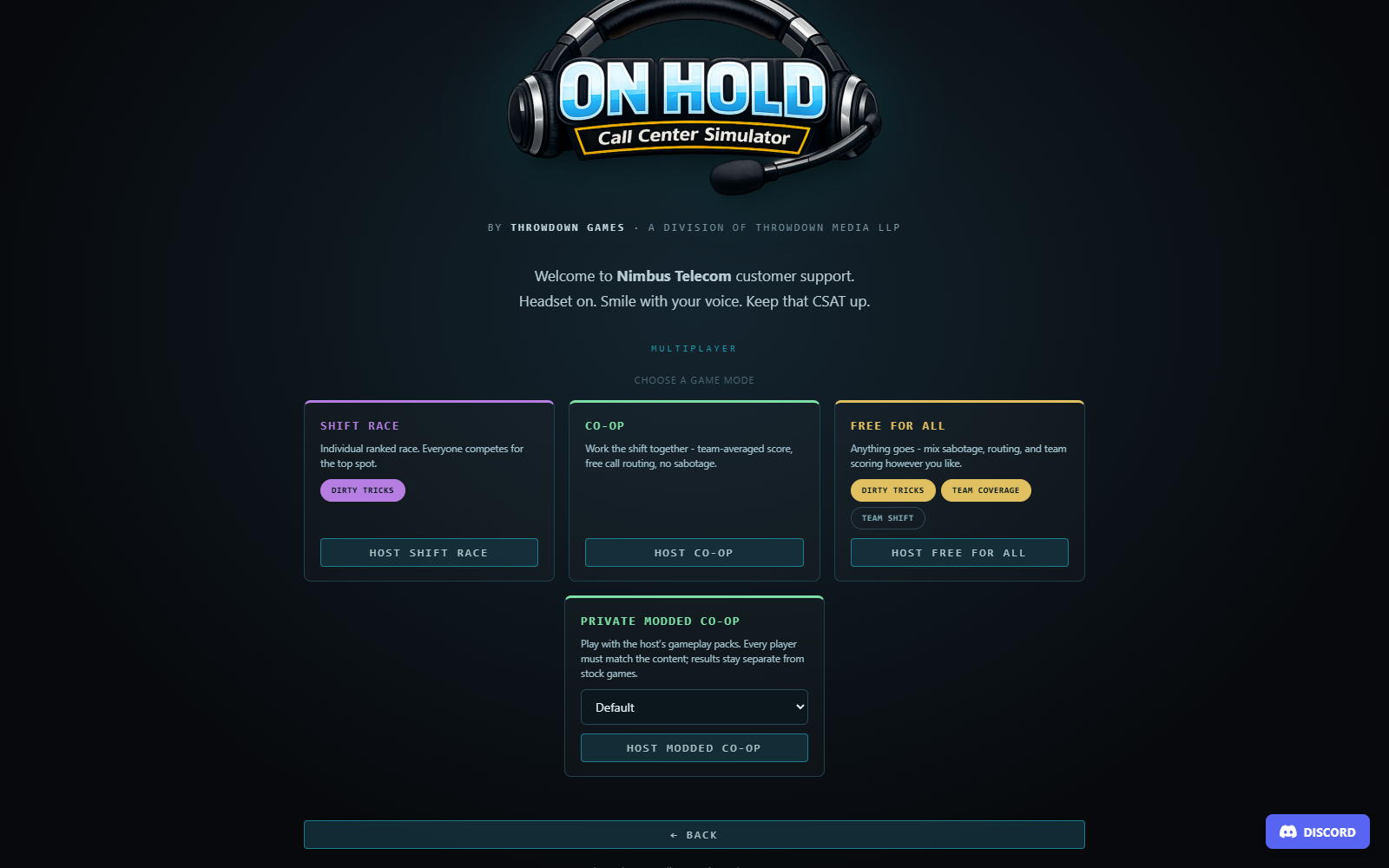
Host a stock shift
- Open multiplayer from the title screen and choose HOST.
- Choose SHIFT RACE, CO-OP or FREE FOR ALL.
- Set the rules offered by that mode before creating the lobby.
- Share the lobby's COPY code or use STEAM INVITE.
- Wait until the roster lists the other players.
- Each player, including the host, presses READY.
- With at least two players and everyone ready, the host presses START SHIFT.
The named mode and its rules are locked when the host creates the lobby. Guests see them in the mode banner. To choose a different stock preset, return to the host flow and create the intended lobby.
Join a shift
Choose JOIN BY CODE, enter the code and join. Codes are case-insensitive and tolerate ordinary separators; the numeric Steam lobby ID is also accepted. A Steam invite or Join Game action can open the appropriate lobby directly.
Confirm the roster and mode banner, then press READY. If only one person appears, verify that the second PC is signed into a different account. If the host has left or closed the lobby, request a new code from a current lobby rather than retrying a stale one indefinitely.
Three stock modes
| Mode | Scoring | Routing | Dirty Tricks |
|---|---|---|---|
| Shift Race | Individual ranking | Off | Host can enable or disable |
| Co-Op | Team average | On | Off |
| Free For All | Host selects individual or team | Host selects | Host selects |
Free For All intentionally allows combinations such as team scoring with sabotage. Read its banner rather than assuming it behaves like curated Co-Op. The host's rules apply to everyone.
Stock matches start at the first shift's difficulty day. Player-specific identities are mixed into the match seed, so agents get different deterministic caller streams. You are competing under shared mode rules, not answering one identical replicated conversation together.
Scores and results
The live board shows rank, resolved calls, CSAT and money. Rank is driven by service score, not who earns the most cash or finishes first. The final score follows the ordinary daily formula:
CSAT / 5 × 60 + resolved / scheduled × 40
− strikes × 8 − missed × 4 − unlogged tickets × 2
The live display does not include the final abandoned-ticket penalty by default. Finish logging before you finish the shift to avoid a surprise drop on the results screen. Daily letter-grade thresholds are S 92, A 82, B 70, C 55, D 40 and F below 40.
In Co-Op or Free For All with TEAM SHIFT on, the team score is the average of non-DNF result scores. 55 or above passes the team shift. Individual rows remain visible so you can see where the team lost points. A player removed from the floor is marked DNF and ranked after finishers.
After finishing locally, wait for the others' results. The host aggregates the result board and has a bounded fallback for unfinished peers. A guest disconnect can be recorded as DNF while other players continue. If the host leaves, the match is aborted because the host owns that aggregation; there is no advertised mid-match host migration or reconnect resume.
Opening your pause/options menu is not a shared pause request for every participant. Other agents and the network session can continue; coordinate a settings break before the host starts the shift.
Team Coverage: routing a caller
Routing is available only when the host's TEAM COVERAGE rule is on. It moves a ringing ordinary call, before you answer it, to a teammate still participating in the shift. Special callers cannot be routed. You cannot route an already active conversation or send it to yourself.
Use the teammate-routing controls in SoftPhone. The sender's line clears without a miss or fee, while the receiver gets an equivalent call and another scheduled task. Only the scenario requirement is shared; this is a recreated local conversation, not a live audio transfer with shared CustomerDeck state.
When the receiver resolves that routed call with at least 4 CSAT, both receiver and sender can receive an $8 team bonus. Coordinate in chat: sending every caller to someone already overwhelmed does not automatically improve your collective score.
Career coworker-favor transfers and the career Tier 2 fee are separate mechanics. They are unavailable in this mode.
Dirty Tricks
With sabotage enabled, you begin with one charge. Every three resolutions earn another charge, to a maximum of three. Sending a trick consumes one charge and starts a 30-second cooldown. You cannot target yourself, a player who has finished or a player marked DNF.
Click a rival's sabotage button on the board and select a trick:
| Trick | Victim effect |
|---|---|
| Decaf Swap | Coffee sip relief is zero for two minutes |
| Courtesy Transfer | An additional ordinary caller joins their queue |
| Scheduled Maintenance | CustomerDeck unavailable for 20 seconds |
| Karen Protocol | Their next eligible caller arrives furious |
| Fish Bomb | Immediate stress increase and the fish-office effect |
| Earworm | Hold music altered for one minute |
Hits are publicly attributed in system chat. Maintenance is temporary; verify that the app has recovered rather than attempting to fix it by changing your save. Courtesy Transfer also raises the victim's scheduled workload, so it affects the denominator they must complete.
The charge bar shows available charges and cooldown. If nothing sends, check charge count, cooldown, target eligibility and the host's rule. A hidden sabotage bar in Co-Op is expected behavior.
Text chat
Lobby chat is available before the shift; an overlay continues during play. Press Enter to focus its input, type a message and submit. Escape cancels/blurs a chat input rather than treating its typed keys as game actions. Individual messages are limited to 240 characters, and the widget retains a bounded recent history. The game provides text chat; use your own preferred voice-chat service if you want spoken coordination.
Private modded Co-Op
The host can select a mod profile in the private modded host card. It creates private Co-Op with team scoring and routing, and requires at least one eligible pack. The host's selected content must declare multiplayer support and pass validation.
Before anyone becomes ready, the game agrees on a frozen content snapshot: ordered packs, their versions and gameplay hashes. This includes the declared dependency/conflict contract, not just matching a pack's display title. Every guest must verify equivalent gameplay content against the host's requirements.
The lobby displays requirements and match/mismatch status. For missing Workshop content, use the explicit download/subscribe action, wait for installation and recheck. For a local-only pack, obtain the exported ZIP from the host and import it through Workshop Hub; automatic Workshop downloading cannot discover an unpublished ZIP.
Matching local and Workshop copies can satisfy the same requirements if their identities, versions and gameplay contents match. A coincidentally similar call title or folder name is insufficient. The exact game version must also match.
Once accepted, each peer freezes its sources before Ready. If the host refreshes the content requirements, readiness is cleared and everyone must agree again. A Workshop update arriving between Ready and match start does not silently change the frozen agreed content.
Presentation-only packs can remain local to each client where supported: voices, UI dictionaries and office colors do not need to force the same personal presentation for everyone. A pack that also changes gameplay must still participate in agreement. Custom gameplay does not award ordinary stock progression or Steam trophies in the private modded match.
See Installing mods and profiles and Community multiplayer authoring for the creator-facing rules.
Connection troubleshooting
If a roster or Ready state stalls, first check build versions, the live Steam account, lobby code and content panel. The lobby's diagnostic line shows member/roster counts, transmitted/received packet counts and recent failure information. Record that information when reporting a reproducible issue.
Do not assume a successful local mock test proves that a particular two-account internet session or Workshop download has completed. Steam account entitlement, live client state and installed content all participate. If a session aborts, the career save remains separate; start a fresh lobby rather than trying to load a multiplayer match from a career slot.